How to download files over FTP with wget
FTP retrieval still shows up in partner exports, archive feeds, and older integrations where the remote side only gives you a file path on an FTP server. GNU wget fits that job well because it can log in from the shell, save files into a predictable directory, and resume a partial transfer without switching tools.
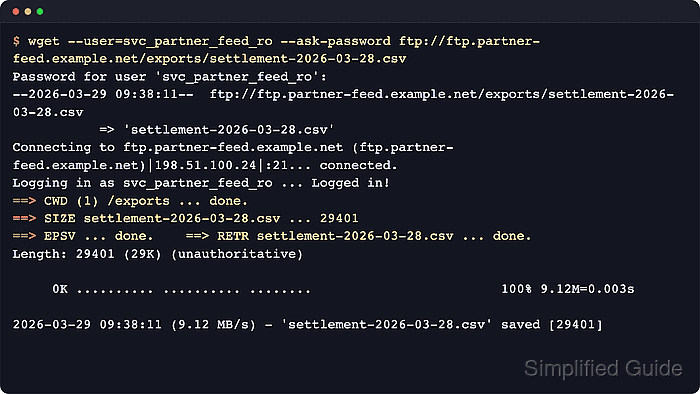
GNU wget can authenticate to FTP with --ftp-user plus a prompted password, or by reading ~/.netrc when credentials are not passed on the command line. --directory-prefix keeps the retrieved files in one local tree, and --continue asks the server to resume a partial file from the existing local size. Passive FTP is still the default, so the transcript may show either PASV or EPSV depending on what the server offers.
Plain FTP does not encrypt the login or the file contents. Use it only on trusted network paths, keep saved credential files readable only by the account that needs them, and switch to FTPS or SFTP when the data must not travel in clear text.
Steps to download files over FTP with wget:
- Pull one file with a prompted password and place it under a dedicated local directory.
$ wget --ftp-user=svc_partner_feed_ro --ask-password --directory-prefix=partner-feed-downloads ftp://ftp.partner-feed.example.net/exports/settlement-2026-04-21.csv
Password:
--2026-06-06 10:36:13--  ftp://ftp.partner-feed.example.net/exports/settlement-2026-04-21.csv
           => 'partner-feed-downloads/settlement-2026-04-21.csv'
Resolving ftp.partner-feed.example.net (ftp.partner-feed.example.net)... 198.51.100.24
Connecting to ftp.partner-feed.example.net (ftp.partner-feed.example.net)|198.51.100.24|:21... connected.
Logging in as svc_partner_feed_ro ... Logged in!
==> SYST ... done.    ==> PWD ... done.
==> TYPE I ... done.  ==> CWD (1) /exports ... done.
==> SIZE settlement-2026-04-21.csv ... 24025
==> PASV ... done.    ==> RETR settlement-2026-04-21.csv ... done.
Length: 24025 (23K) (unauthoritative)

     0K .......... .......... ...                             100% 43.1M=0.001s

2026-06-06 10:36:13 (43.1 MB/s) - 'partner-feed-downloads/settlement-2026-04-21.csv' saved [24025]
Replace the masked host, account, and path with the real FTP target, and let the password prompt carry the secret instead of putting it on the command line.
- Save the FTP login in ~/.netrc when the same server is used repeatedly.
~/.netrc
machine ftp.partner-feed.example.net
  login svc_partner_feed_ro
  password MASKED_PARTNER_FEED_PASSWORD
The machine value must match the FTP hostname, and the file should stay at 600 or stricter so other local users cannot read it.
- Restrict the saved credential file to the account that runs wget.
$ chmod 600 ~/.netrc
- Confirm the saved credential file mode before using it in a recurring job.
$ ls -l ~/.netrc
-rw------- 1 user user 101 Jun  6 10:33 /home/user/.netrc
- Reuse the saved login for the next transfer without repeating the username or password prompt.
$ wget --directory-prefix=partner-feed-downloads ftp://ftp.partner-feed.example.net/exports/nightly-ledger-2026-04-21.tar.gz
--2026-06-06 10:33:25--  ftp://ftp.partner-feed.example.net/exports/nightly-ledger-2026-04-21.tar.gz
           => 'partner-feed-downloads/nightly-ledger-2026-04-21.tar.gz'
Resolving ftp.partner-feed.example.net (ftp.partner-feed.example.net)... 198.51.100.24
Connecting to ftp.partner-feed.example.net (ftp.partner-feed.example.net)|198.51.100.24|:21... connected.
Logging in as svc_partner_feed_ro ... Logged in!
==> SYST ... done.    ==> PWD ... done.
==> TYPE I ... done.  ==> CWD (1) /exports ... done.
==> SIZE nightly-ledger-2026-04-21.tar.gz ... 6291456
==> PASV ... done.    ==> RETR nightly-ledger-2026-04-21.tar.gz ... done.
Length: 6291456 (6.0M) (unauthoritative)

##### snipped #####

2026-06-06 10:33:25 (247 MB/s) - 'partner-feed-downloads/nightly-ledger-2026-04-21.tar.gz' saved [6291456]
A clean rerun with only the FTP URL confirms that the host, login, and saved password line up before you move the job into cron or another scheduler.
- Resume an interrupted FTP file from the same local directory prefix that holds the partial copy.
$ wget --continue --directory-prefix=partner-feed-downloads ftp://ftp.partner-feed.example.net/exports/nightly-ledger-2026-04-21.tar.gz
--2026-06-06 10:33:42--  ftp://ftp.partner-feed.example.net/exports/nightly-ledger-2026-04-21.tar.gz
           => 'partner-feed-downloads/nightly-ledger-2026-04-21.tar.gz'
Connecting to ftp.partner-feed.example.net (ftp.partner-feed.example.net)|198.51.100.24|:21... connected.
Logging in as svc_partner_feed_ro ... Logged in!
==> SYST ... done.    ==> PWD ... done.
==> TYPE I ... done.  ==> CWD (1) /exports ... done.
==> SIZE nightly-ledger-2026-04-21.tar.gz ... 6291456
==> PASV ... done.    ==> REST 1048576 ... done.
==> RETR nightly-ledger-2026-04-21.tar.gz ... done.
Length: 6291456 (6.0M), 5242880 (5.0M) remaining (unauthoritative)

        [ skipping 1000K ]
##### snipped #####

2026-06-06 10:33:42 (125 MB/s) - 'partner-feed-downloads/nightly-ledger-2026-04-21.tar.gz' saved [6291456]
The REST line shows that the server accepted the existing local offset instead of restarting the file from byte zero. Related: How to resume interrupted downloads using wget
- Verify the finished files before handing them to the next job stage.
$ ls -lh partner-feed-downloads
total 12296
-rw-r--r-- 1 user user 6.0M Jun  6 10:33 nightly-ledger-2026-04-21.tar.gz
-rw-r--r-- 1 user user  23K Jun  6 10:36 settlement-2026-04-21.csv
Matching the expected filenames and rough file sizes is the final check before an import, archive move, or downstream batch run.