How to use Vim auto-complete
Vim’s auto-complete feature helps streamline typing by suggesting words from the current document. This basic functionality, triggered with simple commands, reduces repetitive typing and prevents errors. It scans the buffer and offers matching suggestions as you type, making text editing faster.
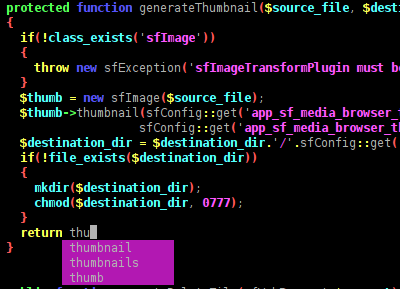
For coding, omni-completion goes further by providing language-specific suggestions. It reads the syntax of the file and offers relevant completions, especially useful for languages like Python, HTML, or JavaScript.
You can expand Vim's auto-completion with plugins, which offer more powerful suggestions. However, mastering Vim’s built-in keyword completion and omni-completion features is essential for an efficient workflow before integrating more advanced tools.
Steps to use auto-completion in Vim:
- Enable keyword completion with Ctrl-n to show the next word suggestion.
Note: This command searches the buffer for matching words.
- Use Ctrl-p to go back to previous suggestions.
Tip: This command cycles through previously used words in reverse order.
- Press Ctrl-x Ctrl-o to activate omni-completion for programming languages.
**Example command for //omni-completion//:** ```vim function hello_world() { console.<CTRL-x CTRL-o> } ``` **Sample output for //omni-completion//:** ```vim console.log console.error console.warn ``` - Ensure file type detection is enabled for omni-completion to work properly.
```vim
:filetype on
:filetype plugin on
```
- Adjust `completeopt` in your configuration for better menu behavior.
```vim
set completeopt=menuone,noselect
```
- Install plugins like YouCompleteMe or coc.nvim for enhanced completion.
**Example of installing //YouCompleteMe// with //vim-plug//:**

```vim
Plug 'ycm-core/YouCompleteMe'
:PlugInstall
```
- Keep your plugins updated for compatibility with your current setup.
Tip: Regularly update plugins to ensure they work with your latest Vim version.