How to enable JavaScript auto-completion in Vim
Vim is a highly customizable text editor, and although it doesn’t provide out-of-the-box auto-completion for JavaScript, you can enable it using Vim’s built-in omnifunc. This feature offers a simple way to complete JavaScript functions, methods, and variables without relying on external plugins, enhancing your coding speed and accuracy.
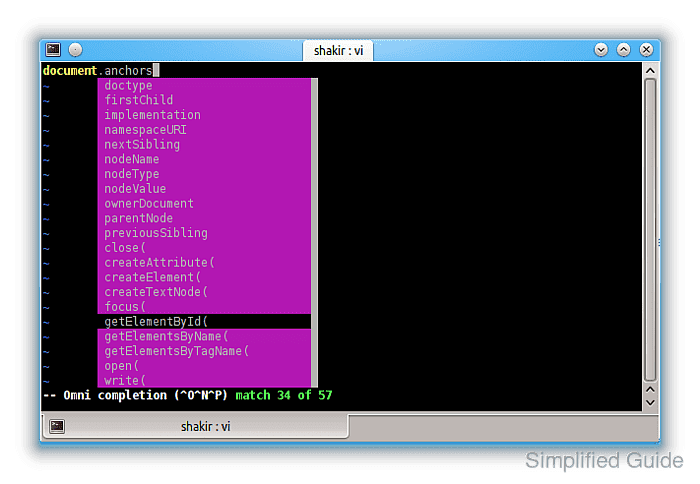
When properly configured, omnifunc for JavaScript suggests functions and methods as you type, making it easier to code without having to type out long method names or look up syntax. This setup integrates seamlessly with Vim’s native capabilities, keeping the environment lightweight while improving productivity.
By linking omnifunc to JavaScript files, you can enable code completion for core JavaScript functions and objects. The following steps show you how to configure Vim for JavaScript completion, ensuring a streamlined workflow without unnecessary bloat.
Steps to configure JavaScript auto-completion in Vim:
- Open any JavaScript file in Vim.
Use any existing or newly created `.js` file in Vim for testing. This helps confirm that omnifunc works before making permanent changes.
- Manually set omnifunc to the JavaScript completion function.
:set omnifunc=javascriptcomplete#CompleteJS
- Enter insert mode.
Press the `i` key to enter insert mode.
- Trigger omnifunc completion with <C-x><C-o>.
- Review and select the suggested completions.
Navigate using the arrow keys. Press `Enter` to select a suggestion, or continue typing to refine the list.
- If the completion works, open your vimrc configuration file.
vim ~/.vimrc
- Add a new autocmd to enable omnifunc for JavaScript files.
autocmd FileType javascript setlocal omnifunc=javascriptcomplete#CompleteJS
- Save and close the vimrc file.
To save your changes, use `:wq` in Vim.
- Reopen any JavaScript file to verify the changes.
After reopening the file, omnifunc will automatically trigger for files with the `.js` extension.
- (Optional) Create a key mapping to simplify triggering omnifunc completion.
inoremap <silent><expr> <Tab> pumvisible() ? "\<C-n>" : "\<C-x>\<C-o>"
This key mapping allows you to trigger omnifunc with the `<Tab>` key and cycle through suggestions smoothly.