How to enable CSS auto-completion in Vim
Vim is a lightweight text editor widely used by developers for its efficiency and keyboard-centric workflow. Although it doesn't provide auto-completion for CSS out of the box, Vim's built-in omnifunc can be configured to support CSS property and value suggestions. This allows developers to speed up their workflow and minimize syntax errors while keeping Vim's minimalist setup intact.
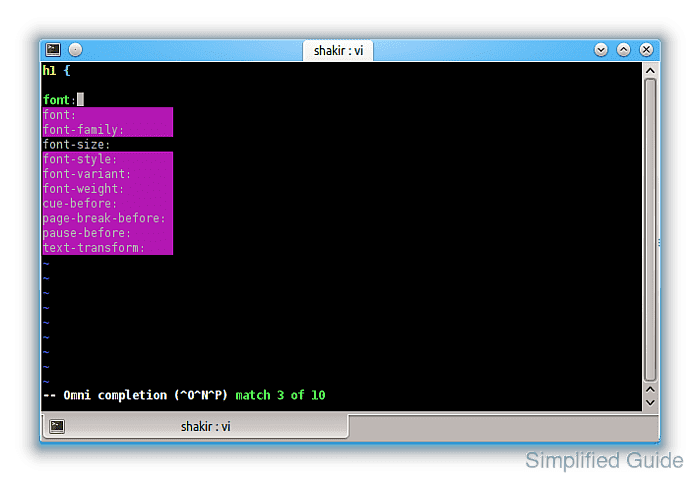
Omnifunc is a context-aware code completion feature within Vim. When enabled for CSS, it can suggest standard properties and values as you type. This helps streamline the writing of CSS rules and eliminates the need for repetitive typing or external references. By activating this native Vim feature, you can improve the efficiency of writing CSS without relying on third-party plugins.
Configuring Vim for CSS auto-completion with omnifunc ensures a focused, resource-light development environment. The setup involves linking omnifunc to CSS file types, enabling property and value suggestions while preserving Vim's core performance benefits. This approach is suitable for developers who prefer simplicity and control while coding in Vim.
Steps to configure CSS auto-completion in Vim:
- Open any CSS file in Vim.
Use any existing or newly created `.css` file in Vim for testing. This helps ensure omnifunc is working correctly before making permanent changes to the configuration file.
- Manually set omnifunc to the CSS completion function.
:set omnifunc=csscomplete#CompleteCSS
- Enter insert mode.
To enter insert mode, press the `i` key while in normal mode.
- Trigger omnifunc completion with <C-x><C-o>.
- Review and select the suggested completions.
Use the arrow keys to navigate through the suggestions provided by omnifunc. You can accept a suggestion by pressing `Enter` or continue typing to refine your selection.
- If the completion works, open your vimrc configuration file.
vim ~/.vimrc
- Add a new autocmd to enable omnifunc for CSS files.
autocmd FileType css setlocal omnifunc=csscomplete#CompleteCSS
- Save and close the vimrc file.
Ensure that the vimrc file is correctly saved by pressing `:wq` in Vim.
- Reopen any CSS file to verify the changes.
Once you reopen a CSS file, the omnifunc will be automatically triggered for all files with the `.css` extension.
- (Optional) Create a key mapping to simplify triggering omnifunc completion.
inoremap <silent><expr> <Tab> pumvisible() ? "\<C-n>" : "\<C-x>\<C-o>"
This will allow you to trigger omnifunc with the `<Tab>` key and cycle through suggestions with ease.