How to enable Night Light in Ubuntu (GNOME)
Night Light adjusts the color temperature of the display to reduce blue light and ease eye strain during late hours. It is integrated within Ubuntu running the GNOME desktop, leveraging a color-shifting feature that modifies the monitor’s color output. This mechanism relies on location data and a preferred schedule to change brightness and hue based on time of day.
On recent GNOME versions, the Night Light system hooks into display settings and interacts with the underlying compositor for smooth transitions. It can shift the screen’s color temperature gradually or apply an instant change. This function benefits those who prefer warmer tones when using the computer at night, reducing glare and improving eye comfort.
In many deployments, Night Light is handled automatically. The system can also be configured manually to match varying work routines, offering quick toggles and custom schedules to align with user habits. Default settings are user-friendly, but deeper GNOME tools allow fine-tuning for individuals who require more precise color management.
Steps to enable Night Light in Ubuntu (GNOME):
- Open the Activities overview and type Settings in the search field.
- Select Settings from the results, then choose Displays from the left panel.
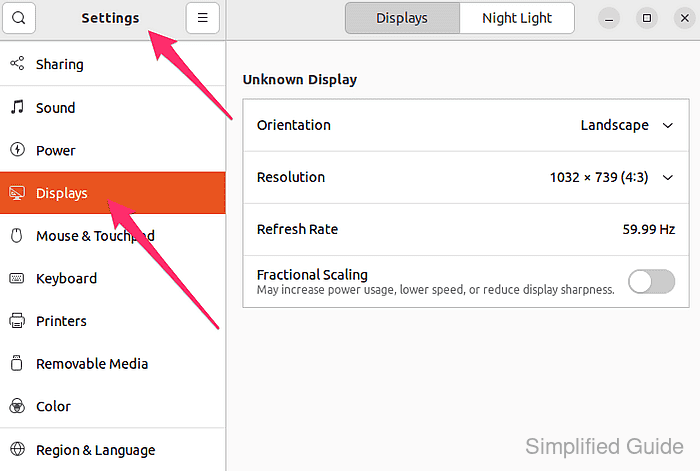
- Click the Night Light tab to access the configuration page.
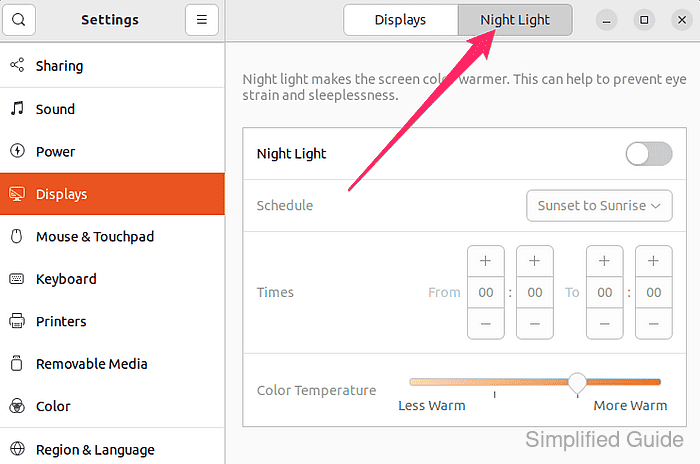
- Toggle the Night Light switch to enable or disable the Night Light feature.
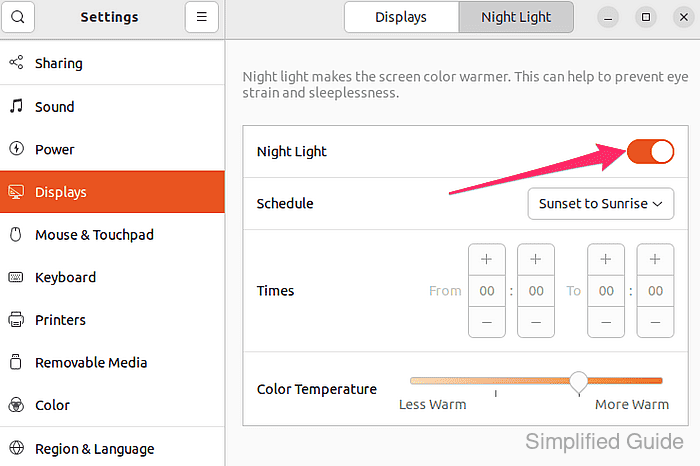
- Adjust the “Color Temperature” slider to find a comfortable viewing warmth level.
- Choose “Sunset to Sunrise” or “Manual” under “Schedule” to set automatic or fixed start/end times.
Using Night Light automatically applies a warmer color tone in the evening and early morning hours.
This guide is tested on Ubuntu:
| Version | Code Name |
|---|---|
| 22.04 LTS | Jammy Jellyfish |
| 23.10 | Mantic Minotaur |
| 24.04 LTS | Noble Numbat |