How to compile a function with tf.function in TensorFlow
TensorFlow's eager execution makes individual operations easy to inspect, but repeated tensor-only calculations still pass through Python for each call. A graph-backed callable moves that calculation into TensorFlow's runtime while preserving an ordinary Python call interface.
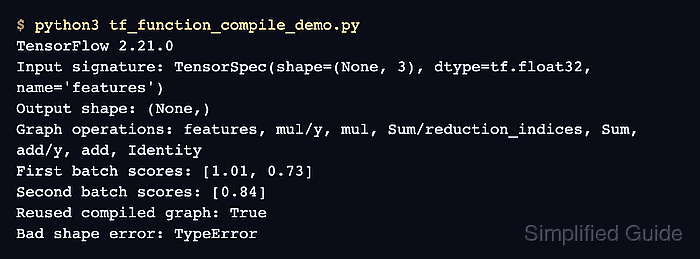
The callable returned by tf.function is polymorphic and selects a ConcreteFunction for the inputs it receives. An input_signature declares one accepted tensor contract, and a None batch dimension permits different row counts without changing the fixed feature width.
Graph tracing is separate from XLA compilation. The jit_compile=True option requests an additional compiler pass, whereas an input_signature controls which tensor shapes and dtypes can use the graph. A variable batch dimension demonstrates ordinary graph reuse without introducing XLA behavior or performance claims.
Steps to compile a function with tf.function in TensorFlow:
- Create tf_function_compile_demo.py with the TensorFlow import, scoring constants, and compatible input batches.
- tf_function_compile_demo.py
import os

os.environ["TF_CPP_MIN_LOG_LEVEL"] = "2"

import tensorflow as tf

tf.get_logger().setLevel("ERROR")

weights = tf.constant([0.7, -0.2, 0.5], dtype=tf.float32)
bias = tf.constant(0.1, dtype=tf.float32)

first_batch = tf.constant(
    [
        [1.0, 0.2, 0.5],
        [0.3, 0.9, 1.2],
    ],
    dtype=tf.float32,
)
second_batch = tf.constant([[0.8, 0.1, 0.4]], dtype=tf.float32)
- Append the graph-backed scoring function with a signature for batches of three float32 features.
- tf_function_compile_demo.py
@tf.function(
    input_signature=[
        tf.TensorSpec(shape=(None, 3), dtype=tf.float32, name="features")
    ]
)
def score_batch(features):
    return tf.reduce_sum(features * weights, axis=1) + bias
The None dimension accepts different batch sizes, while 3 fixes the required number of features in every row.
- Append calls that resolve the concrete function and score both compatible batches.
- tf_function_compile_demo.py
compiled_score = score_batch.get_concrete_function()
first_scores = score_batch(first_batch)
second_scores = score_batch(second_batch)
reused_graph = score_batch.get_concrete_function() is compiled_score
- Append an incompatible-width check for the declared three-feature signature.
- tf_function_compile_demo.py
try:
    score_batch(tf.constant([[1.0, 2.0]], dtype=tf.float32))
except TypeError as error:
    rejected_shape = type(error).__name__
else:
    rejected_shape = "not rejected"
- Finish tf_function_compile_demo.py with the signature and outcome reporting block.
- tf_function_compile_demo.py
print(f"Input signature: {compiled_score.structured_input_signature[0][0]}")
print("First batch scores:", tf.round(first_scores * 100) / 100)
print("Second batch scores:", tf.round(second_scores * 100) / 100)
print(f"Reused concrete function: {reused_graph}")
print(f"Incompatible shape: {rejected_shape}")
- Run tf_function_compile_demo.py to exercise the compiled scoring function across both accepted batch sizes.
$ python3 tf_function_compile_demo.py
Input signature: TensorSpec(shape=(None, 3), dtype=tf.float32, name='features')
First batch scores: tf.Tensor([1.01 0.73], shape=(2,), dtype=float32)
Second batch scores: tf.Tensor([0.84], shape=(1,), dtype=float32)
Reused concrete function: True
Incompatible shape: TypeError
Reused concrete function: True confirms that both batch sizes use the same graph. Incompatible shape: TypeError confirms that the signature rejects a row with only two features.