How to check tensors for NaN and Inf in TensorFlow
Floating-point failures can surface several operations after the calculation that created them. A NaN or infinite tensor can therefore obscure whether the original fault came from a logarithm boundary, division by zero, loss scaling, or another numerically sensitive operation.
Use tf.debugging.check_numerics() when the suspect tensor is already known. It returns a finite floating tensor unchanged, but raises tf.errors.InvalidArgumentError when the tensor contains NaN or Inf.
Use tf.debugging.enable_check_numerics() when the first invalid tensor is still unknown. The instrumentation covers eager and tf.function graph execution on the calling thread, so keep it around a focused reproduction and disable it before normal training or inference continues.
Steps to check TensorFlow tensors for NaN and Inf:
- Create the base check_tensor_numerics.py program.
- check_tensor_numerics.py
import os

os.environ["TF_CPP_MIN_LOG_LEVEL"] = "2"

import tensorflow as tf

tf.get_logger().setLevel("ERROR")


def report_error(label, error):
    relevant = next(
        line.strip()
        for line in str(error).splitlines()
        if "Detected Infinity or NaN" in line or "Tensor had" in line
    )
    cleaned = relevant.replace("!!! ", "").replace(" !!!", "")
    if "}} " in cleaned:
        cleaned = cleaned.split("}} ", 1)[1]
    cleaned = cleaned.replace(" (# of outputs: 1)", "")
    cleaned = cleaned.split(" [Op:", 1)[0]
    print(f"{label}: {cleaned}")
The reporter selects TensorFlow's actual invalid-numerics line so eager and graph errors remain readable without hiding whether the runtime detected NaN or Inf.
- Append the finite-tensor pass-through check.
finite_tensor = tf.debugging.check_numerics(
    tf.constant([1.0, 2.0], dtype=tf.float32),
    "finite tensor",
)
print(f"Finite tensor: {finite_tensor.numpy().tolist()}")
check_numerics() accepts floating types such as float16, bfloat16, float32, and float64. A finite input is returned with the same type.
- Append the targeted Inf check.
try:
    tf.debugging.check_numerics(
        tf.constant([1.0, float("inf")], dtype=tf.float32),
        "target tensor",
    )
except tf.errors.InvalidArgumentError as error:
    report_error("Targeted check", error)
The target tensor message prefix appears in the exception line and can identify the batch, loss, gradient, or layer in a project.
- Enable global numerics checking below the targeted check.
tf.debugging.enable_check_numerics()
The global mechanism is idempotent and applies only to the thread that enables it.
- Append the eager Sqrt check.
try:
    tf.math.sqrt(tf.constant([4.0, -1.0], dtype=tf.float32))
except tf.errors.InvalidArgumentError as error:
    report_error("Eager check", error)
- Append the tf.function Log check.
@tf.function
def unstable_log(values):
    return tf.math.log(values)


try:
    unstable_log(tf.constant([1.0, 0.0], dtype=tf.float32))
except tf.errors.InvalidArgumentError as error:
    report_error("Graph check", error)
- Disable global numerics checking after the graph check.
tf.debugging.disable_check_numerics()
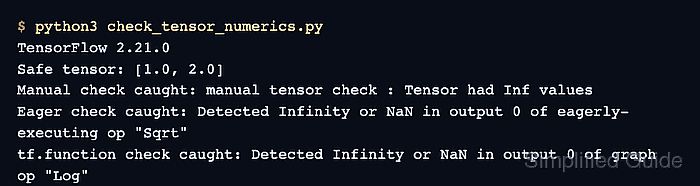
- Run the completed numerics program to confirm all four expected outcomes.
$ python3 check_tensor_numerics.py
Finite tensor: [1.0, 2.0]
Targeted check: target tensor : Tensor had Inf values
Eager check: Detected Infinity or NaN in output 0 of eagerly-executing op "Sqrt"
Graph check: Detected Infinity or NaN in output 0 of graph op "Log"
The finite tensor passes unchanged. Each invalid operation raises at the point where Inf or NaN first appears instead of allowing the value to propagate.