How to compute gradients with TensorFlow GradientTape
Automatic differentiation connects a computed value back to the inputs and trainable parameters that influenced it. TensorFlow records that connection with tf.GradientTape, making the same mechanism useful for inspecting a derivative or supplying gradients to a custom optimizer step.
A tape watches trainable tf.Variable objects automatically when the calculation reads them inside its context. A plain tf.Tensor is not watched automatically, so derivative calculations with respect to tensor inputs need an explicit tape.watch() call.
The forward calculation and its scalar target must occur while recording is active, but tape.gradient() is called after the context closes. A disconnected source produces None, and a non-persistent tape releases its recording after the first gradient request.
Steps to compute gradients with TensorFlow GradientTape:
- Create gradient_tape_demo.py with the initial TensorFlow setup.
- gradient_tape_demo.py
import os

os.environ["TF_CPP_MIN_LOG_LEVEL"] = "2"

import tensorflow as tf

x = tf.constant(3.0)
- Append the scalar-derivative tape section to gradient_tape_demo.py.
with tf.GradientTape() as tape:
    tape.watch(x)
    y = x * x + 2.0 * x

dy_dx = tape.gradient(y, x)
The explicit tape.watch(x) call is required because x is a plain tensor rather than a trainable variable.
- Append the trainable-variable inputs to gradient_tape_demo.py.
weight = tf.Variable(2.0, name="weight")
feature = tf.constant(3.0)
target = tf.constant(15.0)
optimizer = tf.keras.optimizers.SGD(learning_rate=0.05)
- Append the recorded variable-gradient section to gradient_tape_demo.py.
with tf.GradientTape() as tape:
    prediction = weight * feature
    loss_before = tf.square(prediction - target)

gradient = tape.gradient(loss_before, weight)

if gradient is None:
    raise RuntimeError("The loss is not connected to weight.")
weight is watched automatically because it is a trainable variable read inside the tape context.
- Append the optimizer update section to gradient_tape_demo.py.
weight_before = tf.identity(weight)
optimizer.apply_gradients([(gradient, weight)])
loss_after = tf.square(weight * feature - target)
- Append the result checks to gradient_tape_demo.py.
tf.debugging.assert_near(dy_dx, tf.constant(8.0))
tf.debugging.assert_less(loss_after, loss_before)

print(f"dy/dx at x=3.0: {float(dy_dx):.2f}")
print(f"weight gradient: {float(gradient):.2f}")
print(f"weight: {float(weight_before):.2f} -> {float(weight):.2f}")
print(f"loss: {float(loss_before):.2f} -> {float(loss_after):.2f}")
- Compare the completed gradient_tape_demo.py file with this consolidated version.
- gradient_tape_demo.py
import os

os.environ["TF_CPP_MIN_LOG_LEVEL"] = "2"

import tensorflow as tf

x = tf.constant(3.0)

with tf.GradientTape() as tape:
    tape.watch(x)
    y = x * x + 2.0 * x

dy_dx = tape.gradient(y, x)

weight = tf.Variable(2.0, name="weight")
feature = tf.constant(3.0)
target = tf.constant(15.0)
optimizer = tf.keras.optimizers.SGD(learning_rate=0.05)

with tf.GradientTape() as tape:
    prediction = weight * feature
    loss_before = tf.square(prediction - target)

gradient = tape.gradient(loss_before, weight)

if gradient is None:
    raise RuntimeError("The loss is not connected to weight.")

weight_before = tf.identity(weight)
optimizer.apply_gradients([(gradient, weight)])
loss_after = tf.square(weight * feature - target)

tf.debugging.assert_near(dy_dx, tf.constant(8.0))
tf.debugging.assert_less(loss_after, loss_before)

print(f"dy/dx at x=3.0: {float(dy_dx):.2f}")
print(f"weight gradient: {float(gradient):.2f}")
print(f"weight: {float(weight_before):.2f} -> {float(weight):.2f}")
print(f"loss: {float(loss_before):.2f} -> {float(loss_after):.2f}")
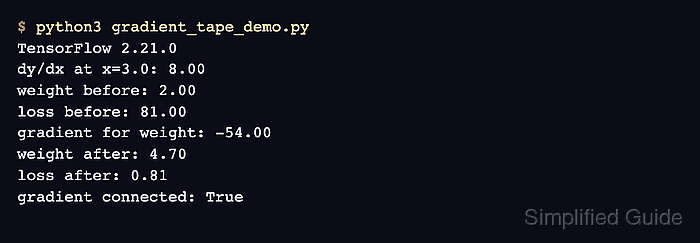
- Run gradient_tape_demo.py to confirm that GradientTape computes the expected derivative while the optimizer lowers the loss.
$ python3 gradient_tape_demo.py
dy/dx at x=3.0: 8.00
weight gradient: -54.00
weight: 2.00 -> 4.70
loss: 81.00 -> 0.81