How to remove Snapper snapshots in openSUSE and SLES
Retained Snapper snapshots protect openSUSE and SLES systems during updates, package changes, and configuration work, but they also consume space on btrfs subvolumes that may already be under pressure. Removing snapshots that are no longer needed frees room for future snapshots, package transactions, and normal system activity.
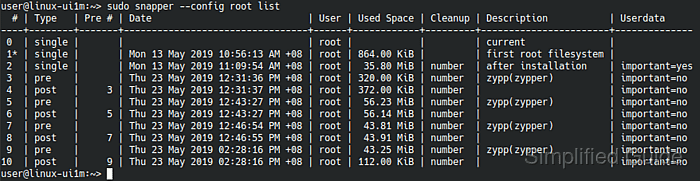
Snapper stores snapshots inside named configurations such as root and tracks each snapshot by numeric ID, type, cleanup policy, and description. The safe workflow is to identify the correct configuration first, inspect the snapshot list, and then delete only the IDs that no longer need to remain available for rollback or file recovery.
Deleting a snapshot permanently removes that restore point from the selected configuration. Snapshot 0 cannot be removed, and on btrfs the snapshot that is currently mounted or set as the next default subvolume also cannot be deleted, so the list output should always be reviewed before running the delete command.
Steps to remove Snapper snapshots in openSUSE and SLES:
- List available Snapper configurations to identify which subvolume holds the snapshots that need cleanup.
$ sudo snapper list-configs
Config | Subvolume
-------+----------
root   | /
The default configuration is usually root, but some systems expose additional configurations for other btrfs subvolumes.
- List snapshots for the target configuration and note the numeric IDs that are safe to remove.
$ sudo snapper -c root list
 # | Type   | Pre # | Date                            | User | Cleanup | Description
---+--------+-------+---------------------------------+------+---------+-----------------------
0  | single |       |                                 | root |         | current
1* | single |       | Mon 13 May 2019 10:56:13 AM +08 | root |         | first root filesystem
2  | single |       | Mon 13 May 2019 11:09:54 AM +08 | root | number  | after installation
3  | pre    |       | Thu 23 May 2019 12:31:36 PM +08 | root | number  | zypp(zypper)
4  | post   |     3 | Thu 23 May 2019 12:31:37 PM +08 | root | number  |
##### snipped #####
On btrfs, an asterisk on the snapshot number marks the snapshot that is both mounted now and set as the next default boot target. That snapshot and snapshot 0 are not removable.
- Delete a single snapshot by number when only one restore point is no longer needed.
$ sudo snapper -c root delete 2
Deleting a snapshot permanently removes that recovery point for the selected configuration. Review pre/post snapshot pairs carefully before deleting only one side of a transaction snapshot set.
- Delete a contiguous range when cleaning out a batch of older snapshots.
$ sudo snapper -c root delete 3-10
Ranges use the form start-end. When immediate space recovery matters on btrfs, add --sync so snapper waits until the deleted snapshots have actually released their space.
$ sudo snapper -c root delete --sync 3-10
- List snapshots again to verify that the deleted IDs are no longer present.
$ sudo snapper -c root list
 # | Type   | Pre # | Date                            | User | Cleanup | Description
---+--------+-------+---------------------------------+------+---------+-----------------------
0  | single |       |                                 | root |         | current
1* | single |       | Mon 13 May 2019 10:56:13 AM +08 | root |         | first root filesystem
The cleanup is complete when the target IDs are absent from the list and the remaining snapshots still cover the rollback points that need to be kept.