Table of Contents
How to disable filesystem snapshots in SUSE
Automatic filesystem snapshots on openSUSE and SLES make it easier to undo risky package or configuration changes, but they also consume root filesystem space as the system changes over time. On small virtual machines, short-lived lab hosts, and appliances where rollback points are less important than free disk space, stopping new snapshot creation can keep the system from filling unexpectedly.
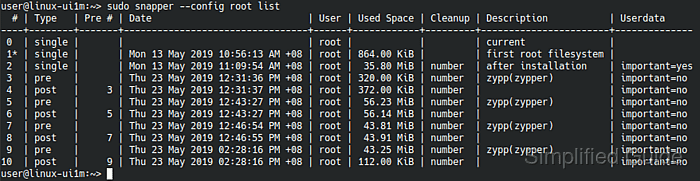
In a standard Btrfs-based installation, Snapper can create snapshots from three separate sources: timeline schedules, package transactions handled by Zypper or YaST through the snapper-zypp-plugin, and YaST administration actions controlled by the USE_SNAPPER setting in /etc/sysconfig/yast2. Disabling only one source does not fully stop automatic snapshots, so the current configuration needs to be checked and each active trigger turned off.
These steps target regular openSUSE Leap and SLES systems where Snapper manages a writable Btrfs root. Transactional platforms such as MicroOS or SLE Micro rely on snapshot-based updates as part of their operating model and should not be treated as a routine disk-space cleanup case. Existing snapshots also remain on disk after automatic creation is disabled, so remove them separately only when their rollback value is no longer needed.
Steps to disable automatic Snapper snapshots in SUSE:
Check the current Snapper configuration
- Open a terminal with an account that can use sudo.
- List the available Snapper configurations.
$ sudo snapper list-configs
Config | Subvolume
-------+----------
root   | /
If more than one configuration is listed, repeat the timeline check for every configuration that should stop creating automatic snapshots. If root is not listed, the system is not using the default root Snapper configuration.
- Check whether timeline snapshots are enabled for the target configuration.
$ sudo snapper -c root get-config | grep TIMELINE_CREATE
TIMELINE_CREATE        | yes
On many default root installations, this may already show no.
- Check whether YaST administration snapshots are enabled.
$ sudo grep '^USE_SNAPPER=' /etc/sysconfig/yast2
USE_SNAPPER="yes"
- Check whether package transactions are still creating snapshots through the Zypper plugin.
$ rpm -q snapper-zypp-plugin
snapper-zypp-plugin-0.8.16-150300.3.6.1.noarch
Disable snapper's timeline snapshots
- Disable timeline snapshots for the selected configuration.
$ sudo snapper -c root set-config "TIMELINE_CREATE=no"
Repeat the command with each configuration name returned by snapper list-configs when the system uses multiple Snapper configs.
- Confirm that timeline snapshot creation is disabled.
$ sudo snapper -c root get-config | grep TIMELINE_CREATE
TIMELINE_CREATE        | no
If this value was already no before the change, timeline snapshots were not the source of new root snapshots on that system.
Remove snapper plugin for zypper
- Remove the package that creates automatic snapshots for Zypper and YaST package transactions.
$ sudo zypper remove snapper-zypp-plugin
The following package is going to be REMOVED:
  snapper-zypp-plugin

1 package to remove.

Continue? [y/n/v/...? shows all options] (y): y
(1/1) Removing snapper-zypp-plugin-0.8.16-150300.3.6.1.noarch ......[done]
Future package installs, updates, and removals will no longer create rollback snapshots automatically after this package is removed.
Removing the plugin is the supported system-wide way to disable installation snapshots completely.
- Verify that the plugin is no longer installed.
$ rpm -q snapper-zypp-plugin
package snapper-zypp-plugin is not installed
Disable YaST snapshots
- Open the YaST sysconfig file with elevated privileges.
$ sudo vi /etc/sysconfig/yast2
- Set USE_SNAPPER to no in the file.
USE_SNAPPER="no"
- Confirm that the setting now disables YaST administration snapshots.
$ sudo grep '^USE_SNAPPER=' /etc/sysconfig/yast2
USE_SNAPPER="no"
Verify the disabled snapshot sources
- Review the three automatic snapshot controls to confirm they are disabled for the system.
$ sudo snapper -c root get-config | grep TIMELINE_CREATE
TIMELINE_CREATE        | no

$ rpm -q snapper-zypp-plugin
package snapper-zypp-plugin is not installed

$ sudo grep '^USE_SNAPPER=' /etc/sysconfig/yast2
USE_SNAPPER="no"
Existing snapshots remain available until they are deleted separately.