How to change system hostname in openSUSE and SLES
Changing the system hostname keeps openSUSE and SLES machines aligned with DNS records, SSH prompts, monitoring labels, and inventory names. A clear static hostname avoids confusion when the installer-assigned name no longer matches the server's role or when a temporary network name appears on the host.

On current SUSE systems, hostnamectl updates the running host name through systemd-hostnamed and stores the persistent value in /etc/hostname. Once a valid static hostname is set, systemd prefers that name over a transient hostname received from network configuration, so the new value survives reboots and fresh login sessions.
The replacement name should follow normal DNS hostname rules and is usually best set to a fully qualified domain name on managed networks. Hosts that still accept names from DHCP can keep showing a transient name until that behavior is disabled in YaST, and systems with an existing host-specific entry in /etc/hosts may still need that line updated so local resolution matches the rename.
Steps to change the system hostname in openSUSE and SLES:
- Open the Terminal application.
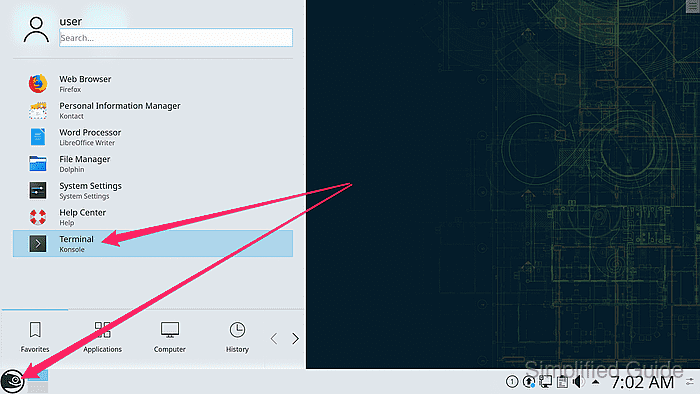
- Check the current static hostname before changing it.
$ hostnamectl --static
linux-ui1m
- Set the new hostname with hostnamectl.
$ sudo hostnamectl hostname server1.example.com
Use a lowercase host name that is either a single DNS label such as server1 or a fully qualified domain name such as server1.example.com.
Update DNS records, SSH known-hosts entries, monitoring targets, and certificates that still refer to the old host name before treating the rename as complete.
If a DHCP profile keeps restoring a transient name, disable Change Hostname via DHCP in YaST so the static value remains authoritative.
- Confirm that the running system and /etc/hostname now use the new name.
$ hostnamectl --static
server1.example.com
$ hostname
server1.example.com
$ cat /etc/hostname
server1.example.com
- Check whether /etc/hosts still contains the old hostname.
$ grep -n 'linux-ui1m' /etc/hosts
3:192.168.1.20 linux-ui1m.example.com linux-ui1m
Skip the next step when /etc/hosts does not contain a host-specific entry for the old name.
- Replace the old host mapping in /etc/hosts when one exists.
$ sudo vi /etc/hosts
127.0.0.1 localhost
192.168.1.20 server1.example.com server1
Keep the existing IP address and update only the host names on that line.
- Open a new terminal window or reconnect the SSH session so the shell prompt picks up the renamed host.
$ hostname
server1.example.com
The hostname is already changed at this point; starting a new shell only refreshes prompts and login banners that cached the previous value. The prompt itself usually includes the host name, so a fresh session makes the prompt line up with the new system name.
