How to send environment variables over SSH
Environment variables passed through SSH can keep a remote command on the same deployment target, locale, proxy, or build mode as the client shell. OpenSSH does not copy arbitrary client variables by default, so the client must request the names to send and the server must explicitly accept them.
The client-side directive is SendEnv, which names variables from the local environment. The server-side directive is AcceptEnv, which copies only approved names into the remote session environment. SetEnv can send a fixed NAME=VALUE pair from client config, but the server still has to allow that variable name.
Keep the allowlist narrow because environment variables can affect shells, language runtimes, proxies, build tools, and restricted account behavior. Do not use this path for secrets, tokens, or broad patterns such as *; use an explicit variable name and verify the result with a fresh remote command after reloading sshd.
Related: How to show SSH client configuration
Related: How to view SSH server configuration
Steps to send an environment variable over SSH:
- Choose the exact variable name that the server should accept.
$ export DEPLOY_ENV=staging
The example uses DEPLOY_ENV as an operational selector. Avoid sending password, token, cookie, private-key path, or cloud credential variables through AcceptEnv.
- Open a server-side sshd configuration drop-in with administrator privileges.
$ sudoedit /etc/ssh/sshd_config.d/90-accept-env.conf
Use a drop-in only when /etc/ssh/sshd_config includes /etc/ssh/sshd_config.d/*.conf. Otherwise add the same directive to the main file before any Match blocks that should not override it.
- Add an AcceptEnv allowlist entry for the approved variable name.
/etc/ssh/sshd_config.d/90-accept-env.conf
AcceptEnv DEPLOY_ENV
Do not allow broad patterns such as * or secret-like names. OpenSSH warns that accepted environment variables can bypass restricted user environments.
- Test the sshd configuration syntax.
$ sudo sshd -t
No output means the daemon configuration parsed successfully.
Related: How to test SSH server configuration
- Reload the SSH service to apply the server allowlist.
$ sudo systemctl reload ssh
Use sudo systemctl reload sshd on distributions that name the server unit sshd.
- Add SendEnv to the matching client Host block.
~/.ssh/config
Host host.example.net
    SendEnv DEPLOY_ENV
Place this line inside the existing host-specific block if the host already has HostName, User, Port, IdentityFile, or ProxyJump settings. Use SetEnv DEPLOY_ENV=staging instead of SendEnv only when every connection should send the same fixed value.
- Check that the resolved client configuration includes the variable name.
$ ssh -G host.example.net
host host.example.net
user user
hostname host.example.net
port 22
sendenv DEPLOY_ENV
##### snipped #####
ssh -G prints the client configuration after Host and Match rules are applied without opening a login session.
- Send the variable to a new remote command.
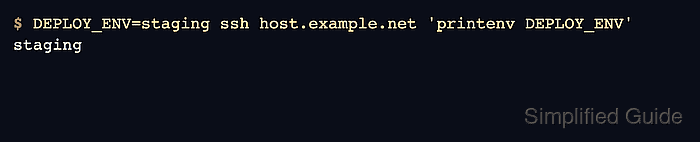
$ DEPLOY_ENV=staging ssh host.example.net 'printenv DEPLOY_ENV'
staging
The remote output proves that the client sent DEPLOY_ENV and the server accepted it into the session environment.
- Check that an unapproved variable is not copied.
$ UNAPPROVED_TOKEN=secret ssh -o SendEnv=UNAPPROVED_TOKEN host.example.net 'printenv UNAPPROVED_TOKEN'
No output means sshd rejected the variable because AcceptEnv did not list UNAPPROVED_TOKEN. printenv returns a nonzero status when the name is absent.