Table of Contents
How to prevent SSH session timeouts
Idle SSH shells that close while a command, file copy, or maintenance window is still in progress usually need keepalive traffic rather than another login attempt. Server-side keepalives make sshd check that the client is still present, while client-side keepalives help when only the workstation can be changed.
OpenSSH keeps server and client timers separate. On the server, ClientAliveInterval sends encrypted checks to the client after the session has been silent, and ClientAliveCountMax controls how many missed replies are allowed. On the client, ServerAliveInterval and ServerAliveCountMax perform the matching check toward the server.
Use the server method when the host policy should apply to every new login after sshd reloads. Use the client method when the remote server cannot be changed or when only one host alias needs protection from idle network drops. Very long count values can leave dead sessions behind, so choose settings that survive normal idle periods without hiding broken network paths.
Related: How to enable SSH client keepalive
Related: How to monitor active connections to an SSH server
Methods to prevent SSH session timeouts:
Steps to prevent SSH session timeouts:
Avoid SSH timeout from the server
Server-side keepalives fit managed servers where idle disconnects affect multiple users or automation accounts. The change belongs in the sshd configuration, should be tested before reload, and affects only new sessions after the daemon accepts the updated settings.
- Keep a second administrator session or console path open before changing sshd.
A syntax error or access-rule mistake can block new remote logins even when the current shell is still connected.
- Inspect the main server configuration for an included drop-in directory.
$ sudo cat /etc/ssh/sshd_config
# This is the sshd server system-wide configuration file.  See
# sshd_config(5) for more information.
##### snipped #####
Include /etc/ssh/sshd_config.d/*.conf
Use the included directory when it exists. If the main file does not include drop-ins, add the same directives to /etc/ssh/sshd_config instead.
Related: How to view SSH server configuration
- Open a local keepalive drop-in file.
$ sudoedit /etc/ssh/sshd_config.d/90-keepalive.conf
- Add the server keepalive directives.
ClientAliveInterval 60
ClientAliveCountMax 15
TCPKeepAlive no
With these values, sshd sends an encrypted client-alive check after 60 silent seconds and disconnects only after about 15 unanswered checks.
Set ClientAliveCountMax to 0 only when dead sessions are acceptable, because current OpenSSH treats zero as disabling server-side termination.
- Save the keepalive drop-in file.
- Test the sshd configuration.
$ sudo sshd -t
No output means the server configuration parsed successfully and the configured host keys passed the sanity check.
Related: How to test SSH server configuration
- Reload the SSH service.
$ sudo systemctl reload ssh
Use sudo systemctl reload sshd on systems that package the service as sshd, and use a restart only when the unit does not support reload.
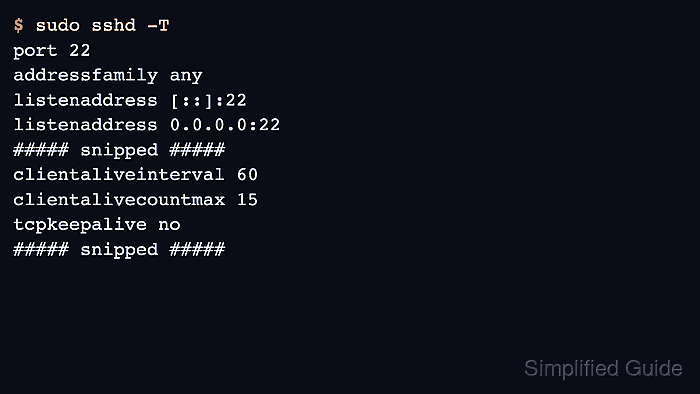
- Check the effective server timeout values.
$ sudo sshd -T
port 22
addressfamily any
listenaddress [::]:22
listenaddress 0.0.0.0:22
##### snipped #####
clientaliveinterval 60
clientalivecountmax 15
tcpkeepalive no
##### snipped #####
sshd -T prints the parsed daemon settings after defaults and included files are applied.
- Confirm a new SSH connection still works from a separate client.
$ ssh user@host.example.net 'echo SSH keepalive policy loaded'
SSH keepalive policy loaded
Use a new connection because existing sessions may not inherit the updated daemon settings.
- Leave a non-critical session idle longer than the previous failure window.
$ ssh user@host.example.net
user@host:~$
If the session still closes at the same fixed interval, check shell idle limits, bastion policy, VPN timeout, firewall state expiry, or managed terminal gateways outside sshd.
Avoid SSH timeout from the client
Client-side keepalives fit individual workstations, shared jump aliases, and hosts where server-side sshd policy is not yours to edit. The client settings can be limited to one Host block so unrelated SSH destinations keep their existing behavior.
- Create the per-user SSH configuration directory if needed.
$ install -d -m 700 ~/.ssh
- Open the per-user client configuration file.
$ vi ~/.ssh/config
Edit /etc/ssh/ssh_config only when the same client-side policy should apply to every local user.
- Add or update a Host block for the destination that loses idle sessions.
Host host.example.net
  HostName host.example.net
  User user
  ServerAliveInterval 60
  ServerAliveCountMax 15
Replace host.example.net with the same host name or alias used on the ssh command line.
- Save the client configuration file.
- Show the effective client settings for that host.
$ ssh -G host.example.net
host host.example.net
user user
hostname host.example.net
port 22
##### snipped #####
serveralivecountmax 15
serveraliveinterval 60
##### snipped #####
If serveraliveinterval still shows 0, the wrong Host block matched or an earlier block supplied the first value.
Related: How to show SSH client configuration
- Reconnect with the configured host entry.
$ ssh host.example.net
user@host:~$
- Leave the new shell idle past the previous failure window.
Client keepalives cannot override a server, bastion, shell, or network policy that deliberately closes sessions after a fixed limit.