How to disable SSH public key authentication
A server that must reject key-based SSH logins needs a verified fallback before the daemon is reloaded. Disabling PubkeyAuthentication stops OpenSSH from accepting user keys through authorized_keys files, user certificates, or authorized key commands, so the change belongs in a controlled maintenance window rather than a quick hardening shortcut.
sshd reads /etc/ssh/sshd_config and any files loaded by Include. Current Debian and Ubuntu packages include /etc/ssh/sshd_config.d/*.conf near the start of the main file, and OpenSSH uses the first global value it reads for most directives, so an early local drop-in is the clearest place for this override on those systems.
Public key authentication is often stronger than password-only login. Leave an approved non-key method such as PasswordAuthentication or a keyboard-interactive MFA path enabled, keep a second session or console path open, and verify both the effective daemon setting and the methods offered to a new client before closing the recovery session.
Steps to disable SSH public key authentication:
- Open a terminal on the SSH server with sudo privileges.
$ whoami
user
Keep a second SSH session or console access available until a new login test confirms that the remaining authentication method works.
- Check whether the main sshd configuration includes a drop-in directory.
$ sudo less /etc/ssh/sshd_config
##### snipped #####
Include /etc/ssh/sshd_config.d/*.conf
##### snipped #####
If the host does not include /etc/ssh/sshd_config.d/*.conf, place the same directives in /etc/ssh/sshd_config and keep a backup before editing the main file.
- Open an early local drop-in file for the authentication override.
$ sudoedit /etc/ssh/sshd_config.d/01-disable-public-key-authentication.conf
The low numeric prefix helps this local value appear before later package or cloud snippets in the include order.
- Disable public key authentication and keep the approved fallback method enabled.
PubkeyAuthentication no
PasswordAuthentication yes
Use PasswordAuthentication yes only when password login is the approved fallback. If the server uses keyboard-interactive MFA instead, keep that MFA path enabled and test it before reloading sshd.
- Test the sshd configuration syntax.
$ sudo sshd -t
No output means the daemon parsed the active configuration without a blocking syntax error.
Related: How to test SSH server configuration - Reload the SSH service.
$ sudo systemctl reload ssh
Use sudo systemctl reload sshd on distributions where the service unit is sshd instead of ssh. If reload is unsupported, use a restart only while a recovery session is still open.
Related: How to manage the SSH server service with systemctl - Confirm the effective daemon setting.
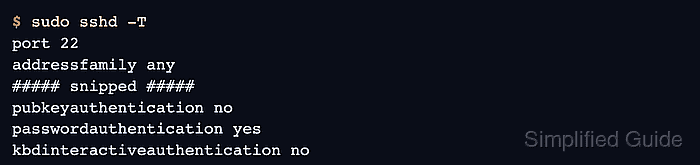
$ sudo sshd -T
port 22
addressfamily any
##### snipped #####
pubkeyauthentication no
passwordauthentication yes
kbdinteractiveauthentication no
##### snipped #####
pubkeyauthentication no confirms that the daemon will not offer public key login. The remaining authentication line should match the fallback method selected for the server.
- Probe the server from a separate client using only public key authentication.
$ ssh -vv -o PreferredAuthentications=publickey -o PubkeyAuthentication=yes -i ~/.ssh/id_ed25519 user@host.example.net true
##### snipped #####
debug1: Authentications that can continue: password
debug1: No more authentication methods to try.
user@host.example.net: Permission denied (password).
The command is expected to fail. The offered methods exclude publickey, while the remaining password method shows that the server still advertises the configured fallback.