How to increase SSH client verbosity
When an SSH connection fails before the remote shell or command starts, normal client output often hides whether the problem is DNS, TCP reachability, host-key trust, key selection, or authentication. Raising OpenSSH client verbosity prints the connection progress from the local client so the failing stage is visible without changing the server configuration.
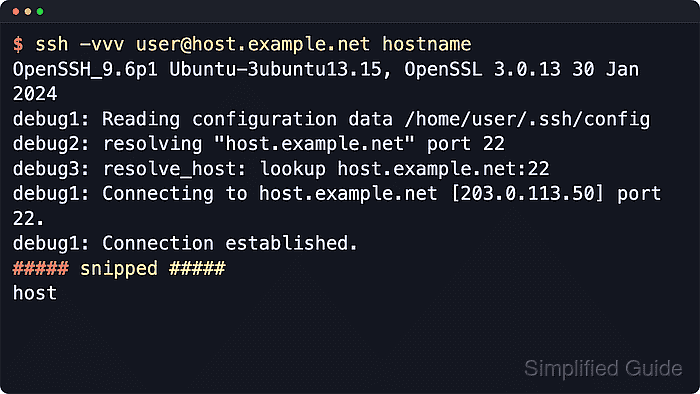
The -v option enables debug1 messages for one command, and repeating the option as -vv or -vvv adds debug2 and debug3 detail. These messages are client diagnostics, not remote command output, and they are written around the normal stdout from the command that runs on the server.
Use high verbosity for troubleshooting runs and short support captures instead of routine automation. Debug output can expose usernames, key paths, hostnames, host key fingerprints, and chosen algorithms, so persistent LogLevel DEBUG3 settings should stay inside a narrow Host block rather than a broad Host * default.
Related: How to reduce SSH client output
Related: How to suppress SSH login banners and MOTD
Steps to increase SSH client verbosity:
- Run ssh with -v to print basic client diagnostics for one connection.
$ ssh -v user@host.example.net hostname
debug1: OpenSSH_10.2p1 Ubuntu-2ubuntu3.2, OpenSSL 3.5.5 27 Jan 2026
debug1: Reading configuration data /etc/ssh/ssh_config
debug1: Connecting to host.example.net [203.0.113.50] port 22.
debug1: Connection established.
debug1: Authenticating to host.example.net:22 as 'user'
Authenticated to host.example.net ([203.0.113.50]:22) using "publickey".
##### snipped #####
host
-v is usually enough to confirm the target host, port, local configuration file, and authentication method.
- Repeat the option as -vv when the first debug level does not show enough detail.
$ ssh -vv user@host.example.net hostname
debug1: OpenSSH_10.2p1 Ubuntu-2ubuntu3.2, OpenSSL 3.5.5 27 Jan 2026
debug1: Reading configuration data /etc/ssh/ssh_config
debug1: Connecting to host.example.net [203.0.113.50] port 22.
debug1: Connection established.
debug2: fd 3 setting O_NONBLOCK
debug1: Authenticating to host.example.net:22 as 'user'
##### snipped #####
host
-vv adds debug2 messages for connection setup, key exchange, and channel handling decisions that are hidden at debug1.
- Use -vvv for the most detailed one-time client trace.
$ ssh -vvv user@host.example.net hostname
debug1: OpenSSH_10.2p1 Ubuntu-2ubuntu3.2, OpenSSL 3.5.5 27 Jan 2026
debug3: channel_clear_timeouts: clearing
debug3: ssh_connect_direct: entering
debug1: Connecting to host.example.net [203.0.113.50] port 22.
debug3: set_sock_tos: set socket 3 IP_TOS 0xb8
debug1: Connection established.
debug1: Authenticating to host.example.net:22 as 'user'
##### snipped #####
host
-vvv can print local key paths, host key fingerprints, selected algorithms, and server prompts. Remove sensitive lines before sharing a trace outside the trusted troubleshooting group.
- Open the per-user SSH client configuration file when the same host should always use a higher log level.
$ nano ~/.ssh/config
Create ~/.ssh/config first if it does not exist, and keep it readable only by the local account.
- Add LogLevel DEBUG3 to the matching Host block.
Host host.example.net
  User user
  HostName host.example.net
  IdentityFile ~/.ssh/id_ed25519
  LogLevel DEBUG3
Current OpenSSH accepts DEBUG, DEBUG1, DEBUG2, and DEBUG3 for LogLevel. DEBUG and DEBUG1 are equivalent, and DEBUG3 prints the most client detail.
Tool: SSH Client Config Editor
- Inspect the resolved client settings for the host.
$ ssh -G host.example.net
host host.example.net
user user
hostname host.example.net
port 22
loglevel DEBUG3
identityfile ~/.ssh/id_ed25519
##### snipped #####
ssh -G prints the merged client configuration after command-line options, ~/.ssh/config, and /etc/ssh/ssh_config are evaluated.
Related: How to show SSH client configuration
- Connect to the host again to verify the per-host DEBUG3 setting.
$ ssh host.example.net hostname
debug3: channel_clear_timeouts: clearing
debug3: ssh_connect_direct: entering
debug1: Connecting to host.example.net [203.0.113.50] port 22.
debug3: set_sock_tos: set socket 3 IP_TOS 0xb8
debug1: Connection established.
debug1: Authenticating to host.example.net:22 as 'user'
##### snipped #####
host
A broad Host * block with LogLevel DEBUG3 adds noisy diagnostics to every SSH-based tool that reads the same client configuration, including scp and sftp.