How to build sparse semantic search with Sentence Transformers
Sparse retrieval keeps exact terms such as product labels, error codes, and account actions visible in a ranked result while still expanding a query beyond literal token overlap. Sentence Transformers exposes SPLADE models through SparseEncoder, which makes an in-memory search useful for proving this retrieval path before choosing a sparse-vector backend.
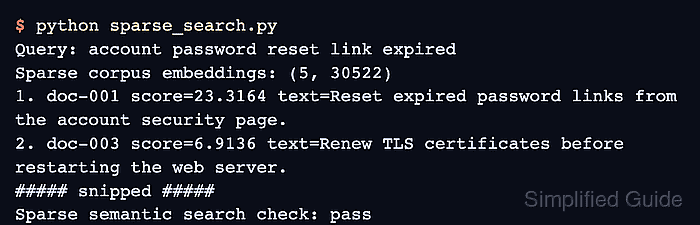
The SparseEncoder API can route stored text and search requests through separate encode_document() and encode_query() calls. The returned sparse tensors work with semantic_search() and the model's dot-product similarity function without converting the corpus to dense vectors.
Application record IDs stay beside their source text because each search hit returns a corpus_id position rather than an application-owned identifier. The first-result assertion therefore checks the mapped record ID, while exact similarity scores remain free to vary with model and library releases.
Steps to build sparse semantic search with Sentence Transformers:
- Create sparse_search.py with the sparse model imports and initialization.
- sparse_search.py
from sentence_transformers import SparseEncoder
from sentence_transformers.util import semantic_search


model = SparseEncoder("naver/splade-cocondenser-ensembledistil")
- Define the retrieval inputs after the model initialization.
documents = [
    {
        "id": "doc-001",
        "text": "Reset expired password links from the account security page.",
    },
    {
        "id": "doc-002",
        "text": "Rotate SSH deployment keys before a release window.",
    },
    {
        "id": "doc-003",
        "text": "Renew TLS certificates before restarting the web server.",
    },
    {
        "id": "doc-004",
        "text": "Export invoice PDFs from the billing dashboard.",
    },
    {
        "id": "doc-005",
        "text": "Troubleshoot SAML login errors from the identity provider logs.",
    },
]

query = "account password reset link expired"
corpus = [document["text"] for document in documents]
Each source ID remains beside its text so corpus_id can be mapped back to the application record.
- Add the sparse encoding stage after the corpus projection.
corpus_embeddings = model.encode_document(
    corpus,
    convert_to_tensor=True,
    show_progress_bar=False,
)
query_embedding = model.encode_query(
    query,
    convert_to_tensor=True,
    show_progress_bar=False,
)
- Add the ranked-output section after the query encoding.
hits = semantic_search(
    query_embedding,
    corpus_embeddings,
    top_k=3,
    score_function=model.similarity,
)[0]

print(f"Query: {query}")
print(f"Sparse corpus embeddings: {tuple(corpus_embeddings.shape)}")

for rank, hit in enumerate(hits, start=1):
    document = documents[hit["corpus_id"]]
    print(f"{rank}. {document['id']} text={document['text']}")
- Add a fail-capable first-result check after the result loop.
top_document = documents[hits[0]["corpus_id"]]
if top_document["id"] != "doc-001":
    raise SystemExit(f"unexpected top sparse result: {top_document['id']}")

print("Sparse semantic search check: pass")
- Run the completed sparse search program to confirm that doc-001 ranks first.
$ python sparse_search.py
Query: account password reset link expired
Sparse corpus embeddings: (5, 30522)
1. doc-001 text=Reset expired password links from the account security page.
2. doc-003 text=Renew TLS certificates before restarting the web server.
3. doc-005 text=Troubleshoot SAML login errors from the identity provider logs.
Sparse semantic search check: pass
The program exits with an error instead of printing the pass line when another record ranks first.