How to run text clustering with Sentence Transformers
Semantic grouping turns a flat collection of short text into reviewable topics without requiring a label for every item. Sentence Transformers supplies meaning-aware vectors, while K-means assigns nearby vectors to the same group.
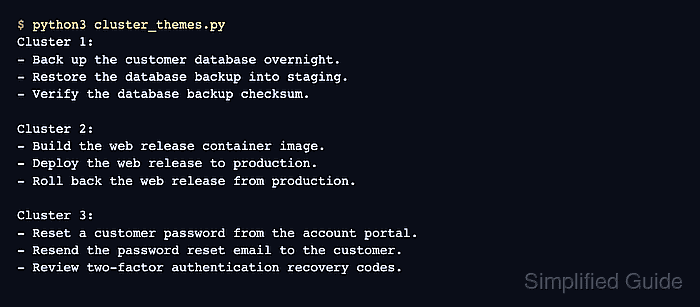
K-means suits a collection when the intended number of groups is known. The sample uses three themes and normalized sentence-transformers/all-MiniLM-L6-v2 embeddings so vector length does not dominate the Euclidean distances minimized by K-means.
Numeric cluster IDs are generated labels rather than reusable category names. Sample-only expected theme IDs let the adjusted Rand index verify membership without depending on those numbers, while the silhouette score measures how distinctly the groups separate.
Steps to run text clustering with Sentence Transformers:
- Create the starter data section in cluster_themes.py.
- cluster_themes.py
from collections import defaultdict

from sentence_transformers import SentenceTransformer
from sklearn.cluster import KMeans
from sklearn.metrics import adjusted_rand_score, silhouette_score

texts = [
    "Reset the customer account password.",
    "Email the customer account password reset link.",
    "Review the customer account recovery settings.",
    "Build the website release image.",
    "Deploy the website release image.",
    "Roll back the website release image.",
    "Create the database backup archive.",
    "Restore the database backup archive.",
    "Verify the database backup archive.",
]
expected_theme_ids = [0, 0, 0, 1, 1, 1, 2, 2, 2]
The list represents one short text field per record. The expected IDs evaluate only this labeled smoke-test corpus and are never passed into K-means; unlabeled production records often need external IDs beside their text instead.
- Append the embedding stage after the source text list.
model = SentenceTransformer("sentence-transformers/all-MiniLM-L6-v2", device="cpu")
embeddings = model.encode(
    texts,
    normalize_embeddings=True,
    show_progress_bar=False,
)
The first model load can download files from Hugging Face. Normalized vectors make Euclidean distance on the unit sphere track embedding direction more closely.
- Append the K-means fit after the embedding stage.
clusterer = KMeans(n_clusters=3, random_state=7, n_init=10)
labels = clusterer.fit_predict(embeddings)
n_clusters is the number of groups the review expects. The fixed random_state and explicit n_init make this small sample reproducible, but production cluster counts still need evaluation against representative text.
- Append the grouped output and evaluation checks after the K-means fit.
groups = defaultdict(list)
for text, label in zip(texts, labels):
    groups[int(label)].append(text)

for cluster_number, label in enumerate(
    sorted(groups, key=lambda key: groups[key][0]),
    start=1,
):
    print(f"Cluster {cluster_number}:")
    for text in groups[label]:
        print(f"- {text}")
    print()

score = silhouette_score(embeddings, labels)
agreement = adjusted_rand_score(expected_theme_ids, labels)
print(f"Silhouette score: {score:.2f}")
print(f"Adjusted Rand index: {agreement:.2f}")

if score < 0.40 or agreement < 1.0:
    raise SystemExit("sample clustering checks failed")
The silhouette score ranges from -1 to 1, with higher values indicating stronger separation. The adjusted Rand index reaches 1.00 only when the predicted memberships match the sample themes, regardless of arbitrary cluster numbers; 0.40 is a sample-specific separation threshold rather than a universal production cutoff.
- Compare cluster_themes.py with the completed file before execution.
- cluster_themes.py
from collections import defaultdict

from sentence_transformers import SentenceTransformer
from sklearn.cluster import KMeans
from sklearn.metrics import adjusted_rand_score, silhouette_score


texts = [
    "Reset the customer account password.",
    "Email the customer account password reset link.",
    "Review the customer account recovery settings.",
    "Build the website release image.",
    "Deploy the website release image.",
    "Roll back the website release image.",
    "Create the database backup archive.",
    "Restore the database backup archive.",
    "Verify the database backup archive.",
]
expected_theme_ids = [0, 0, 0, 1, 1, 1, 2, 2, 2]

model = SentenceTransformer("sentence-transformers/all-MiniLM-L6-v2", device="cpu")
embeddings = model.encode(
    texts,
    normalize_embeddings=True,
    show_progress_bar=False,
)

clusterer = KMeans(n_clusters=3, random_state=7, n_init=10)
labels = clusterer.fit_predict(embeddings)

groups = defaultdict(list)
for text, label in zip(texts, labels):
    groups[int(label)].append(text)

for cluster_number, label in enumerate(
    sorted(groups, key=lambda key: groups[key][0]),
    start=1,
):
    print(f"Cluster {cluster_number}:")
    for text in groups[label]:
        print(f"- {text}")
    print()

score = silhouette_score(embeddings, labels)
agreement = adjusted_rand_score(expected_theme_ids, labels)
print(f"Silhouette score: {score:.2f}")
print(f"Adjusted Rand index: {agreement:.2f}")

if score < 0.40 or agreement < 1.0:
    raise SystemExit("sample clustering checks failed")
- Run cluster_themes.py to print the groups and enforce the sample separation threshold.
$ python3 cluster_themes.py
Cluster 1:
- Build the website release image.
- Deploy the website release image.
- Roll back the website release image.

Cluster 2:
- Create the database backup archive.
- Restore the database backup archive.
- Verify the database backup archive.

Cluster 3:
- Reset the customer account password.
- Email the customer account password reset link.
- Review the customer account recovery settings.

Silhouette score: 0.45
Adjusted Rand index: 1.00
Cluster numbers can differ after changing the model, data, or initialization. The adjusted Rand index checks membership without requiring a particular number-to-topic mapping.