How to vectorize text with TF-IDF in scikit-learn
Machine-learning estimators operate on numbers, while support tickets, reviews, and other documents arrive as text. TF-IDF gives each document a sparse numeric row whose columns represent learned terms and whose values emphasize terms that are frequent in that document but less common across the fitted corpus.
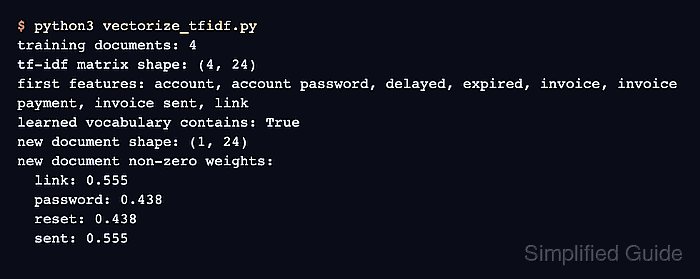
The TfidfVectorizer class combines token counting with inverse-document-frequency weighting. fit_transform() learns the vocabulary and weights from training documents, while transform() reuses them for new documents so training and inference keep the same feature columns.
Word unigrams and bigrams preserve individual terms and adjacent phrases in the sample corpus. Matching 24-column matrix shapes and a non-zero feature list show that a new ticket was encoded against the fitted training space instead of learning a second vocabulary.
Steps to vectorize text with TF-IDF in scikit-learn:
- Create vectorize_tfidf.py with a training corpus of support-ticket text.
- vectorize_tfidf.py
from sklearn.feature_extraction.text import TfidfVectorizer


tickets = [
    "reset password token expired",
    "reset account password link",
    "invoice payment receipt delayed",
    "payment reminder invoice sent",
]
- Append the TfidfVectorizer configuration and training transformation to vectorize_tfidf.py.
vectorizer = TfidfVectorizer(
    stop_words="english",
    ngram_range=(1, 2),
)
training_matrix = vectorizer.fit_transform(tickets)
fit_transform() learns the vocabulary and IDF weights from tickets. The fitted vectorizer must accompany the model that consumes the matrix.
- Append the new-ticket transformation and matched-feature report to vectorize_tfidf.py.
new_tickets = ["reset password link sent"]
new_matrix = vectorizer.transform(new_tickets)
feature_names = vectorizer.get_feature_names_out()
nonzero_weights = new_matrix.toarray()[0]

print(f"Training matrix: {training_matrix.shape}")
print(f"New matrix: {new_matrix.shape}")
print("Matched TF-IDF features:")
for feature, weight in zip(feature_names, nonzero_weights):
    if weight > 0:
        print(f"  {feature}: {weight:.3f}")
transform() uses the vocabulary and document frequencies learned from tickets; it does not add unseen terms to the feature space.
- Run vectorize_tfidf.py to confirm that training and new-ticket matrices use the same fitted feature columns.
$ python3 vectorize_tfidf.py
Training matrix: (4, 24)
New matrix: (1, 24)
Matched TF-IDF features:
  link: 0.437
  password: 0.344
  password link: 0.437
  reset: 0.344
  reset password: 0.437
  sent: 0.437
Both matrices have 24 columns, and the listed non-zero weights belong only to fitted unigrams and bigrams found in the new ticket.