How to cluster data with KMeans in scikit-learn
Unlabeled numeric records often contain groups whose members occupy nearby regions of feature space. KMeans is a suitable starting point when the number of groups is known in advance and compact, roughly spherical clusters are a reasonable assumption.
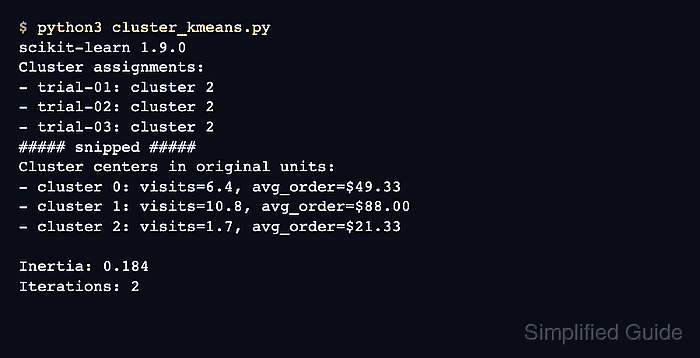
The customer sample pairs monthly visits with average order value, so the columns operate at different scales. A Pipeline keeps StandardScaler and KMeans together, which applies the same fitted scaling when new rows are assigned later.
Cluster numbers are arbitrary identifiers, so interpret them through the inverse-transformed centers rather than the numbers themselves. A successful result separates the nine training rows into three coherent groups and assigns each new row to its nearest learned centroid without refitting the scaler or clusterer.
Steps to cluster data with scikit-learn KMeans:
- Create cluster_kmeans.py with the imports and customer feature rows.
- cluster_kmeans.py
import numpy as np
from sklearn.cluster import KMeans
from sklearn.pipeline import make_pipeline
from sklearn.preprocessing import StandardScaler


customer_names = np.array(
    [
        "trial-01",
        "trial-02",
        "trial-03",
        "steady-01",
        "steady-02",
        "steady-03",
        "premium-01",
        "premium-02",
        "premium-03",
    ]
)

features = np.array(
    [
        [1.2, 18.0],
        [1.8, 22.0],
        [2.0, 24.0],
        [5.8, 47.0],
        [6.4, 52.0],
        [6.9, 49.0],
        [10.2, 85.0],
        [10.8, 91.0],
        [11.4, 88.0],
    ],
    dtype=float,
)
The first column represents monthly visits, while the second represents average order value.
- Append the scaling and KMeans fit after the feature array.
model = make_pipeline(
    StandardScaler(),
    KMeans(n_clusters=3, n_init=10, random_state=42),
)
labels = model.fit_predict(features)

scaler = model.named_steps["standardscaler"]
kmeans = model.named_steps["kmeans"]
centers = scaler.inverse_transform(kmeans.cluster_centers_)
The fixed seed makes this sample reproducible, and ten initializations let KMeans retain the fit with the lowest inertia.
- Append the fitted-member and centroid report after the inverse transform.
print("Fitted clusters:")
for cluster_id, center in enumerate(centers):
    members = ", ".join(customer_names[labels == cluster_id])
    visits, spend = center
    print(f"- cluster {cluster_id}: {members}")
    print(f"  center: visits={visits:.1f}, avg_order=${spend:.2f}")

print(f"Inertia in scaled space: {kmeans.inertia_:.3f}")
The inverse transform expresses each centroid in visits and currency again, while inertia remains in the scaled feature space.
- Append the new-row prediction after the fitted-cluster report.
new_rows = np.array(
    [
        [2.3, 23.0],
        [10.5, 89.0],
    ],
    dtype=float,
)
new_labels = model.predict(new_rows)

print("New row assignments:")
for row, label in zip(new_rows, new_labels):
    visits, spend = row
    print(f"- visits={visits:.1f}, avg_order=${spend:.2f}: cluster {label}")
The fitted pipeline applies its stored scaling parameters before assigning each row to the nearest learned centroid.
- Run cluster_kmeans.py to verify its fitted-cluster and new-row output.
$ python3 cluster_kmeans.py
Fitted clusters:
- cluster 0: steady-01, steady-02, steady-03
  center: visits=6.4, avg_order=$49.33
- cluster 1: premium-01, premium-02, premium-03
  center: visits=10.8, avg_order=$88.00
- cluster 2: trial-01, trial-02, trial-03
  center: visits=1.7, avg_order=$21.33
Inertia in scaled space: 0.184
New row assignments:
- visits=2.3, avg_order=$23.00: cluster 2
- visits=10.5, avg_order=$89.00: cluster 1