How to select features with SelectKBest in scikit-learn
Feature selection narrows a wide dataset to the columns with the strongest individual relationship to its target. SelectKBest provides this supervised screening in scikit-learn and can pass the reduced matrix directly to an estimator.
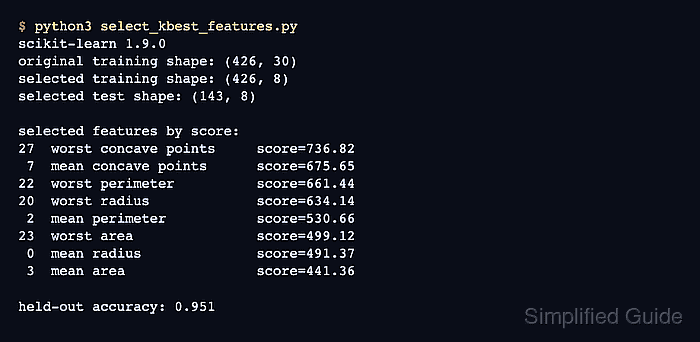
The selector scores each feature independently with a function such as f_classif for classification. Its fitted get_support() mask identifies the original columns retained by k, while get_feature_names_out() maps those positions back to readable dataset names.
Training and evaluation data must not share fitted selection statistics. Placing SelectKBest before LogisticRegression in a Pipeline fits both stages from training rows and applies the learned selection to held-out rows during prediction.
Steps to select features with scikit-learn SelectKBest:
- Create select_kbest_features.py with the imports and stratified dataset split.
- select_kbest_features.py
import sklearn
from sklearn.datasets import load_breast_cancer
from sklearn.feature_selection import SelectKBest, f_classif
from sklearn.linear_model import LogisticRegression
from sklearn.metrics import accuracy_score
from sklearn.model_selection import train_test_split
from sklearn.pipeline import Pipeline


dataset = load_breast_cancer()
X_train, X_test, y_train, y_test = train_test_split(
    dataset.data,
    dataset.target,
    test_size=0.25,
    stratify=dataset.target,
    random_state=42,
)
- Append the eight-feature selector and classifier pipeline below the dataset split.
- select_kbest_features.py
model = Pipeline(
    steps=[
        ("select", SelectKBest(score_func=f_classif, k=8)),
        ("classify", LogisticRegression(max_iter=5000)),
    ]
)
f_classif scores continuous features for a classification target. f_regression is the corresponding score for a continuous target, while chi2 requires non-negative features such as counts.
- Append model fitting and selected-feature inspection below the pipeline definition.
- select_kbest_features.py
model.fit(X_train, y_train)

selector = model.named_steps["select"]
selected_indices = selector.get_support(indices=True)
selected_names = selector.get_feature_names_out(dataset.feature_names)
selected_scores = selector.scores_[selected_indices]
ranked_features = sorted(
    zip(selected_indices, selected_names, selected_scores),
    key=lambda item: item[2],
    reverse=True,
)
named_steps[“select”] returns the fitted selector from the pipeline. Equal-score ties have no guaranteed order.
- Append the matrix shapes, ranked feature names, and held-out score below the ranking block.
- select_kbest_features.py
print(f"scikit-learn {sklearn.__version__}")
print(f"original training shape: {X_train.shape}")
print(f"selected training shape: {selector.transform(X_train).shape}")
print(f"selected test shape: {selector.transform(X_test).shape}")
print()
print("selected features by score:")
for index, name, score in ranked_features:
    print(f"{index:2d}  {name:<24} score={score:.2f}")
print()
print(f"held-out accuracy: {accuracy_score(y_test, model.predict(X_test)):.3f}")
- Run the completed script from a Python environment with scikit-learn installed.
$ python3 select_kbest_features.py
scikit-learn 1.9.0
original training shape: (426, 30)
selected training shape: (426, 8)
selected test shape: (143, 8)

selected features by score:
27  worst concave points     score=736.82
 7  mean concave points      score=675.65
22  worst perimeter          score=661.44
20  worst radius             score=634.14
 2  mean perimeter           score=530.66
23  worst area               score=499.12
 0  mean radius              score=491.37
 3  mean area                score=441.36

held-out accuracy: 0.951
The two selected shapes must end in 8 columns, and a numeric held-out accuracy confirms that the fitted pipeline transformed unseen rows before classification. Production feature counts should come from project-specific validation results across candidate k values.