How to debug rsync filter rules
A missing path in an rsync preview can come from a rule that matched the path itself or from an earlier rule that stopped traversal at one of its parent directories. FILTER debug messages name the sender-side match, so the first wrong decision can be corrected without running a live transfer.
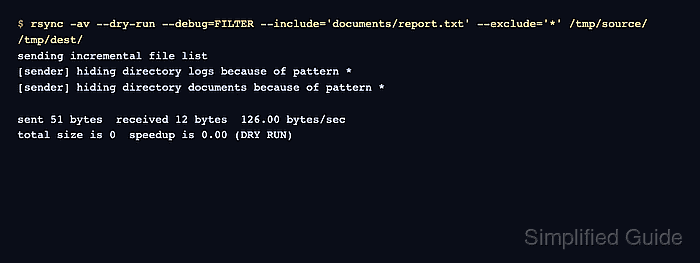
Filter order matters because rsync stops at the first matching include or exclude rule for each name. An include for /documents/report.txt cannot rescue the file after * has already hidden /documents/, so every parent directory that must be scanned needs an earlier include.
Run the diagnostic against the same source, destination, and ordered rules planned for the transfer. Use --debug=FILTER when the source is local or on a remote push; use -M--debug=FILTER for a remote pull so the option reaches the remote sender.
Steps to debug rsync filter rules:
- Reproduce the wrong file list with filter debugging and a dry run.
$ rsync -a --dry-run --debug=FILTER --include='/documents/report.txt' --exclude='*' source/ destination/
[sender] hiding directory data because of pattern *
[sender] hiding directory documents because of pattern *
Use the exact paths and filter order from the planned transfer. For a remote pull, replace --debug=FILTER with -M--debug=FILTER because the remote source is the sender.
- Follow the first unexpected match for the missing branch.
The trace says * hid the documents directory. Rsync therefore did not enter that directory and never evaluated the later file include for documents/report.txt.
- Insert an include for the parent directory before the file include and final catch-all rule, then repeat the debug dry run.
$ rsync -a --dry-run --debug=FILTER --include='/documents/' --include='/documents/report.txt' --exclude='*' source/ destination/
[sender] hiding directory data because of pattern *
[sender] showing directory documents because of pattern /documents/
[sender] hiding file documents/notes.txt because of pattern *
[sender] showing file documents/report.txt because of pattern /documents/report.txt
[sender] hiding file documents/report-hardlink.txt because of pattern *
The leading slash anchors both include patterns at the transfer root. The trailing slash on /documents/ limits that rule to the directory.
- Check that every unexpected hiding or showing line now names the intended rule.
Keep rules from --filter, --include-from, and --exclude-from in their original relative order while diagnosing a real command because all of them join the same ordered filter list.
- Remove filter debugging but keep the corrected rules and dry run for the final preview.
$ rsync -av --dry-run --include='/documents/' --include='/documents/report.txt' --exclude='*' source/ destination/
sending incremental file list
./
documents/
documents/report.txt

sent 121 bytes  received 26 bytes  294.00 bytes/sec
total size is 28  speedup is 0.19 (DRY RUN)
If the live command includes --delete, do not remove --dry-run until this final list contains only the paths that should be transferred or deleted. Changing filters can also change which destination files are protected from deletion.