How to read rsync itemized changes
An rsync preview becomes an approval record only when each marker is understood. Itemized output separates file transfers, directory creation, metadata-only changes, and deletions, so an unexpected path or action can stop the sync before data changes.
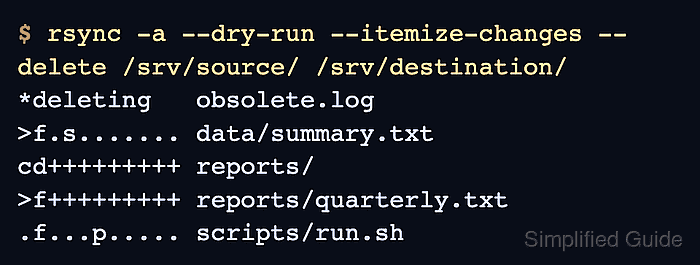
Each normal line begins with an 11-character field shaped like YXcstpoguax. The first position is the update action, the second is the item type, and positions three through eleven identify the attributes that rsync would update.
Message rows use a different shape. A line beginning with *deleting announces a destination removal rather than a normal 11-position marker, and it should be rejected unless that path is expected to disappear under the reviewed --delete policy.
Steps to read rsync itemized changes:
- Run the planned sync with --dry-run and --itemize-changes.
$ rsync -a --dry-run --itemize-changes --delete /srv/source/ /srv/destination/
*deleting   obsolete.log
>f.s....... data/summary.txt
cd+++++++++ reports/
>f+++++++++ reports/quarterly.txt
.f...p..... scripts/run.sh
Keep the source, destination, trailing slash, excludes, preservation flags, and deletion options identical to the planned live command. --dry-run prevents this preview from writing or deleting files.
- Check deletion messages before normal markers. *deleting obsolete.log means rsync would remove the destination-only file because --delete is active.
Reject the run if any *deleting path must remain on the destination.
- Read the first two positions of each normal marker. In this local copy, >f means the destination receives a regular file, cd means rsync creates a directory locally, and .f means the regular file data stays in place while an attribute changes.
- Interpret the remaining nine positions for the specific change. +++++++++ marks every attribute as new, so cd+++++++++ creates reports/ and >f+++++++++ creates reports/quarterly.txt. The s in >f.s....... identifies a size change, while the p in .f...p..... identifies a permissions-only update.
A regular-file c marker requires --checksum and means the checksum differs. ACL and extended-attribute changes appear as a and x in the last two positions when those attributes are preserved.
Related: How to compare files by checksum with rsync - Reject any decoded line that does not match the intended change set. Correct the source, destination, excludes, preservation flags, or deletion policy, then generate a new dry run for review.
- Apply the sync only after every path and marker is approved. Removing --dry-run writes the listed updates, and --delete removes the destination-only paths shown as *deleting.
$ rsync -a --itemize-changes --delete /srv/source/ /srv/destination/
*deleting   obsolete.log
>f.s....... data/summary.txt
cd+++++++++ reports/
>f+++++++++ reports/quarterly.txt
.f...p..... scripts/run.sh
- Repeat the same itemized dry run after the live sync.
$ rsync -a --dry-run --itemize-changes --delete /srv/source/ /srv/destination/
No marker lines and exit status 0 mean rsync sees no remaining creates, transfers, attribute updates, or deletions for the reviewed paths and options.