How to configure TLS between phpMyAdmin and MySQL or MariaDB
Traffic between phpMyAdmin and a remote database can cross networks where credentials and query results should not travel in clear text. TLS encrypts that connection, while certificate verification prevents phpMyAdmin from accepting an impostor that presents an untrusted certificate.

The official phpMyAdmin container loads /etc/phpmyadmin/config.user.inc.php after its generated server configuration. Keeping the override and CA certificate under ./phpmyadmin/ beside compose.yaml gives Docker Compose explicit host files to mount read-only at the paths used by the web process.
The database server must already offer TLS with a certificate whose subject alternative name matches its DNS host name. The ssl, ssl_ca, and ssl_verify settings enable encryption and verify the server identity; client certificate settings such as ssl_cert and ssl_key are needed only when the database account requires mutual TLS.
Steps to configure TLS between phpMyAdmin and MySQL or MariaDB:
- Create the phpMyAdmin host-file directory beside compose.yaml.
$ install -d -m 0755 phpmyadmin
- Copy the database CA certificate into the Compose project directory.
$ install -m 0644 database-ca.pem phpmyadmin/database-ca.pem
The CA certificate is public trust material, not the database server's private key. Database private keys do not belong in the phpMyAdmin project unless mutual TLS is required.
- Open the host-side custom override file in an editor.
$ vi phpmyadmin/config.user.inc.php
- Configure the first server definition for the certificate's DNS name with verified TLS.
<?php
$cfg['Servers'][1]['host'] = 'database.example.net';
$cfg['Servers'][1]['ssl'] = true;
$cfg['Servers'][1]['ssl_ca'] = '/etc/phpmyadmin/database-ca.pem';
$cfg['Servers'][1]['ssl_verify'] = true;
Setting ssl_verify to false disables certificate and host-name verification, allowing a man-in-the-middle server to impersonate the database endpoint.
- Add read-only bind mounts for the custom override and CA certificate to the phpmyadmin service in compose.yaml.
services:
  phpmyadmin:
    volumes:
      - ./phpmyadmin/config.user.inc.php:/etc/phpmyadmin/config.user.inc.php:ro
      - ./phpmyadmin/database-ca.pem:/etc/phpmyadmin/database-ca.pem:ro
- Validate the syntax of compose.yaml.
$ docker compose config --quiet
- Recreate the phpmyadmin service with both read-only bind mounts.
$ docker compose up --detach --force-recreate phpmyadmin
- Confirm the running container can see both mounted host files.
$ docker compose exec phpmyadmin ls -l /etc/phpmyadmin/config.user.inc.php /etc/phpmyadmin/database-ca.pem
- Check the mounted custom override for PHP syntax errors.
$ docker compose exec phpmyadmin php -l /etc/phpmyadmin/config.user.inc.php
No syntax errors detected in /etc/phpmyadmin/config.user.inc.php
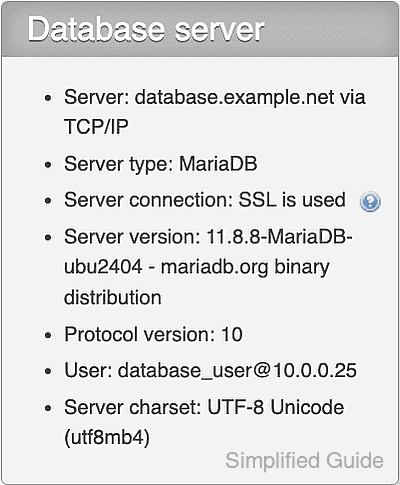
- Confirm the Database server panel in a new authenticated phpMyAdmin session reports Server connection: SSL is used.