How to disable a PHP function
Disabling one risky PHP function is useful when a specific site, pool, or tenant should never call that capability. Blocking exec(), shell_exec(), proc_open(), or another internal helper reduces exposure after an upload bug, compromised plugin, or exposed admin tool reaches the runtime.
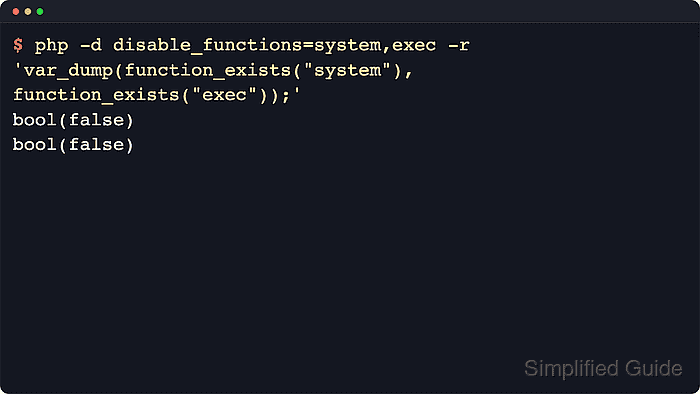
The control point is still the disable_functions directive, but this workflow treats the change as a targeted policy edit instead of a broad hardening list. Current PHP documentation marks the directive as INI_SYSTEM, only internal functions are affected, and PHP 8+ removes disabled internal functions from the function table for that runtime.
Use this page when the decision is “disable this one function here” and the success condition is a served request proving that the function no longer exists. For a larger denylist across many functions or tenants, use the broader disable-functions guide and review application breakage risks before applying the list globally.
Steps to disable one PHP function in PHP-FPM:
- Choose the single internal function to block and confirm that the application path does not legitimately depend on it.
$ grep -R "exec(" /var/www/app.example.test/releases/currentSearch the application, deployment hooks, queue workers, and maintenance scripts before blocking process-control helpers. A narrow change is easier to justify and roll back than a copied denylist.
- Check which PHP-FPM configuration file the served runtime loads and read the current disable_functions value.
$ sudo php-fpm8.5 -y /etc/php/8.5/fpm/php-fpm.conf -i
phpinfo()
PHP Version => 8.5.4
##### snipped #####
Loaded Configuration File => /etc/php/8.5/fpm/php.ini
##### snipped #####
Scan this dir for additional .ini files => /etc/php/8.5/fpm/conf.d
##### snipped #####
disable_functions => no value => no value
Replace 8.5 with the installed PHP major.minor version when the host packages another branch. On hosts that ship an unversioned binary, use sudo php-fpm -y /etc/php/<version>/fpm/php-fpm.conf -i instead. php --ini reports the CLI tree, which can differ from the web-facing PHP-FPM runtime.
- Search the PHP-FPM pool directory for an existing function policy before editing the main file.
$ sudo grep -RF "value[disable_functions]" /etc/php/8.5/fpm/pool.d/
No output means the sampled pool files are not currently adding extra disabled functions. In PHP-FPM, php_value[disable_functions] and php_admin_value[disable_functions] append to the base php.ini list instead of replacing it, so check the pool serving the affected site before adding a duplicate entry.
- Create a backup of the active PHP-FPM configuration file before editing it.
$ sudo cp /etc/php/8.5/fpm/php.ini /etc/php/8.5/fpm/php.ini.bak-$(date +%Y%m%d%H%M%S)
A malformed php.ini can stop new worker processes from loading cleanly, so keep the timestamped backup until the new list is confirmed.
- Open the active PHP-FPM configuration file in a text editor.
$ sudoedit /etc/php/8.5/fpm/php.ini
- Add the selected function to the existing disable_functions value.
disable_functions = exec
When the file already contains disabled functions, append the new function to that comma-delimited list instead of replacing the existing policy. Only internal functions are affected by this directive.
For a site-specific PHP-FPM pool policy, add the function with php_value[disable_functions] = exec or php_admin_value[disable_functions] = exec in that pool file, then test the same pool before reloading.
- Test the same PHP-FPM configuration tree before reloading the service.
$ sudo php-fpm8.5 -y /etc/php/8.5/fpm/php-fpm.conf -t
[05-Jun-2026 21:55:02] NOTICE: configuration file /etc/php/8.5/fpm/php-fpm.conf test is successful
Use the matching binary for the installed package, such as php-fpm on hosts that do not ship a versioned PHP-FPM command.
Do not reload the service until the configuration test succeeds.
- Reload the PHP-FPM service so new worker processes pick up the updated directive.
$ sudo systemctl reload php8.5-fpm
Packaged Ubuntu and Debian systems commonly use a versioned unit such as php8.5-fpm, while other layouts can expose an unversioned unit such as php-fpm. Reload Apache instead when the application runs through the Apache module instead of PHP-FPM.
- Create a temporary probe in the same document root or virtual host that serves the application.
<?php
header('Content-Type: text/plain');
echo 'disable_functions=', ini_get('disable_functions') ?: 'no value', "\n";
echo 'exec_exists=', function_exists('exec') ? 'yes' : 'no', "\n";
?>
Save the file as php-disable-functions-check.php in the exact site, pool, or virtual host that should receive the restricted runtime.
- Request the temporary probe through the web server.
$ curl -sS https://app.example.test/php-disable-functions-check.php
disable_functions=exec
exec_exists=no
exec_exists=no confirms that the served PHP-FPM runtime no longer has exec() in the function table. The reported disable_functions value also confirms that the request path is using the expected php.ini and pool settings.
Related: How to show disabled PHP functions
- Remove the temporary probe after the check.
$ sudo rm /var/www/app.example.test/public/php-disable-functions-check.php
Leaving the file accessible exposes runtime policy details that should not remain public.
- Roll back the single-function block if the application fails after deployment.
$ sudo cp /etc/php/8.5/fpm/php.ini.bak-20260605215502 /etc/php/8.5/fpm/php.ini
$ sudo php-fpm8.5 -y /etc/php/8.5/fpm/php-fpm.conf -t
$ sudo systemctl reload php8.5-fpm
Use the actual backup filename created earlier. After rollback, request the same probe or application path again to confirm that the runtime no longer carries the temporary function block.