How to auto-instrument a Java service with OpenTelemetry
Auto-instrumenting a Java service with the OpenTelemetry Java agent adds tracing to an existing JVM process without rebuilding the application. It is useful when a service already runs under Java and can be started with one extra JVM argument.
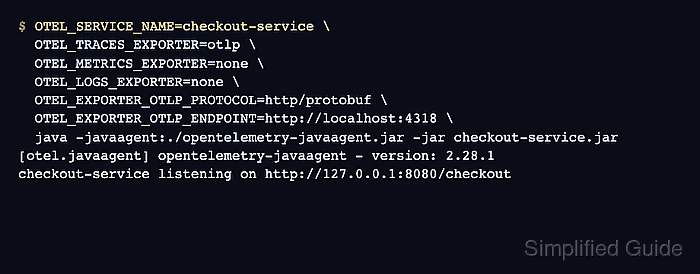
The agent attaches with the -javaagent option and reads OpenTelemetry settings from environment variables or -D system properties. This flow uses environment variables so the service name, OTLP transport, and local Collector endpoint stay outside the application artifact.
A local Collector with an OTLP HTTP receiver and debug exporter gives immediate proof before telemetry is sent to a production backend. The smoke test exports traces only, so the Collector output stays focused on the HTTP server span created by one request.
Steps to auto-instrument a Java service with OpenTelemetry:
- Download the OpenTelemetry Java agent jar.
$ curl --location --output opentelemetry-javaagent.jar https://github.com/open-telemetry/opentelemetry-java-instrumentation/releases/latest/download/opentelemetry-javaagent.jar
The Java agent jar is architecture-independent. Store it in a deployment-owned path such as /opt/opentelemetry/opentelemetry-javaagent.jar when moving beyond a local smoke test.
- Confirm that the agent jar is present.
$ ls -lh opentelemetry-javaagent.jar
-rw-r--r-- 1 deploy deploy 23M Jun 18 06:17 opentelemetry-javaagent.jar
- Create a local Collector config that receives OTLP over HTTP and prints traces.
- collector-java-demo.yaml
receivers:
  otlp:
    protocols:
      http:
        endpoint: 127.0.0.1:4318

exporters:
  debug:
    verbosity: detailed

service:
  pipelines:
    traces:
      receivers: [otlp]
      exporters: [debug]
The debug exporter prints telemetry to the Collector log for inspection. Do not leave detailed debug output enabled for normal production traffic because spans can include request paths, service names, and attributes.
Tool: OpenTelemetry Collector Config Generator - Validate the Collector config.
$ otelcol validate --config collector-java-demo.yaml
No output means the Collector accepted the config file.
- Start the local Collector.
$ otelcol --config collector-java-demo.yaml
2026-06-18T06:17:47.371Z	info	Starting HTTP server	{"endpoint":"127.0.0.1:4318"}
2026-06-18T06:17:47.371Z	info	Everything is ready. Begin running and processing data.
Leave this terminal running while the Java service sends telemetry.
- Start the Java service with the agent attached.
$ OTEL_SERVICE_NAME=checkout-service \
  OTEL_RESOURCE_ATTRIBUTES=deployment.environment=dev \
  OTEL_TRACES_EXPORTER=otlp \
  OTEL_METRICS_EXPORTER=none \
  OTEL_LOGS_EXPORTER=none \
  OTEL_EXPORTER_OTLP_PROTOCOL=http/protobuf \
  OTEL_EXPORTER_OTLP_ENDPOINT=http://localhost:4318 \
  java -javaagent:./opentelemetry-javaagent.jar -jar checkout-service.jar
[otel.javaagent] opentelemetry-javaagent - version: 2.28.1
checkout-service listening on http://127.0.0.1:8080/checkout
Replace checkout-service.jar and the local service URL with the real service. Use JAVA_TOOL_OPTIONS=-javaagent:/opt/opentelemetry/opentelemetry-javaagent.jar when the service launcher does not expose the java command directly.
- Send one request through a route handled by the service.
$ curl http://localhost:8080/checkout
checkout ok
- Check the Collector terminal for the exported server span.
2026-06-18T06:17:52.043Z	info	Traces	{"resource spans":1,"spans":1}
     -> service.name: Str(checkout-service)
Span #0
    Name           : GET /checkout
    Kind           : Server
     -> http.request.method: Str(GET)
     -> url.path: Str(/checkout)
The service is auto-instrumented when the Collector sees the configured service.name and a span for the request route.
- Stop the local debug Collector after the smoke test.
Ctrl+C
Keep the same OTEL_SERVICE_NAME, OTEL_EXPORTER_OTLP_PROTOCOL, and OTEL_EXPORTER_OTLP_ENDPOINT values when moving the service to a shared Collector or observability backend.