How to instrument a browser web app with OpenTelemetry JavaScript
Instrumenting a browser web app with OpenTelemetry JavaScript captures page-load timing and frontend HTTP spans before the request reaches a backend service. Browser traces help separate slow page loading, blocked API calls, and user-triggered request latency from server-side telemetry that starts later in the path.
Browser telemetry is exported by page code, so the endpoint must work within browser security rules. Use the OTLP HTTP exporter on port 4318, allow the collector endpoint in any Content Security Policy, and return CORS headers for the exact web app origin.
The local setup adds document-load and fetch instrumentation to an existing JavaScript app, sets a browser-specific service name, and verifies spans through a local OpenTelemetry Collector debug exporter. Browser instrumentation is still experimental, so pin package versions in real projects and retest upgrades before production rollout.
Steps to instrument a browser web app with OpenTelemetry JavaScript:
- Install the browser tracing packages in the frontend project.
$ npm install --save @opentelemetry/api \
  @opentelemetry/sdk-trace-web \
  @opentelemetry/sdk-trace-base \
  @opentelemetry/exporter-trace-otlp-http \
  @opentelemetry/instrumentation \
  @opentelemetry/instrumentation-document-load \
  @opentelemetry/instrumentation-fetch \
  @opentelemetry/context-zone \
  @opentelemetry/resources
Browser apps must use an OTLP HTTP exporter such as /v1/traces on port 4318. The OTLP gRPC exporter is for Node.js, not browser JavaScript.
- Create a browser instrumentation module before the main app bootstrap code.
/* src/otel.js */
import { ZoneContextManager } from '@opentelemetry/context-zone';
import { OTLPTraceExporter } from '@opentelemetry/exporter-trace-otlp-http';
import { registerInstrumentations } from '@opentelemetry/instrumentation';
import { DocumentLoadInstrumentation } from '@opentelemetry/instrumentation-document-load';
import { FetchInstrumentation } from '@opentelemetry/instrumentation-fetch';
import { resourceFromAttributes } from '@opentelemetry/resources';
import { BatchSpanProcessor } from '@opentelemetry/sdk-trace-base';
import { WebTracerProvider } from '@opentelemetry/sdk-trace-web';

const exporter = new OTLPTraceExporter({
  url: 'http://localhost:4318/v1/traces',
});

const provider = new WebTracerProvider({
  resource: resourceFromAttributes({
    'service.name': 'checkout-browser',
    'service.version': '1.0.0',
  }),
  spanProcessors: [
    new BatchSpanProcessor(exporter, {
      scheduledDelayMillis: 1000,
    }),
  ],
});

provider.register({
  contextManager: new ZoneContextManager(),
});

registerInstrumentations({
  instrumentations: [
    new DocumentLoadInstrumentation(),
    new FetchInstrumentation({
      clearTimingResources: true,
    }),
  ],
});
Replace checkout-browser with a service name that separates browser spans from backend spans in the same observability backend. If the page is served over HTTPS, export to an HTTPS collector or reverse-proxy endpoint to avoid browser mixed-content blocking.
- Import the instrumentation module before the application starts.
/* src/main.js */
import './otel.js';
import './app.js';
The instrumentation must register before the page code creates requests that should be traced. Framework apps can use the same pattern in their entry file, such as main.js, main.ts, index.jsx, or app.tsx.
- Configure a local Collector OTLP HTTP receiver for the browser origin.
receivers:
  otlp:
    protocols:
      http:
        endpoint: 0.0.0.0:4318
        cors:
          allowed_origins:
            - http://localhost:5173

exporters:
  debug:
    verbosity: detailed

service:
  pipelines:
    traces:
      receivers: [otlp]
      exporters: [debug]
Replace http://localhost:5173 with the exact scheme, host, and port that serves the web app. Add allowed_headers only when the browser exporter sends custom headers.
- Start the Collector with the local configuration.
$ docker run --rm --name otel-browser-collector \
  -p 4318:4318 \
  -v "$PWD/collector-config.yaml":/etc/otelcol/config.yaml \
  otel/opentelemetry-collector:latest
2026-06-18T06:15:53.272Z	info	otlpreceiver	Starting HTTP server	{"endpoint": "[::]:4318"}
2026-06-18T06:15:53.272Z	info	service	Everything is ready. Begin running and processing data.
For production browser telemetry, put a reverse proxy with TLS and explicit CORS rules in front of the Collector instead of exposing the Collector process directly.
- Start the web app from the frontend project.
$ npm run dev

> dev
> vite --host 0.0.0.0

  Local:   http://localhost:5173/
Use the normal command for the project. The Collector allowed_origins entry and exporter URL must match the app origin and OTLP endpoint used during this run.
- Open the web app and trigger a request that uses fetch.
http://localhost:5173/
Page-load spans export when the document timing data is available. fetch spans export after an instrumented request completes.
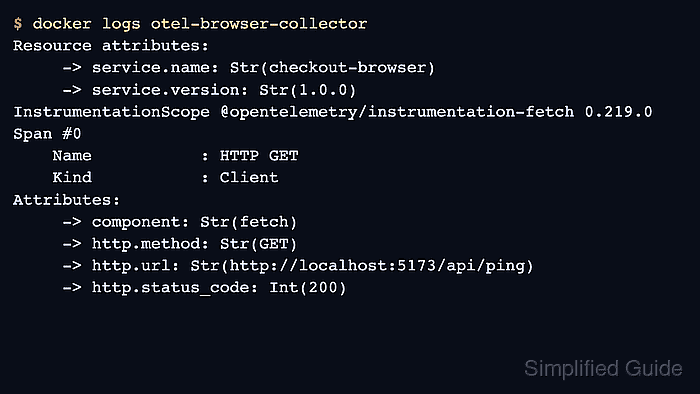
- Verify the browser spans in the Collector output.
$ docker logs otel-browser-collector
##### snipped #####
Resource attributes:
     -> service.name: Str(checkout-browser)
     -> service.version: Str(1.0.0)
InstrumentationScope @opentelemetry/instrumentation-fetch 0.219.0
Span #0
    Name           : HTTP GET
    Kind           : Client
Attributes:
     -> component: Str(fetch)
     -> http.method: Str(GET)
     -> http.url: Str(http://localhost:5173/api/ping)
     -> http.status_code: Int(200)
The same output should also include document-load spans such as documentLoad or documentFetch after the browser loads the page.
Related: How to test OpenTelemetry Collector pipelines with the debug exporter - Stop the local Collector after the smoke test.
$ docker stop otel-browser-collector
otel-browser-collector