How to stack NumPy arrays
Measurements collected at matching positions often arrive as separate arrays, but analysis may need a new dimension that identifies the source of each reading. NumPy can preserve that distinction instead of merging the values into an existing axis.
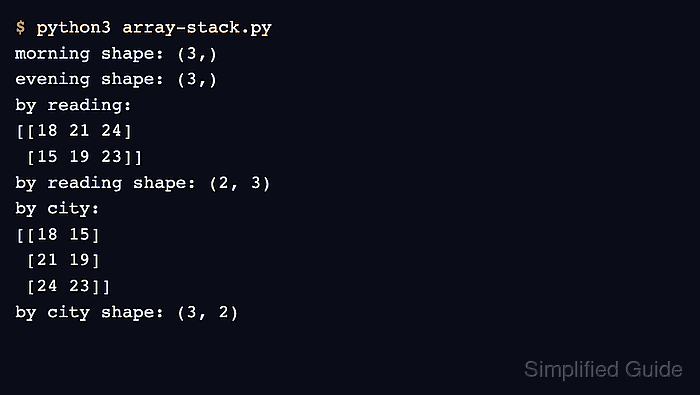
NumPy's np.stack() requires every input array to have the same shape and inserts a new axis into the result. With two (3,) arrays, axis=0 produces shape (2, 3), while axis=-1 produces shape (3, 2).
The sample values represent morning and evening temperatures for the same three cities. The axis choice therefore decides whether each reading becomes a row or each city receives a pair of readings.
Related: Concatenate arrays
Related: Reshape an array
Related: Transpose an array
Steps to stack NumPy arrays:
- Create array-stack.py with matching morning and evening arrays.
- array-stack.py
import numpy as np

morning = np.array([18, 21, 24])
evening = np.array([15, 19, 23])
Both arrays have shape (3,), so np.stack() can place them along a new axis without broadcasting either input.
- Append the first-axis stack below the input arrays.
by_reading = np.stack((morning, evening), axis=0)
axis=0 inserts the new dimension first, which makes the two readings the rows of a (2, 3) array.
- Append the last-axis stack below the first stack.
by_city = np.stack((morning, evening), axis=-1)
axis=-1 inserts the new dimension last, which pairs the morning and evening values for each city in a (3, 2) array.
- Complete array-stack.py with the labeled output section.
- array-stack.py
import numpy as np

morning = np.array([18, 21, 24])
evening = np.array([15, 19, 23])

by_reading = np.stack((morning, evening), axis=0)
by_city = np.stack((morning, evening), axis=-1)

print("axis=0:")
print(by_reading)
print("axis=0 shape:", by_reading.shape)
print("axis=-1:")
print(by_city)
print("axis=-1 shape:", by_city.shape)
- Run array-stack.py to confirm both stacked arrays and their new shapes.
$ python3 array-stack.py
axis=0:
[[18 21 24]
 [15 19 23]]
axis=0 shape: (2, 3)
axis=-1:
[[18 15]
 [21 19]
 [24 23]]
axis=-1 shape: (3, 2)