How to index and slice a NumPy array
Rows and columns in numerical data often need to be isolated before a calculation, plot, or quality check. NumPy expresses those selections inside square brackets, so a scalar or subarray follows the same coordinate order as its source ndarray.
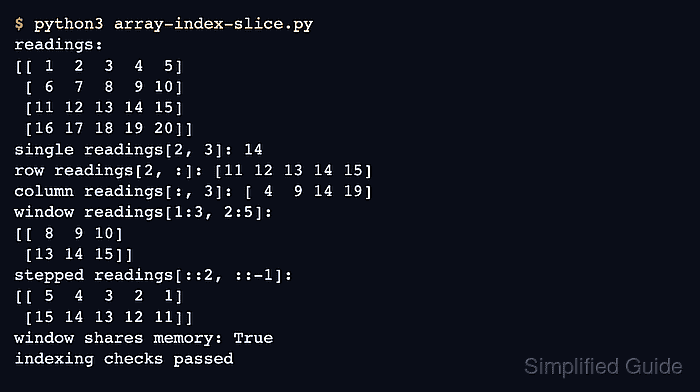
A two-dimensional index addresses the row axis first and the column axis second. An integer removes the selected axis, while a colon retains every position on that axis; positions start at zero, and negative positions count backward from the end.
Slice bounds use start:stop:step and exclude the stop position. Basic slices ordinarily share the original data buffer, which avoids copying but also means that changing a slice can change its source; call .copy() when the selected data must be independent.
Related: Filter with a boolean mask
Related: Check view or copy state
Related: Reshape an array
Steps to index and slice a NumPy array:
- Create the input array in array-index-slice.py.
- array-index-slice.py
import numpy as np

readings = np.arange(1, 21).reshape(4, 5)

print("readings:")
print(readings)
- Append the integer-indexing selections to array-index-slice.py.
- array-index-slice.py
single = readings[2, 3]
row = readings[2, :]
column = readings[:, 3]

print("single readings[2, 3]:", single)
print("row readings[2, :]:", row)
print("column readings[:, 3]:", column)
readings[2, 3] returns one scalar. readings[2, :] keeps every column in row 2, while readings[:, 3] keeps column 3 from every row.
- Append the basic-slice selections to array-index-slice.py.
- array-index-slice.py
window = readings[1:3, 2:5]
reversed_rows = readings[::2, ::-1]

print("window readings[1:3, 2:5]:")
print(window)
print("reversed rows readings[::2, ::-1]:")
print(reversed_rows)
The rectangular slice keeps rows 1 and 2 with columns 2 through 4. The stepped slice keeps every second row and reverses its column order.
- Append fail-capable selection checks to array-index-slice.py.
- array-index-slice.py
assert single == 14
assert row.tolist() == [11, 12, 13, 14, 15]
assert column.tolist() == [4, 9, 14, 19]
assert window.tolist() == [[8, 9, 10], [13, 14, 15]]
assert reversed_rows.tolist() == [[5, 4, 3, 2, 1], [15, 14, 13, 12, 11]]
assert np.shares_memory(readings, window)

print("window shares memory:", np.shares_memory(readings, window))
print("indexing and slicing checks passed")
Python stops with an AssertionError if any selection differs from the expected values or the basic rectangular slice does not share memory with readings.
- Run the completed indexing and slicing script.
$ python3 array-index-slice.py
readings:
[[ 1  2  3  4  5]
 [ 6  7  8  9 10]
 [11 12 13 14 15]
 [16 17 18 19 20]]
single readings[2, 3]: 14
row readings[2, :]: [11 12 13 14 15]
column readings[:, 3]: [ 4  9 14 19]
window readings[1:3, 2:5]:
[[ 8  9 10]
 [13 14 15]]
reversed rows readings[::2, ::-1]:
[[ 5  4  3  2  1]
 [15 14 13 12 11]]
window shares memory: True
indexing and slicing checks passed
The final line appears only after every scalar, row, column, rectangular-window, stepped-slice, and memory-sharing assertion succeeds.