How to view Nagios Core host and service status
Nagios Core status pages turn monitoring results into rows and object detail screens that operators can review during handoff, triage, or post-change checks. The service list shows many checks at once, while each detail page shows the current state, latest plugin output, and command links for the selected object.
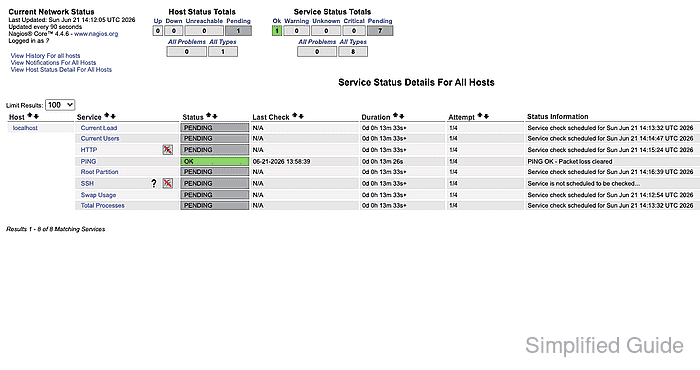
The service list is generated by status.cgi and can show all services or narrow the view by host, hostgroup, servicegroup, state, and display style. It is the fastest screen for finding a failing, pending, or disabled service before opening the object that owns the result.
Host and service detail pages are generated by extinfo.cgi. Open the detail page before submitting rechecks, acknowledgements, downtime, or notification changes because the command panel belongs to the specific host or service named at the top of that page.
Steps to view host and service status in Nagios Core web interface:
- Open the Nagios Core web interface as a user allowed to view the target hosts and services.
http://monitor.example.net/nagios4/
Debian and Ubuntu packages commonly use the /nagios4/ URL path. Source installs often use /nagios/ instead.
- Open Services from the Current Status navigation.
http://monitor.example.net/nagios4/cgi-bin/status.cgi?host=all&style=detail
- Review the service row that matches the host or check under investigation.
Use Host, Service, Status, Last Check, Duration, Attempt, and Status Information together. Status Information is the plugin output from the latest check.
- Open the service detail page for the row that needs closer review.
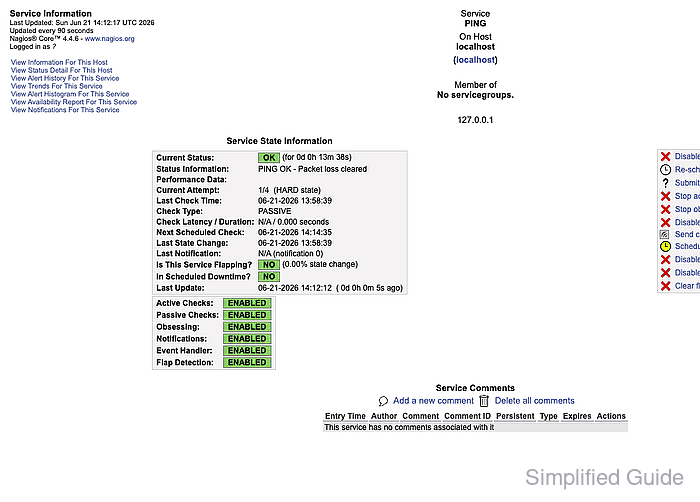
Current Status, Check Type, Last Check Time, Current Attempt, and Status Information show whether the row is current, active or passive, and still retrying.
- Check Service Commands only after confirming Service and On Host at the top of the page.
- Open the host detail page when the service result may be caused by host reachability or host-level state.
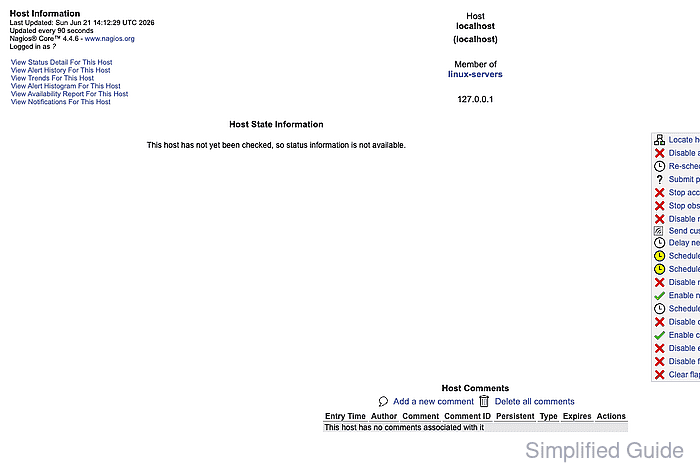
A host detail page can show an UP, DOWN, UNREACHABLE, or not-yet-checked state depending on the host check schedule and current monitoring history.
- Confirm the status review is complete when the detail pages identify the correct object names, current state or pending state, latest output, and the command panel that matches the intended follow-up action.