How to view table schema in MySQL or MariaDB
Inspecting a table schema before changing queries, indexes, or migration code prevents type mismatches, missing defaults, and broken foreign-key assumptions from surfacing only after application traffic reaches the database.
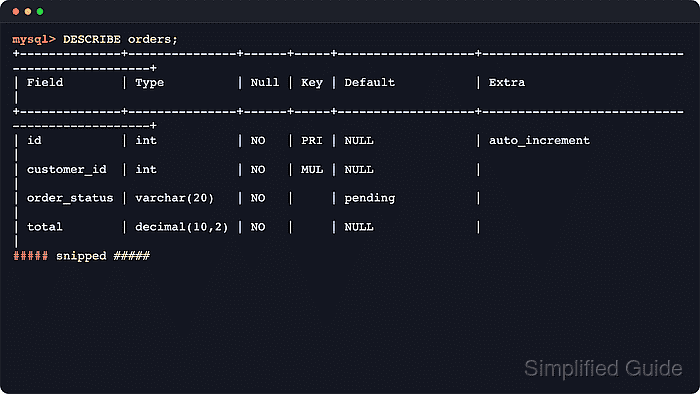
MySQL and MariaDB expose table structure through several overlapping metadata commands. DESCRIBE provides a fast column summary, SHOW FULL COLUMNS adds collation, comments, and privileges, SHOW CREATE TABLE returns the declared DDL, SHOW INDEX lists key definitions, and SHOW TABLE STATUS reports storage details such as engine, row format, and table collation.
Metadata visibility still depends on the current account's privileges, and some fields differ between current MySQL and MariaDB releases. Triggers are stored separately from the table definition, and SHOW CREATE TABLE reflects the declared statement rather than every runtime detail, so a complete schema check should include column, index, foreign-key, and trigger metadata when table behavior is unclear.
Steps to view a table schema in MySQL or MariaDB:
- Connect to the server, switch to the database that owns the table, and confirm the active schema.
$ mysql -u dbuser -p
Enter password:
mysql> USE appdb;
Database changed
mysql> SELECT DATABASE();
+------------+
| DATABASE() |
+------------+
| appdb      |
+------------+
1 row in set (0.00 sec)
- Confirm that the target table exists in the selected database.
mysql> SHOW TABLES LIKE 'orders';
+--------------------------+
| Tables_in_appdb (orders) |
+--------------------------+
| orders                   |
+--------------------------+
1 row in set (0.00 sec)
Use backticks for identifiers that collide with reserved words or include special characters, such as `order` or `user-profile`.
- Run DESCRIBE for a quick column layout that shows names, types, nullability, keys, and default values.
mysql> DESCRIBE orders;
+--------------+---------------+------+-----+-------------------+-----------------------------------------------+
| Field        | Type          | Null | Key | Default           | Extra                                         |
+--------------+---------------+------+-----+-------------------+-----------------------------------------------+
| id           | int           | NO   | PRI | NULL              | auto_increment                                |
| customer_id  | int           | NO   | MUL | NULL              |                                               |
| order_status | varchar(20)   | NO   |     | pending           |                                               |
| total        | decimal(10,2) | NO   |     | NULL              |                                               |
| created_at   | timestamp     | YES  |     | CURRENT_TIMESTAMP | DEFAULT_GENERATED                             |
| updated_at   | timestamp     | YES  |     | CURRENT_TIMESTAMP | DEFAULT_GENERATED on update CURRENT_TIMESTAMP |
+--------------+---------------+------+-----+-------------------+-----------------------------------------------+
6 rows in set (0.00 sec)
DESCRIBE is a shortcut for SHOW COLUMNS FROM in both MySQL and MariaDB. Current MariaDB may display integer widths such as int(11) and timestamp defaults as current_timestamp(), but the column meanings stay the same.
- Run SHOW FULL COLUMNS when collation, comments, or column-level privileges matter.
mysql> SHOW FULL COLUMNS FROM orders;
+--------------+---------------+--------------------+------+-----+-------------------+-----------------------------------------------+---------------------------------+----------------+
| Field        | Type          | Collation          | Null | Key | Default           | Extra                                         | Privileges                      | Comment        |
+--------------+---------------+--------------------+------+-----+-------------------+-----------------------------------------------+---------------------------------+----------------+
| id           | int           | NULL               | NO   | PRI | NULL              | auto_increment                                | select,insert,update,references |                |
| customer_id  | int           | NULL               | NO   | MUL | NULL              |                                               | select,insert,update,references |                |
| order_status | varchar(20)   | utf8mb4_unicode_ci | NO   |     | pending           |                                               | select,insert,update,references | workflow state |
| total        | decimal(10,2) | NULL               | NO   |     | NULL              |                                               | select,insert,update,references |                |
| created_at   | timestamp     | NULL               | YES  |     | CURRENT_TIMESTAMP | DEFAULT_GENERATED                             | select,insert,update,references |                |
| updated_at   | timestamp     | NULL               | YES  |     | CURRENT_TIMESTAMP | DEFAULT_GENERATED on update CURRENT_TIMESTAMP | select,insert,update,references |                |
+--------------+---------------+--------------------+------+-----+-------------------+-----------------------------------------------+---------------------------------+----------------+
6 rows in set (0.00 sec)
- Show the declared DDL for the table, including keys, constraints, and table-level charset or collation settings.
mysql> SHOW CREATE TABLE orders\G
*************************** 1. row ***************************
       Table: orders
Create Table: CREATE TABLE `orders` (
  `id` int NOT NULL AUTO_INCREMENT,
  `customer_id` int NOT NULL,
  `order_status` varchar(20) CHARACTER SET utf8mb4 COLLATE utf8mb4_unicode_ci NOT NULL DEFAULT 'pending' COMMENT 'workflow state',
  `total` decimal(10,2) NOT NULL,
  `created_at` timestamp NULL DEFAULT CURRENT_TIMESTAMP,
  `updated_at` timestamp NULL DEFAULT CURRENT_TIMESTAMP ON UPDATE CURRENT_TIMESTAMP,
  PRIMARY KEY (`id`),
  KEY `idx_orders_customer_id` (`customer_id`),
  CONSTRAINT `fk_orders_customer` FOREIGN KEY (`customer_id`) REFERENCES `customers` (`id`)
) ENGINE=InnoDB AUTO_INCREMENT=2 DEFAULT CHARSET=utf8mb4 COLLATE=utf8mb4_unicode_ci
1 row in set (0.00 sec)
SHOW CREATE TABLE is the fastest way to inspect the table's declared DDL, but triggers are separate objects and some engine-level runtime details still need SHOW TABLE STATUS or information_schema.
- Inspect index names, uniqueness, column order, and index method.
mysql> SHOW INDEX FROM orders;
+--------+------------+------------------------+--------------+-------------+-----------+-------------+----------+--------+------+------------+---------+---------------+---------+------------+
| Table  | Non_unique | Key_name               | Seq_in_index | Column_name | Collation | Cardinality | Sub_part | Packed | Null | Index_type | Comment | Index_comment | Visible | Expression |
+--------+------------+------------------------+--------------+-------------+-----------+-------------+----------+--------+------+------------+---------+---------------+---------+------------+
| orders |          0 | PRIMARY                |            1 | id          | A         |           1 |     NULL |   NULL |      | BTREE      |         |               | YES     | NULL       |
| orders |          1 | idx_orders_customer_id |            1 | customer_id | A         |           1 |     NULL |   NULL |      | BTREE      |         |               | YES     | NULL       |
+--------+------------+------------------------+--------------+-------------+-----------+-------------+----------+--------+------+------------+---------+---------------+---------+------------+
2 rows in set (0.00 sec)
Current MySQL adds Visible and Expression columns here, while current MariaDB returns Ignored instead. Cardinality is an optimizer estimate, not an exact row count.
- Check storage-engine details such as engine, row format, table collation, and the next AUTO_INCREMENT value.
mysql> SHOW TABLE STATUS LIKE 'orders'\G
*************************** 1. row ***************************
           Name: orders
         Engine: InnoDB
        Version: 10
     Row_format: Dynamic
           Rows: 1
 Avg_row_length: 16384
    Data_length: 16384
Max_data_length: 0
   Index_length: 16384
      Data_free: 0
 Auto_increment: 2
    Create_time: 2026-06-07 05:18:28
    Update_time: 2026-06-07 05:18:28
     Check_time: NULL
      Collation: utf8mb4_unicode_ci
       Checksum: NULL
 Create_options:
        Comment:
1 row in set (0.00 sec)
For InnoDB tables, Update_time can be NULL or lag behind recent writes, so treat Engine, Row_format, Collation, and Auto_increment as the higher-signal fields.
- Query information_schema when the exact foreign-key names and update or delete rules are needed.
mysql> SELECT
    ->   kcu.CONSTRAINT_NAME,
    ->   kcu.COLUMN_NAME,
    ->   kcu.REFERENCED_TABLE_NAME,
    ->   kcu.REFERENCED_COLUMN_NAME,
    ->   rc.UPDATE_RULE,
    ->   rc.DELETE_RULE
    -> FROM information_schema.KEY_COLUMN_USAGE AS kcu
    -> JOIN information_schema.REFERENTIAL_CONSTRAINTS AS rc
    ->   ON rc.CONSTRAINT_SCHEMA = kcu.CONSTRAINT_SCHEMA
    ->  AND rc.CONSTRAINT_NAME = kcu.CONSTRAINT_NAME
    -> WHERE kcu.TABLE_SCHEMA = DATABASE()
    ->   AND kcu.TABLE_NAME = 'orders'
    ->   AND kcu.REFERENCED_TABLE_NAME IS NOT NULL
    -> ORDER BY kcu.CONSTRAINT_NAME, kcu.ORDINAL_POSITION;
+--------------------+-------------+-----------------------+------------------------+-------------+-------------+
| CONSTRAINT_NAME    | COLUMN_NAME | REFERENCED_TABLE_NAME | REFERENCED_COLUMN_NAME | UPDATE_RULE | DELETE_RULE |
+--------------------+-------------+-----------------------+------------------------+-------------+-------------+
| fk_orders_customer | customer_id | customers             | id                     | NO ACTION   | NO ACTION   |
+--------------------+-------------+-----------------------+------------------------+-------------+-------------+
1 row in set (0.00 sec)
For the same default foreign-key action, current MySQL commonly reports NO ACTION while current MariaDB reports RESTRICT.
- Inspect triggers separately when inserts, updates, or deletes seem to change data automatically.
mysql> SHOW TRIGGERS WHERE `Table` = 'orders'\G
*************************** 1. row ***************************
             Trigger: orders_before_insert
               Event: INSERT
               Table: orders
           Statement: BEGIN
  IF NEW.order_status = '' THEN
    SET NEW.order_status = 'pending';
  END IF;
END
              Timing: BEFORE
             Created: 2026-06-07 05:18:28.69
##### snipped #####
Use SHOW CREATE TRIGGER orders_before_insert\G when the full trigger body, definer, or SQL mode needs inspection.