How to create a table in MySQL or MariaDB
Creating a table in MySQL or MariaDB turns an idea for stored data into a named schema object that queries, inserts, foreign keys, and application code can rely on. A deliberate table definition keeps data types, required fields, and key columns explicit before rows begin accumulating.
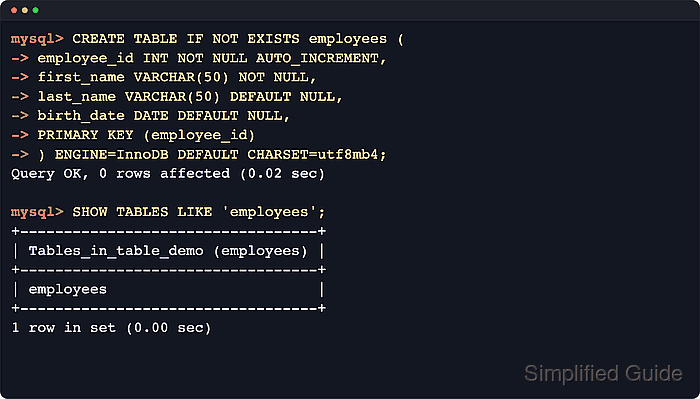
The CREATE TABLE statement writes the column list, indexes, constraints, storage engine, and character-set options into the server's metadata. After the statement succeeds, SHOW CREATE TABLE and DESCRIBE expose the stored definition, while a simple INSERT plus SELECT confirms that the new table accepts data as intended.
Table options still matter even when current defaults look acceptable. Using ENGINE=InnoDB and DEFAULT CHARSET=utf8mb4 keeps the definition portable across current MySQL and MariaDB releases, and IF NOT EXISTS only suppresses the duplicate-name error because it does not compare the existing table structure with the requested definition.
Steps to create a table in MySQL or MariaDB:
- Start the current MySQL or MariaDB command-line client.
$ mysql --user=root --password
Enter password:
mysql>
Current MariaDB documentation names the client mariadb and also ships mysql as a Unix symlink. MySQL uses the mysql client name.
- Select the target database with the USE statement.
mysql> USE table_demo;
DATABASE changed
The target database must already exist. Related: How to create a database in MySQL or MariaDB
- Create the table with an explicit definition.
mysql> CREATE TABLE IF NOT EXISTS employees (
    -> employee_id INT NOT NULL AUTO_INCREMENT,
    -> first_name VARCHAR(50) NOT NULL,
    -> last_name VARCHAR(50) DEFAULT NULL,
    -> birth_date DATE DEFAULT NULL,
    -> PRIMARY KEY (employee_id)
    -> ) ENGINE=InnoDB DEFAULT CHARSET=utf8mb4;
Query OK, 0 ROWS affected (0.02 sec)
The plain CREATE TABLE IF NOT EXISTS … ENGINE=InnoDB DEFAULT CHARSET=utf8mb4 form works on current MySQL and MariaDB releases without relying on server-specific extensions. Format or review longer table definitions before running them when the column list grows.
Tool: SQL Formatter - Confirm the new table appears in the database with SHOW TABLES.
mysql> SHOW TABLES LIKE 'employees';
+----------------------------------+
| Tables_in_table_demo (employees) |
+----------------------------------+
| employees                        |
+----------------------------------+
1 ROW IN SET (0.00 sec)
- Inspect the exact DDL stored by the server with SHOW CREATE TABLE.
mysql> SHOW CREATE TABLE employees\G
*************************** 1. ROW ***************************
       TABLE: employees
CREATE TABLE: CREATE TABLE `employees` (
  `employee_id` INT NOT NULL AUTO_INCREMENT,
  `first_name` VARCHAR(50) NOT NULL,
  `last_name` VARCHAR(50) DEFAULT NULL,
  `birth_date` DATE DEFAULT NULL,
  PRIMARY KEY (`employee_id`)
) ENGINE=InnoDB DEFAULT CHARSET=utf8mb4 COLLATE=utf8mb4_0900_ai_ci
1 ROW IN SET (0.00 sec)
SHOW CREATE TABLE is the quickest way to verify engine, charset, indexes, and constraint names exactly as stored.
Current MySQL 9.7 shows utf8mb4_0900_ai_ci for this example, while current MariaDB 12.3 shows utf8mb4_uca1400_ai_ci for the same table definition.
- Review column-level metadata with DESCRIBE.
mysql> DESCRIBE employees;
+-------------+-------------+------+-----+---------+----------------+
| FIELD       | TYPE        | NULL | KEY | DEFAULT | Extra          |
+-------------+-------------+------+-----+---------+----------------+
| employee_id | INT         | NO   | PRI | NULL    | AUTO_INCREMENT |
| first_name  | VARCHAR(50) | NO   |     | NULL    |                |
| last_name   | VARCHAR(50) | YES  |     | NULL    |                |
| birth_date  | DATE        | YES  |     | NULL    |                |
+-------------+-------------+------+-----+---------+----------------+
4 ROWS IN SET (0.01 sec)
This output summarizes data types, nullability, key participation, defaults, and auto-increment behavior. Current MySQL 9.7 shows int here, while current MariaDB 12.3 still reports int(11) for the same integer column.
- Insert a test row to confirm the table accepts data.
mysql> INSERT INTO employees (first_name, last_name, birth_date)
    -> VALUES ('Ada', 'Lovelace', '1815-12-10');
Query OK, 1 ROW affected (0.01 sec)
- Query the table to confirm the inserted row returns as expected.
mysql> SELECT employee_id, first_name, last_name, birth_date FROM employees;
+-------------+------------+-----------+------------+
| employee_id | first_name | last_name | birth_date |
+-------------+------------+-----------+------------+
|           1 | Ada        | Lovelace  | 1815-12-10 |
+-------------+------------+-----------+------------+
1 ROW IN SET (0.00 sec)
- Re-run the same statement with IF NOT EXISTS only when the goal is to avoid a duplicate-name error.
mysql> CREATE TABLE IF NOT EXISTS employees (
    -> employee_id INT NOT NULL AUTO_INCREMENT,
    -> first_name VARCHAR(50) NOT NULL,
    -> last_name VARCHAR(50) DEFAULT NULL,
    -> birth_date DATE DEFAULT NULL,
    -> PRIMARY KEY (employee_id)
    -> ) ENGINE=InnoDB DEFAULT CHARSET=utf8mb4;
Query OK, 0 ROWS affected, 1 warning (0.00 sec)

mysql> SHOW WARNINGS;
+-------+------+----------------------------------+
| Level | Code | Message                          |
+-------+------+----------------------------------+
| Note  | 1050 | TABLE 'employees' already EXISTS |
+-------+------+----------------------------------+
1 ROW IN SET (0.00 sec)
Current MySQL documentation notes that IF NOT EXISTS prevents the duplicate-name error but does not verify that the existing table matches the requested definition. Current MariaDB likewise returns a warning when the table already exists.