How to change MySQL or MariaDB port
Changing the TCP port for MySQL or MariaDB helps separate multiple database instances on one host, moves the listener off the default scan target at 3306, and aligns the service with network policies or load balancer expectations that reserve a different port number.
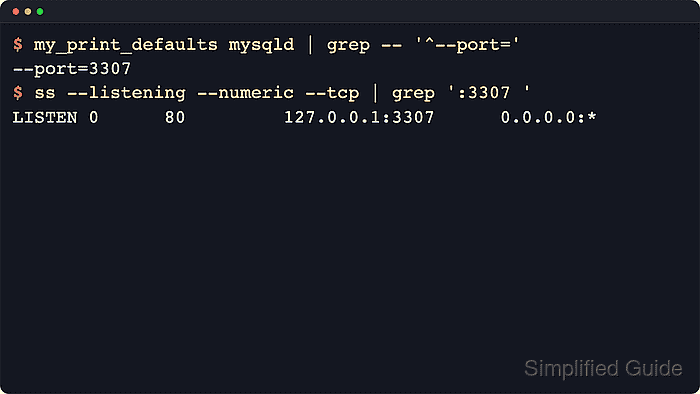
The server opens its classic SQL listener from the startup-only port setting under [mysqld], so the safest workflow is to confirm the active option-file chain first, place the override in a loaded server include directory, and then restart the service. Current package installs often split server defaults across several files under /etc/mysql/ or /etc/my.cnf.d/, which is why my_print_defaults mysqld is useful before the restart.
Every TCP client, firewall rule, health check, and connection string that still assumes 3306 must be updated after the change. Local Unix-socket administration can still work even when the TCP port moves, and remote clients can still fail if bind-address, account host matching, or SELinux policy does not allow the new listener. Avoid privileged ports below 1024 unless the service is deliberately configured with the extra capability that bind requires.
Steps to change MySQL or MariaDB port:
- Print the option-file search order used by the installed server binary.
$ mariadbd --verbose --help
##### snipped #####
Default options are read from the following files in the given order:
/etc/my.cnf /etc/mysql/my.cnf ~/.my.cnf
The following groups are read: mysqld server mysqld-11.8 mariadb mariadb-11.8 mariadbd mariadbd-11.8 client-server galera
##### snipped #####
On MySQL-only hosts, run mysqld --verbose --help instead. The local host is authoritative here. Current MariaDB reports the option groups it reads in the same output, while current MySQL package installs can also report extra distro-specific paths such as /usr/etc/my.cnf/.
- Inspect the base configuration file for included server directories before choosing where to place the override.
$ sudo cat /etc/mysql/my.cnf
# The MariaDB configuration file
##### snipped #####
!includedir /etc/mysql/conf.d/
!includedir /etc/mysql/mariadb.conf.d/
On MariaDB packages for Debian and Ubuntu, the last loaded server directory is commonly /etc/mysql/mariadb.conf.d/. On MySQL packages, use the last server include directory actually referenced by the base file, commonly /etc/mysql/conf.d/ or /etc/mysql/mysql.conf.d/.
- Choose an unused TCP port for the SQL listener, such as 3307.
The classic SQL listener defaults to 3306. On MySQL with X Plugin enabled, mysqlx_port remains separate and normally stays on 33060 unless it is changed explicitly.
- Create a dedicated override file in the last loaded server include directory instead of editing a vendor-managed file in place.
$ sudoedit /etc/mysql/mariadb.conf.d/z-custom-port.cnf
[mysqld] is the safest cross-compatible option group for this change. MariaDB also reads [server], [mariadb], and [mariadbd], but [mysqld] keeps one file working across both server families.
- Set the new SQL listener port under [mysqld].
[mysqld]
port = 3307
Any TCP client, application pool, replication channel, proxy, or health check that still targets 3306 will fail until its connection settings are updated.
- Confirm that the edited file is being read before restarting the service.
$ my_print_defaults mysqld
--socket=/run/mysqld/mysqld.sock
--pid-file=/run/mysqld/mysqld.pid
--basedir=/usr
--bind-address=127.0.0.1
--expire_logs_days=10
--character-set-server=utf8mb4
--collation-server=utf8mb4_general_ci
--port=3307
If the expected line does not appear, the file is in the wrong path, under the wrong option group, or overridden later in the include chain.
- Identify the actual database service unit name before restarting it.
$ systemctl list-unit-files mysql.service mariadb.service mysqld.service
UNIT FILE       STATE   PRESET
mariadb.service enabled enabled

1 unit files listed.
Depending on packaging, the service may be called mysql, mariadb, or mysqld.
- Restart the database service so it can bind the new port.
$ sudo systemctl restart mariadb
Restarting drops active connections, so schedule the change when applications can tolerate a short interruption.
Replace mariadb with the discovered unit name on the host.
- Confirm that the service came back cleanly after the restart.
$ systemctl is-active mariadb
active
If the service does not return active, inspect the recent journal before editing again.
$ sudo journalctl --unit=mariadb.service --no-pager
##### snipped #####
- Verify the live server variable after the restart.
$ sudo mariadb --table --execute "SHOW VARIABLES LIKE 'port';"
+---------------+-------+
| Variable_name | Value |
+---------------+-------+
| port          | 3307  |
+---------------+-------+
Socket-auth installs often allow sudo mariadb or sudo mysql without a password prompt. On MySQL-only hosts, use sudo mysql instead. If the local admin account uses password authentication, drop sudo and add --user plus --password.
- Check that the SQL listener moved to the new TCP port.
$ sudo ss --listening --numeric --tcp 'sport = :3307'
State  Recv-Q Send-Q Local Address:Port Peer Address:Port
LISTEN 0      80         127.0.0.1:3307      0.0.0.0:*
If no :3307 listener appears and a broader ss check still shows :3306, another later option file is overriding port or the service did not restart with the edited file.
- Open the new port in the host firewall only when remote clients must connect.
$ sudo ufw allow 3307/tcp
Rule added
Rule added (v6)
On RHEL-family systems, use firewall-cmd –permanent –add-port=3307/tcp followed by firewall-cmd –reload instead.
On SELinux systems, label the new port for mysqld before expecting remote TCP connections to work, for example with semanage port -a -t mysqld_port_t -p tcp 3307 when the port is not already assigned.
- Remove any no-longer-needed firewall rule for the old port after every client and check has been moved.
$ sudo ufw delete allow 3306/tcp
Rule deleted
Rule deleted (v6)
Keep the old rule until application pools, replica configs, backup jobs, and monitoring checks have all been updated to the new port.
- Test a real TCP login against the new listener from an allowed client.
$ mariadb --protocol=TCP --host=192.0.2.40 --port=3307 --user=appuser --password --table --execute "SELECT @@port AS port, CURRENT_USER() AS current_login;"
Enter password:
+------+-------------------+
| port | current_login     |
+------+-------------------+
| 3307 | appuser@192.0.2.% |
+------+-------------------+
On MySQL-only hosts, use mysql for the client command instead. If the local socket login works but the TCP test fails, recheck bind-address, host firewall rules, account host matching such as 'appuser'@'192.0.2.%', and any upstream security group or ACL still tied to 3306.