How to rename a database in MySQL or MariaDB
Renaming a database becomes necessary when a schema name no longer matches an application, environment, or ownership boundary. A clean rename keeps connection strings, grants, backups, and monitoring aligned with the right data, which matters most during cutovers and long-lived production maintenance.
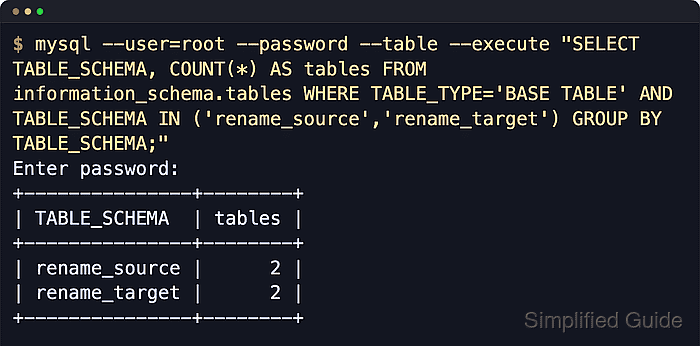
In MySQL and MariaDB, a database is a schema namespace for tables, views, routines, triggers, and events. Neither product exposes a general-purpose atomic RENAME DATABASE statement, so the safest cross-version workflow is to create the new schema, dump the old one, import it into the new name, then cut applications over after validation.
The operation is not instantaneous. Logical dumps need enough free disk space, –single-transaction only gives a consistent snapshot for transactional tables, and imported objects can still contain fully qualified references such as rename_source.table_name. Database-scoped grants are not copied automatically, and dropping the old schema does not remove its old grants, so plan a maintenance window and finish the rename with grant cleanup plus object-level validation.
Steps to rename a MySQL or MariaDB database:
- Quiesce application writes to the source schema and confirm the source and target names before starting.
Logical dumps do not provide an atomic rename. Pause writes, background jobs, and migrations that can change the source schema during the export and cutover window.
- Read the source schema character set and collation.
$ mysql --user=root --password --execute "SELECT DEFAULT_CHARACTER_SET_NAME, DEFAULT_COLLATION_NAME FROM information_schema.SCHEMATA WHERE SCHEMA_NAME='rename_source';"
Enter password:
+----------------------------+------------------------+
| DEFAULT_CHARACTER_SET_NAME | DEFAULT_COLLATION_NAME |
+----------------------------+------------------------+
| utf8mb4                    | utf8mb4_0900_ai_ci     |
+----------------------------+------------------------+
Add --host and --port when connecting to a remote server. On MariaDB, the returned collation name can differ from MySQL; use whatever the source schema reports.
- Create the target schema with the recorded character set and collation.
$ mysql --user=root --password --execute "CREATE DATABASE rename_target CHARACTER SET utf8mb4 COLLATE utf8mb4_0900_ai_ci;"
Enter password:
No output indicates the schema was created.
- Create a protected backup directory for the logical dump.
$ sudo install -d -m 700 /srv/mysql-backups
- Dump the source schema to a SQL file, including routines, triggers, and events.
$ mysqldump --user=root --password --single-transaction --quick --routines --triggers --events rename_source > /srv/mysql-backups/rename-source.sql
Enter password:
Do not use --databases for a rename dump. That option adds CREATE DATABASE and USE statements that can restore into the original schema name instead of the target.
On MariaDB systems, use mariadb-dump when that is the installed dump client. Recent MariaDB releases may not ship a mysqldump compatibility binary.
- Confirm the dump file exists and is non-empty before importing it.
$ ls -lh /srv/mysql-backups/rename-source.sql
-rw-r--r-- 1 root root 7.3K Jun  6 12:45 /srv/mysql-backups/rename-source.sql
- Inspect the dump for fully qualified references to the old schema name.
$ grep -n "rename_source\\." /srv/mysql-backups/rename-source.sql
No output means the dump does not contain direct rename_source. references in object definitions.
If this search prints lines from views, routines, triggers, or events, update or recreate those objects so they point at rename_target before dropping rename_source. Otherwise they can fail immediately after cutover.
- Import the dump into the target schema.
$ mysql --user=root --password rename_target < /srv/mysql-backups/rename-source.sql
Enter password:
Import into an empty target schema. If the import fails partway through, drop and recreate the target schema before retrying.
If the dump was created with mariadb-dump on MariaDB 11 or newer, import it with the matching mariadb client rather than the MySQL mysql client.
- Compare the source and target schema object counts.
$ mysql --user=root --password --execute "
SELECT
  s.schema_name,
  (SELECT COUNT(*) FROM information_schema.tables t WHERE t.table_schema=s.schema_name AND t.table_type='BASE TABLE') AS tables,
  (SELECT COUNT(*) FROM information_schema.tables v WHERE v.table_schema=s.schema_name AND v.table_type='VIEW') AS views,
  (SELECT COUNT(*) FROM information_schema.routines r WHERE r.routine_schema=s.schema_name) AS routines,
  (SELECT COUNT(*) FROM information_schema.triggers tr WHERE tr.trigger_schema=s.schema_name) AS triggers,
  (SELECT COUNT(*) FROM information_schema.events e WHERE e.event_schema=s.schema_name) AS events
FROM (
  SELECT 'rename_source' AS schema_name
  UNION ALL
  SELECT 'rename_target' AS schema_name
) s;
"
Enter password:
+---------------+--------+-------+----------+----------+--------+
| schema_name   | tables | views | routines | triggers | events |
+---------------+--------+-------+----------+----------+--------+
| rename_source |      2 |     1 |        1 |        1 |      1 |
| rename_target |      2 |     1 |        1 |        1 |      1 |
+---------------+--------+-------+----------+----------+--------+
Differences usually mean the dump missed object types, the import failed partway through, or an object was skipped because it referenced the old schema incorrectly.
- List the current grants for the application account that uses the source schema.
$ mysql --user=root --password --execute "SHOW GRANTS FOR 'app_user'@'localhost';"
Enter password:
+--------------------------------------------------------------------------------------------------------------+
| Grants for app_user@localhost                                                                                |
+--------------------------------------------------------------------------------------------------------------+
| GRANT USAGE ON *.* TO `app_user`@`localhost`                                                                 |
| GRANT SELECT, INSERT, UPDATE, DELETE, EXECUTE, EVENT, TRIGGER ON `rename_source`.* TO `app_user`@`localhost` |
+--------------------------------------------------------------------------------------------------------------+
- Grant the same schema-level privileges on the new schema.
$ mysql --user=root --password --execute "GRANT SELECT, INSERT, UPDATE, DELETE, EXECUTE, EVENT, TRIGGER ON rename_target.* TO 'app_user'@'localhost';"
Enter password:
Copy the privilege list from the real SHOW GRANTS output. If access is granted through roles or multiple account entries, update those grants instead of assuming one direct GRANT statement covers everything.
- Switch application configuration to the new schema and validate object behavior against the new name.
Update DSNs, ORM configuration, backup jobs, scheduled tasks, and any application-side SQL that still names rename_source. Re-test views, routines, triggers, and events if the dump inspection step found fully qualified schema references.
- Revoke the old schema grants after cutover succeeds.
$ mysql --user=root --password --execute "REVOKE SELECT, INSERT, UPDATE, DELETE, EXECUTE, EVENT, TRIGGER ON rename_source.* FROM 'app_user'@'localhost';"
Enter password:
MySQL and MariaDB do not automatically remove database-level grants when the old schema is dropped. Clean up those grants explicitly so stale permissions do not remain on the account.
- Drop the old schema after the application and database-object checks pass.
$ mysql --user=root --password --execute "DROP DATABASE rename_source;"
Enter password:
DROP DATABASE permanently deletes the old schema. Keep the SQL dump until the new schema has been backed up and the cutover is fully accepted.
- Confirm the target schema is still listed after cleanup.
$ mysql --user=root --password --execute "SHOW DATABASES LIKE 'rename_target'"
Enter password:
+--------------------------+
| Database (rename_target) |
+--------------------------+
| rename_target            |
+--------------------------+