How to create a MySQL or MariaDB database backup
A logical database backup should leave one private archive that can be tested, moved, and restored before a risky change. Use it before schema edits, application upgrades, or maintenance windows where a recent SQL recovery point is safer than relying on the running server alone.
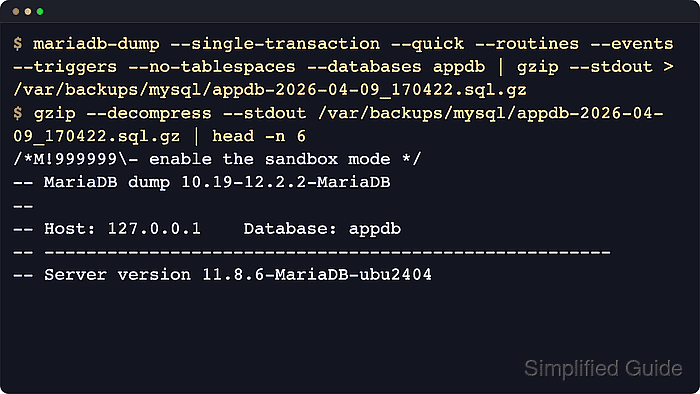
The examples use mariadb-dump because current MariaDB packages and official containers prefer that client name; use mysqldump on MySQL hosts. The dump client connects to the server, writes SQL for the selected database, and streams that output through gzip so the backup is smaller while still being readable with normal command-line tools.
A complete logical dump needs both the right options and a database account that can read the objects being exported. --single-transaction gives InnoDB tables a consistent snapshot while writes continue, but MyISAM or MEMORY tables can still change during the dump. --no-tablespaces avoids tablespace metadata and the extra MySQL PROCESS privilege it can require; MySQL servers with certain GTID settings may still require RELOAD or FLUSH_TABLES for --single-transaction.
Steps to create a MySQL or MariaDB database backup:
- Confirm the dump client available on the host.
$ mariadb-dump --version
mariadb-dump from 12.3.2-MariaDB, client 10.19 for debian-linux-gnu (aarch64)
Run mysqldump --version on a MySQL host and use mysqldump in the dump command below. Recent MariaDB images no longer rely on a mysqldump symlink, so use mariadb-dump when the server is MariaDB.
- Create a private backup directory that the shell user can write to.
$ sudo install --directory --owner=dbops --group=dbops --mode=0700 /var/backups/mysql
Replace dbops with the operating-system user that runs the dump command, because the shell creates the redirected .sql.gz file.
- Confirm that the backup account can read the database objects that belong in the dump.
$ mariadb --user=root --execute "SHOW GRANTS FOR 'dbbackup'@'localhost';"
Grants for dbbackup@localhost
GRANT SELECT, SHOW VIEW, EVENT, TRIGGER ON `appdb`.* TO `dbbackup`@`localhost`
GRANT SHOW CREATE ROUTINE ON *.* TO `dbbackup`@`localhost`
For MySQL 8.0.20 and newer, SHOW_ROUTINE gives a backup account access to stored routine definitions without granting broad global SELECT. For MariaDB, routine-definition access can appear as SHOW CREATE ROUTINE. Without routine-definition access, --routines may miss stored procedures or functions even when tables, triggers, and events are dumped.
- Set a restrictive file-creation mask for the current shell.
$ umask 077
Files created after this command default to mode 600 in the current shell session unless a command sets a different mode.
- Generate a timestamp for the backup filename.
$ date +%F_%H%M%S
2026-06-06_201845
Reuse the timestamp output in the filename below so backup archives sort by creation time.
- Create a compressed dump of the database.
$ mariadb-dump \
    --user=dbbackup \
    --password \
    --single-transaction \
    --quick \
    --routines \
    --events \
    --triggers \
    --hex-blob \
    --no-tablespaces \
    --databases appdb \
  | gzip --stdout > /var/backups/mysql/appdb-2026-06-06_201845.sql.gz
Enter password:
Avoid putting the password on the command line with --password=secret or -psecret because process listings and shell history can expose it.
--databases adds CREATE DATABASE and USE statements so the dump can recreate the named schema during restore. --hex-blob writes binary columns in hexadecimal form so BINARY, VARBINARY, BLOB, BIT, and spatial data survive the logical dump more predictably.
- Confirm that the archive exists and inherited the restrictive file mode.
$ ls -lh /var/backups/mysql/appdb-2026-06-06_201845.sql.gz
-rw------- 1 dbops dbops 1.7K Jun  6 20:18 /var/backups/mysql/appdb-2026-06-06_201845.sql.gz
- Test the compressed archive for gzip corruption.
$ gzip --test /var/backups/mysql/appdb-2026-06-06_201845.sql.gz
No output means the gzip stream is readable. A nonzero exit status means the archive is truncated or corrupt and should not be rotated into the trusted backup set.
- List the compressed and uncompressed sizes recorded in the archive.
$ gzip --list /var/backups/mysql/appdb-2026-06-06_201845.sql.gz
         compressed        uncompressed  ratio uncompressed_name
               1733                7173  76.1% /var/backups/mysql/appdb-2026-06-06_201845.sql
Use How to restore MySQL or MariaDB database from backup to import the archive into an isolated database before depending on it for a change window or incident recovery.