How to automate MySQL or MariaDB database backups with cron
Automatic database backups turn a failed upgrade, a bad deployment, or an accidental DELETE into a restore job with a recent recovery point. A scheduled logical dump is often the simplest way to keep a current copy of schemas and data outside the running database server.
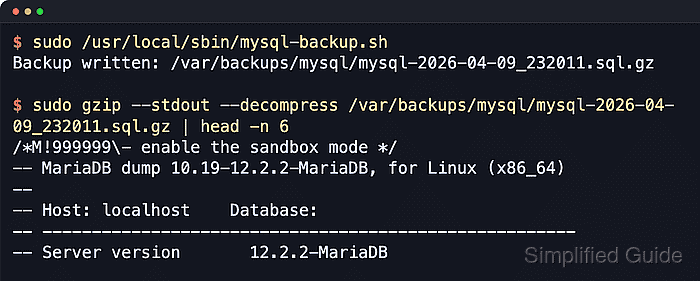
Current MySQL systems use mysqldump, while current MariaDB packages prefer mariadb-dump. Both clients can export schemas, routines, events, triggers, and table data as SQL that can be replayed later. A wrapper script keeps the dump options, compression, filenames, and retention policy consistent, while cron runs that script on a fixed schedule without exposing the password in shell history.
These steps assume a Linux host with cron, gzip, and flock available, and they use --single-transaction for an online logical backup of mostly InnoDB workloads. Nontransactional tables such as MyISAM can still change during the dump. Some MySQL GTID configurations need an extra flush privilege, and recent MariaDB dumps should be restored with a compatible mariadb client because their output can begin with a sandbox-mode statement.
Steps to automate MySQL or MariaDB database backups with cron:
- Create the backup directory at /var/backups/mysql.
$ sudo install --directory --owner=root --group=root --mode=0700 /var/backups/mysql
Mode 0700 keeps the backup archives readable only by root.
- Create a dedicated backup account with the privileges required by this dump pattern.
$ sudo mysql --execute "CREATE USER 'backup'@'localhost' IDENTIFIED BY 'StrongBackupPasswordHere'; GRANT SELECT, SHOW VIEW, EVENT, TRIGGER ON *.* TO 'backup'@'localhost'; FLUSH PRIVILEGES;"
Use mariadb instead of mysql when that is the local SQL client command. The script adds --no-tablespaces when the dump client supports it, so MySQL does not need the broader PROCESS privilege for this pattern.
If the account already exists, use ALTER USER 'backup'@'localhost' IDENTIFIED BY 'StrongBackupPasswordHere'; instead of rerunning CREATE USER. On MySQL servers with gtid_mode=ON and gtid_purged=ON or AUTO, also grant RELOAD or FLUSH_TABLES.
- Verify the grants for the new backup account.
$ sudo mysql --execute "SHOW GRANTS FOR 'backup'@'localhost';"
Grants for backup@localhost
GRANT SELECT, SHOW VIEW, EVENT, TRIGGER ON *.* TO `backup`@`localhost`
- Create the client option file at /root/.my.cnf so the cron job can authenticate non-interactively.
$ sudo install --mode=0600 /dev/null /root/.my.cnf
$ sudo tee /root/.my.cnf >/dev/null <<'EOF'
[client]
user=backup
password=StrongBackupPasswordHere
host=localhost
EOF
Keep /root/.my.cnf at mode 0600 because it stores the backup password in plaintext.
- Test the option file with a non-interactive query.
$ sudo mysql --defaults-extra-file=/root/.my.cnf --execute "SELECT NOW() AS backup_test;"
backup_test
2026-06-06 13:14:20
--defaults-extra-file is an option-file control flag, so keep it before other client options.
- Create the backup script at /usr/local/sbin/mysql-backup.sh.
$ sudo tee /usr/local/sbin/mysql-backup.sh >/dev/null <<'EOF'
#!/usr/bin/env bash
set -euo pipefail

BACKUP_DIR="/var/backups/mysql"
DEFAULTS_FILE="/root/.my.cnf"
RETENTION_DAYS=14
LOCKFILE="/var/lock/mysql-backup.lock"

umask 077

if [ ! -f "$DEFAULTS_FILE" ]; then
  echo "Missing defaults file: $DEFAULTS_FILE" >&2
  exit 1
fi

if command -v mariadb-dump >/dev/null 2>&1; then
  DUMP_CMD="$(command -v mariadb-dump)"
elif command -v mysqldump >/dev/null 2>&1; then
  DUMP_CMD="$(command -v mysqldump)"
else
  echo "No MariaDB or MySQL dump client found" >&2
  exit 1
fi

mkdir -p "$BACKUP_DIR"

timestamp="$(date +%F_%H%M%S)"
outfile="$BACKUP_DIR/mysql-$timestamp.sql.gz"
tmpfile="$outfile.tmp"

cleanup() {
  rm -f "$tmpfile"
}
trap cleanup EXIT

exec 9>"$LOCKFILE"
if ! flock -n 9; then
  echo "Backup already running: $LOCKFILE" >&2
  exit 1
fi

extra_opts=()
if "$DUMP_CMD" --help 2>/dev/null | grep -q -- '--no-tablespaces'; then
  extra_opts+=(--no-tablespaces)
fi

"$DUMP_CMD" \
  --defaults-extra-file="$DEFAULTS_FILE" \
  --all-databases \
  --single-transaction \
  --routines \
  --events \
  --triggers \
  --hex-blob \
  --quick \
  "${extra_opts[@]}" \
  | gzip --stdout --best > "$tmpfile"

mv -f "$tmpfile" "$outfile"

find "$BACKUP_DIR" -maxdepth 1 -type f -name 'mysql-*.sql.gz' -mtime +"$RETENTION_DAYS" -delete

echo "Backup written: $outfile"
EOF
The script prefers mariadb-dump when it is installed and falls back to mysqldump for MySQL or older MariaDB environments.
These steps assume a Linux host where flock is available. If the host does not provide flock, replace the lock section with the local equivalent before scheduling the job.
- Make the backup script executable.
$ sudo chmod 0700 /usr/local/sbin/mysql-backup.sh
- Run the backup script once before scheduling it.
$ sudo /usr/local/sbin/mysql-backup.sh
Backup written: /var/backups/mysql/mysql-2026-06-06_131420.sql.gz
- Confirm that a new archive exists in /var/backups/mysql.
$ sudo ls -lh /var/backups/mysql
total 688K
-rw------- 1 root root 685K Jun  6 13:14 mysql-2026-06-06_131420.sql.gz
- Check the compressed archive record.
$ sudo gzip --list /var/backups/mysql/mysql-2026-06-06_131420.sql.gz
         compressed        uncompressed  ratio uncompressed_name
             700418             3498630  80.0% /var/backups/mysql/mysql-2026-06-06_131420.sql
Use How to restore MySQL or MariaDB database from backup for a separate restore drill before depending on the scheduled backup.
- Edit root's crontab.
$ sudo crontab -e
- Add a nightly cron entry for the backup script.
MAILTO=
SHELL=/bin/bash
PATH=/usr/local/sbin:/usr/local/bin:/usr/sbin:/usr/bin:/sbin:/bin

0 2 * * * /usr/local/sbin/mysql-backup.sh >>/var/log/mysql-backup.log 2>&1
Use a full path in the cron entry because cron starts with a minimal environment. Tool: Crontab Generator
- Confirm the cron entry is installed.
$ sudo crontab -l
MAILTO=
SHELL=/bin/bash
PATH=/usr/local/sbin:/usr/local/bin:/usr/sbin:/usr/bin:/sbin:/bin

0 2 * * * /usr/local/sbin/mysql-backup.sh >>/var/log/mysql-backup.log 2>&1
- Check the log after the first scheduled run.
$ sudo cat /var/log/mysql-backup.log
Backup written: /var/backups/mysql/mysql-2026-06-07_020000.sql.gz
If the log stays empty, confirm that the host cron service is enabled and that the dump client and script paths match the local installation.