How to monitor Mastodon Sidekiq queues
Mastodon sends federation delivery, incoming activity handling, email delivery, media work, search indexing, and scheduled maintenance through Sidekiq. Queue monitoring shows whether background jobs are waiting, failing, or being processed before timelines, uploads, notifications, or mail delivery look broken to users.
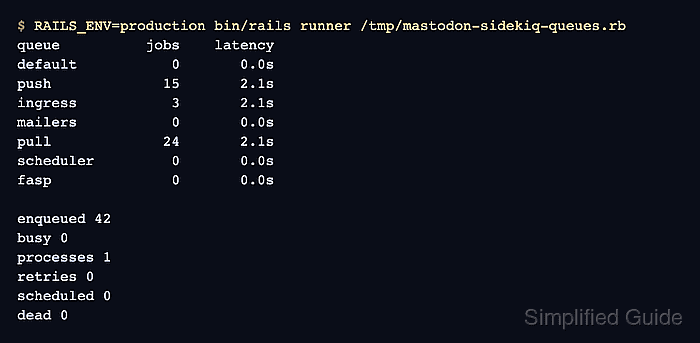
Sidekiq queue size shows how many jobs are waiting, while queue latency shows how long the oldest waiting job has been sitting in that queue. Current Mastodon queues include default, push, ingress, mailers, pull, scheduler, and fasp, and the default queue order prioritizes local-user work before lower-priority background tasks.
The source-install path uses a temporary Rails runner probe so Mastodon loads the same Redis and Sidekiq configuration used by production. The web dashboard at /sidekiq is also available to signed-in users with the DevOps permission, but the terminal check works over SSH and leaves no application change after the probe file is removed.
Related: How to configure Mastodon full-text search
Related: How to clear Mastodon media cache with tootctl
Related: How to upgrade Mastodon
Steps to monitor Mastodon Sidekiq queues:
- Switch to the Mastodon application account.
$ sudo -iu mastodon
- Change into the Mastodon application directory.
$ cd /home/mastodon/live
- Confirm that the main Sidekiq service is active.
$ systemctl is-active mastodon-sidekiq
active
Use the queue-specific service names when the server runs split Sidekiq units, such as mastodon-sidekiq-default or mastodon-sidekiq-pull.
- Create a temporary queue probe.
$ cat >/tmp/mastodon-sidekiq-queues.rb <<'RUBY'
require "sidekiq/api"
require "logger"

Sidekiq.logger.level = Logger::WARN

queues = %w[default push ingress mailers pull scheduler fasp]

puts format("%-10s %8s %10s", "queue", "jobs", "latency")
queues.each do |name|
  queue = Sidekiq::Queue.new(name)
  puts format("%-10s %8d %9.1fs", name, queue.size, queue.latency)
end

stats = Sidekiq::Stats.new

puts
puts "enqueued #{stats.enqueued}"
puts "busy #{stats.workers_size}"
puts "processes #{stats.processes_size}"
puts "retries #{stats.retry_size}"
puts "scheduled #{stats.scheduled_size}"
puts "dead #{stats.dead_size}"

processes = Sidekiq::ProcessSet.new
if processes.size.positive?
  puts
  puts "process queue coverage"
  processes.each do |process|
    puts "#{process["hostname"]} pid=#{process["pid"]} busy=#{process["busy"]}/#{process["concurrency"]} queues=#{process["queues"].join(",")}"
  end
end
RUBY
The probe reads Sidekiq state through the public API. It does not retry, delete, drain, or clear jobs.
- Run the queue probe through the production Rails environment.
$ RAILS_ENV=production bin/rails runner /tmp/mastodon-sidekiq-queues.rb
queue          jobs    latency
default           0       0.0s
push             15       2.1s
ingress           3       2.1s
mailers           0       0.0s
pull             24       2.1s
scheduler         0       0.0s
fasp              0       0.0s

enqueued 42
busy 0
processes 1
retries 0
scheduled 0
dead 0

process queue coverage
social-app-1 pid=3956 busy=0/5 queues=default,push,ingress,mailers,pull,scheduler,fasp
Queue counts that stay high across repeated checks mean workers are not catching up. Latency that keeps rising means at least one job is waiting longer on each check, even when the raw queue size changes slowly. Signed-in accounts with the DevOps permission can cross-check the same state at https://social.example.com/sidekiq/queues.
- Inspect the Sidekiq service command when the process coverage omits a queue.
$ systemctl cat mastodon-sidekiq
# /etc/systemd/system/mastodon-sidekiq.service
[Unit]
Description=mastodon-sidekiq
##### snipped #####
[Service]
WorkingDirectory=/home/mastodon/live
Environment="RAILS_ENV=production"
Environment="DB_POOL=25"
ExecStart=/home/mastodon/.rbenv/shims/bundle exec sidekiq -c 25
A plain sidekiq -c 25 uses the queue list in config/sidekiq.yml. Custom -q options restrict a process to the listed queues; keep scheduler on only one Sidekiq process at a time.
- Remove the temporary queue probe.
$ rm /tmp/mastodon-sidekiq-queues.rb