How to configure memory for a LlamaIndex agent
Conversation-aware agents need a place to keep earlier turns separate from the prompt that arrives on each call. In LlamaIndex, a Memory object gives the agent a session-scoped chat history so later prompts can use facts, preferences, or task state that were collected earlier in the conversation.
The current Memory class stores short-term chat history behind a session ID and token limit, and it can also support richer memory blocks. Passing that object into agent.run(…, memory=memory) lets the agent read prior messages before the model call and append the latest user and assistant messages after the run.
Current LlamaIndex documentation marks ChatMemoryBuffer as deprecated for new code, so new agent implementations should start with Memory.from_defaults(). A local smoke test can use MockFunctionCallingLLM to verify memory wiring without an API key, while production code should keep the same memory argument when the agent uses a real function-calling model.
Steps to configure LlamaIndex agent memory:
- Create a session-scoped Memory object for the conversation.
from llama_index.core.memory import Memory

memory = Memory.from_defaults(
    session_id=user_session_id,
    token_limit=40000,
)
Use a stable session ID from the application conversation or user session. A new random ID per request creates a separate memory stream.
- Restore existing turns before the next agent call when the application already has saved chat history.
from llama_index.core.llms import ChatMessage, MessageRole

await memory.aput_messages(
    [
        ChatMessage(role=MessageRole.USER, content="Remember that ticket 7421 belongs to Maya."),
        ChatMessage(role=MessageRole.ASSISTANT, content="Ticket 7421 belongs to Maya."),
    ]
)
Use memory.put_messages() instead of memory.aput_messages() in synchronous application code.
- Pass the Memory object into the agent run.
from llama_index.core.agent.workflow import FunctionAgent

agent = FunctionAgent(llm=llm, tools=tools)
response = await agent.run(user_message, memory=memory)
FunctionAgent expects a function-calling LLM. Keep the memory pattern the same when replacing llm and tools with the application's real model and tool list.
Related: How to add LlamaHub tools to a LlamaIndex agent - Create a local smoke-test script that uses the same memory path without an external model key.
- agent_memory.py
import asyncio

from llama_index.core.agent.workflow import FunctionAgent
from llama_index.core.llms import ChatMessage, MessageRole, MockFunctionCallingLLM
from llama_index.core.memory import Memory


def memory_reply(messages, **kwargs):
    memory_text = "\n".join(str(message.content or "") for message in messages)
    answer = "Ticket 7421 belongs to Maya." if "Maya" in memory_text else "No ticket owner found."
    return ChatMessage(role=MessageRole.ASSISTANT, content=answer)


async def main():
    memory = Memory.from_defaults(session_id="support-ticket-7421", token_limit=1000)
    await memory.aput_messages(
        [
            ChatMessage(role=MessageRole.USER, content="Remember that ticket 7421 belongs to Maya."),
            ChatMessage(role=MessageRole.ASSISTANT, content="Ticket 7421 belongs to Maya."),
        ]
    )

    llm = MockFunctionCallingLLM(response_generator=memory_reply, is_chat_model=True)
    agent = FunctionAgent(
        tools=[],
        llm=llm,
        system_prompt="Answer from chat history when possible.",
    )

    response = await agent.run("Who owns ticket 7421?", memory=memory)
    print(f"agent response: {response}")

    print("stored memory:")
    for message in await memory.aget_all():
        print(f"{message.role.value} | {message.content}")


asyncio.run(main())
The mock LLM reads the messages passed to the agent and returns a deterministic answer. A production model should answer from the same chat history without this test helper.
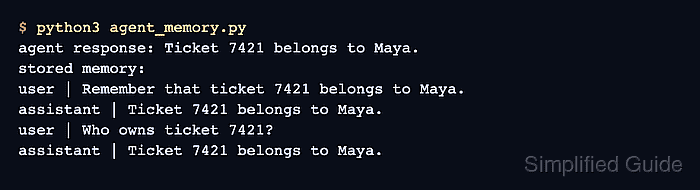
- Run the smoke test and confirm that the remembered owner appears in both the agent response and stored memory.
$ python3 agent_memory.py
agent response: Ticket 7421 belongs to Maya.
stored memory:
user | Remember that ticket 7421 belongs to Maya.
assistant | Ticket 7421 belongs to Maya.
user | Who owns ticket 7421?
assistant | Ticket 7421 belongs to Maya.
If the second turn loses the owner in an application test, confirm that each request reuses the same session ID and passes the same Memory stream into agent.run().