How to install llama.cpp with WinGet
On Windows workstations, WinGet keeps command-line tools in the same package-management flow as browsers, editors, and runtimes. The llama.cpp package gives local AI users prebuilt llama-cli.exe and llama-server.exe binaries without cloning the source tree or compiling CMake targets.
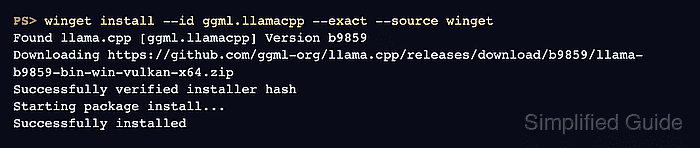
The upstream install page shows the short command winget install llama.cpp, while the exact package identifier in the Windows Package Manager repository is ggml.llamacpp. Installing by identifier avoids substring matches and keeps automation tied to the package that publishes the upstream llama.cpp release ZIP.
The current manifest installs the Windows x64 Vulkan archive and registers the packaged executables on PATH through WinGet's portable-app handling. Use a new terminal after installation before checking the binaries, and choose a source build or another upstream release asset when the workstation needs a different backend such as CUDA, CPU-only, or ARM64.
Related: Install llama.cpp with conda
Related: Install llama.cpp with Homebrew
Related: Build llama.cpp from source with CMake
Steps to install llama.cpp with WinGet:
- Open Windows Terminal or PowerShell where WinGet is available.
PS> winget --version
v1.11.430
WinGet is delivered through App Installer on supported Windows 10, Windows 11, and Windows Server 2025 systems. If this command is not recognized, install or repair App Installer first.
- Refresh the configured WinGet sources.
PS> winget source update
Updating all sources...
Updating source: msstore...
Done
Updating source: winget...
Done
- Confirm the exact llama.cpp package identifier.
PS> winget search --id ggml.llamacpp --exact --source winget
Name      Id            Version Source
--------------------------------------
llama.cpp ggml.llamacpp b9859   winget
The version changes as llama.cpp publishes new releases. Keep the package identifier as ggml.llamacpp.
- Install llama.cpp from the WinGet repository.
PS> winget install --id ggml.llamacpp --exact --source winget
Found llama.cpp [ggml.llamacpp] Version b9859
This application is licensed to you by its owner.
Downloading https://github.com/ggml-org/llama.cpp/releases/download/b9859/llama-b9859-bin-win-vulkan-x64.zip
Successfully verified installer hash
Starting package install...
Successfully installed
The current package depends on Microsoft Visual C++ Redistributable 2015+ x64 and installs the Windows x64 Vulkan release asset. For unattended installs, add --accept-package-agreements and --accept-source-agreements.
- Open a new Windows Terminal or PowerShell session.
A new session reloads PATH so llama-cli.exe and llama-server.exe can resolve from the WinGet portable command location.
- Confirm that WinGet records the installed package.
PS> winget list --id ggml.llamacpp --exact
Name      Id            Version Source
--------------------------------------
llama.cpp ggml.llamacpp b9859   winget
- Verify that llama-cli.exe starts.
PS> llama-cli.exe --version
version: 1 (4fc4ec5)
built with MSVC for Windows x64
- Verify that llama-server.exe starts.
PS> llama-server.exe --version
version: 1 (4fc4ec5)
built with MSVC for Windows x64
Add a GGUF model before running inference or starting the API server for real requests.
Related: Run a local GGUF model with llama.cpp
Related: Start the llama.cpp server