How to set GPU offload layers in llama.cpp
GPU offload in llama.cpp controls how many model layers stay in accelerator memory instead of system RAM. Adjusting the layer count helps when the default fit leaves too little VRAM for the context cache, when a model fails to load, or when a smaller partial offload gives a steadier run.
The same layer setting is available to llama-server and llama-cli as -ngl, --gpu-layers, or --n-gpu-layers. Current llama.cpp builds accept an exact layer count, auto, or all, and auto is the default when the option is omitted.
The setting only has an effect when the binary can see a GPU backend such as Metal, CUDA, HIP, Vulkan, or SYCL. Start by checking the visible devices, then use a conservative count that fits both the model weights and the context cache before reusing that value in a longer-running server or script.
Steps to set llama.cpp GPU offload layers:
- Confirm the installed server binary exposes the current GPU-layer options.
$ llama-server --help
##### snipped #####
--list-devices                          print list of available devices and exit
##### snipped #####
-ngl,  --gpu-layers, --n-gpu-layers N   max. number of layers to store in VRAM, either an exact number,
                                        'auto', or 'all' (default: auto)
##### snipped #####
If these options are missing, update llama.cpp or rebuild it with the backend needed for the target GPU.
Related: How to build llama.cpp from source with CMake - List the offload devices visible to llama.cpp.
$ llama-server --list-devices
Available devices:
  Metal0: Apple M2 Pro
An empty list after Available devices: means this binary has no visible accelerator on the current host. Fix the backend build, container GPU pass-through, driver, or device selection before tuning --n-gpu-layers.
- Start the server with a conservative explicit layer count.
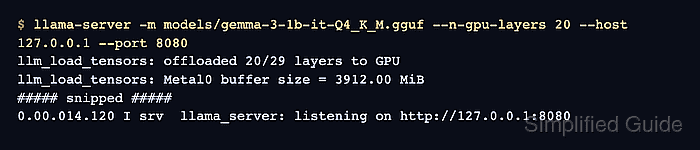
$ llama-server -m models/gemma-3-1b-it-Q4_K_M.gguf --n-gpu-layers 20 --host 127.0.0.1 --port 8080
##### snipped #####
llm_load_tensors: offloaded 20/29 layers to GPU
llm_load_tensors: Metal0 buffer size = 3912.00 MiB
##### snipped #####
0.00.014.120 I srv  llama_server: listening on http://127.0.0.1:8080
Replace the model path with a local .gguf file. The total layer count and buffer size vary by model architecture, quantization, backend, and context size.
- Use auto or all only when that matches the VRAM budget.
$ llama-server -m models/gemma-3-1b-it-Q4_K_M.gguf --n-gpu-layers all --host 127.0.0.1 --port 8080
##### snipped #####
llm_load_tensors: offloaded 29/29 layers to GPU
0.00.014.120 I srv  llama_server: listening on http://127.0.0.1:8080
all asks llama.cpp to keep every possible layer in VRAM. If model load fails, lower the layer count or reduce context size before increasing it again.
- Reduce the layer count after a GPU allocation failure.
$ llama-server -m models/gemma-3-1b-it-Q4_K_M.gguf --n-gpu-layers 12 --host 127.0.0.1 --port 8080
##### snipped #####
llm_load_tensors: offloaded 12/29 layers to GPU
0.00.014.120 I srv  llama_server: listening on http://127.0.0.1:8080
Large context sizes, KV cache settings, multimodal projectors, and other loaded models also consume accelerator memory. Leave enough VRAM for the whole runtime, not only the model weights.
- Export the final count for a wrapper or service file when needed.
$ export LLAMA_ARG_N_GPU_LAYERS=12
llama.cpp maps LLAMA_ARG_N_GPU_LAYERS to the same setting as --n-gpu-layers.
Related: How to start the llama.cpp server - Verify the server still responds after the model starts.
$ curl -sS http://127.0.0.1:8080/health
{"status":"ok"}
A successful health response proves the chosen layer count leaves the server running. Check the startup output for the offloaded layer count when changing the model, context size, or GPU backend.