How to check battery information in Linux
Battery telemetry on a Linux laptop helps separate low charge, battery wear, and missing firmware reports before the system shuts down unexpectedly. Checking the kernel battery files and a user-facing power tool shows the current percentage, charging state, and remaining full capacity without relying on the desktop battery icon.
The kernel exposes power devices under /sys/class/power_supply. Battery directories are usually named BAT0 or BAT1, AC adapters often appear as AC or AC0, and not every battery exports the same charge or energy counters. Use the device name shown on the current system instead of assuming BAT0.
Containers, virtual machines, desktops without an internal battery, and some firmware faults may show no battery directory. Those systems can still confirm that no battery is visible from the running Linux environment, but remaining percentage, wear, voltage, and time estimates must be checked on the physical laptop or through firmware diagnostics.
Steps to check battery information in Linux:
- List the power devices exposed by the kernel.
$ ls /sys/class/power_supply
AC
BAT0
If only AC adapter, USB-C, or wireless peripheral entries appear, the running environment is not exposing an internal laptop battery.
- Confirm that the target power device is a battery.
$ cat /sys/class/power_supply/BAT0/type
Battery
Substitute the battery directory found on the current system, such as BAT1, when BAT0 is not present.
- Read the current charge percentage.
$ cat /sys/class/power_supply/BAT0/capacity
82
The capacity file reports the remaining charge as a percentage of the battery's current full capacity, not its original factory design capacity.
- Check whether the battery is charging, discharging, or full.
$ cat /sys/class/power_supply/BAT0/status
Discharging
Common states include Charging, Discharging, Not charging, and Full.
- Compare the current full energy with the factory design energy.
$ cat /sys/class/power_supply/BAT0/energy_full /sys/class/power_supply/BAT0/energy_full_design
51500000
57400000
The first value is the current full capacity and the second value is the design capacity. These energy_* files use microwatt-hours; systems that expose charge_full and charge_full_design instead use microamp-hours.
- List power objects from UPower when the command is available.
$ upower --enumerate
/org/freedesktop/UPower/devices/line_power_AC
/org/freedesktop/UPower/devices/battery_BAT0
/org/freedesktop/UPower/devices/DisplayDevice
UPower reads power devices through the system power service. Minimal server installs may not include the upower command, so use the /sys/class/power_supply checks as the direct kernel source.
- Show the battery details through UPower.
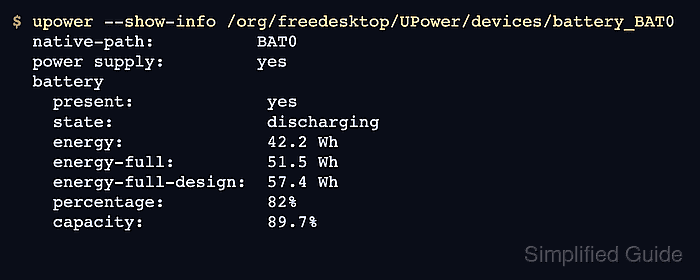
$ upower --show-info /org/freedesktop/UPower/devices/battery_BAT0
  native-path:          BAT0
  power supply:         yes
  battery
    present:             yes
    rechargeable:        yes
    state:               discharging
    warning-level:       none
    energy:              42.2 Wh
    energy-full:         51.5 Wh
    energy-full-design:  57.4 Wh
    energy-rate:         8.6 W
    percentage:          82%
    capacity:            89.7%
The capacity field here describes battery health relative to design capacity, while percentage describes current remaining charge. The object path must match the battery entry shown by upower –enumerate.
- Confirm that /sys and UPower report the same battery state.
The /sys capacity value should match the UPower percentage field apart from rounding or a short update delay. Large mismatches, missing present: yes, or changing object paths point to firmware, driver, or desktop power-service issues rather than normal battery wear.