How to lock accounts after failed login attempts in Linux
Repeated password failures on a Linux server need a limit before they become an open-ended guessing channel. A pam_faillock policy makes PAM reject a local account after a defined number of consecutive failures, so SSH, console login, and other PAM-aware services stop accepting more password attempts until the tally is reset or the unlock timer expires.
pam_faillock reads policy from /etc/security/faillock.conf and stores per-user failure records in a tally directory. On Ubuntu and Debian systems, the shared login stack normally lives in /etc/pam.d/common-auth and /etc/pam.d/common-account, so a lockout policy must be inserted in the right auth and account phases instead of only saving the policy file.
Incorrect PAM ordering can block legitimate administrators from signing in. Keep a root recovery session open, test with a non-privileged local account, and leave directory-backed users such as LDAP, Active Directory, or SSSD accounts to their upstream lockout policy unless the local host is intentionally responsible for that account class.
Related: How to unlock a user account in Linux
Related: How to lock a user account in Linux
Related: How to check authentication logs in Linux
Steps to lock accounts with pam_faillock on Ubuntu and Debian Linux:
- Open a terminal on the server with an account that can use sudo.
$ whoami
user
- Keep a separate root shell or console session open for recovery.
$ sudo -i
Do not close this recovery session until a test account can still authenticate after the policy is reset. A bad PAM stack can block new logins before the mistake is visible.
- Create a protected backup directory for the current PAM files.
$ sudo install -d -m 700 /root/pam-backup
- Back up the shared PAM authentication and account files.
$ sudo cp --archive /etc/pam.d/common-auth /etc/pam.d/common-account /root/pam-backup/
Restore these files from the recovery session if a login test fails before the configuration is understood.
- Set the lockout policy in /etc/security/faillock.conf.
$ sudoedit /etc/security/faillock.conf
deny = 3
fail_interval = 900
unlock_time = 600
silent
deny sets the consecutive failure threshold, fail_interval sets the counting window in seconds, and unlock_time sets how long the account remains locked. silent avoids giving different lockout messages for existing and non-existing users.
- Add the pam_faillock entries to the /etc/pam.d/common-auth primary block.
$ sudoedit /etc/pam.d/common-auth
auth    required                        pam_faillock.so preauth
auth    [success=3 default=ignore]      pam_unix.so nullok
auth    [default=die]                   pam_faillock.so authfail
auth    requisite                       pam_deny.so
auth    required                        pam_permit.so
auth    sufficient                      pam_faillock.so authsucc
auth    optional                        pam_cap.so
Preserve distribution comments, includes, and any site-specific modules outside this block. On systems managed with a packaged PAM profile tool, use the vendor profile mechanism instead of replacing generated files by hand.
- Add the pam_faillock account check to /etc/pam.d/common-account.
$ sudoedit /etc/pam.d/common-account
account [success=1 new_authtok_reqd=done default=ignore] pam_unix.so
account requisite                       pam_deny.so
account required                        pam_permit.so
account required                        pam_faillock.so
The account entry makes locked tallies block access after the password phase has run.
- Clear any old failure tally for the non-privileged test account.
$ sudo faillock --user audituser --reset
Replace audituser with a local account created only for validation or with another non-administrator account that can safely be locked during the test.
- Make failed password attempts against the real login path until the configured threshold is reached.
$ ssh audituser@server.example.net
audituser@server.example.net's password:
Permission denied, please try again.
Do not test the first lockout against the only administrator account. Use the same path that needs protection, such as SSH for remote servers or console login for local systems.
- Inspect the failure tally for the test account.
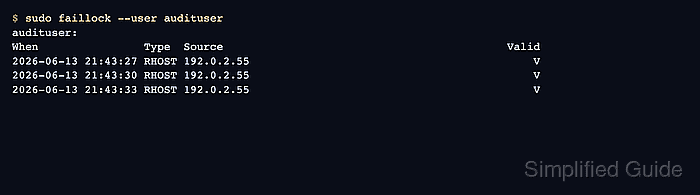
$ sudo faillock --user audituser
audituser:
When                Type  Source                                           Valid
2026-06-13 21:43:27 RHOST 192.0.2.55                                           V
2026-06-13 21:43:30 RHOST 192.0.2.55                                           V
2026-06-13 21:43:33 RHOST 192.0.2.55                                           V
Rows marked V are valid failures that count toward the lockout threshold.
- Confirm that the locked account cannot authenticate even with the correct password.
$ ssh audituser@server.example.net
audituser@server.example.net's password:
Permission denied, please try again.
A denial after the threshold is reached shows that the PAM stack is enforcing the failure tally.
- Reset the test account tally after validation.
$ sudo faillock --user audituser --reset
- Verify that the test account can authenticate again after the reset.
$ ssh audituser@server.example.net whoami
audituser