How to check memory usage in Linux
When a Linux host slows down or a workload approaches its limit, memory numbers can mislead if file cache is mistaken for application use. Checking total, used, cache, available, and swap values shows whether RAM is actually tight or the kernel is mostly using spare memory for cache.
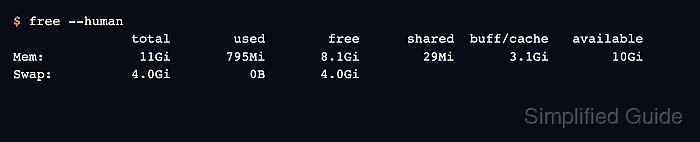
The free command reads the kernel memory counters and summarizes physical memory and swap in one table. The available column is usually more useful than free alone because it estimates how much memory can be allocated without immediate swapping after reclaimable cache is considered.
Use /proc/meminfo when scripts or deeper checks need the source counters, and use top when a live terminal view is easier to read during an incident. High buff/cache with healthy available memory is normally expected on Linux, while low available memory together with swap use is a stronger sign that workloads are competing for memory.
Related: How to check memory pressure in Linux
Related: How to clear memory usage in Linux
Steps to check memory usage in Linux:
- Display current memory and swap usage.
$ free --human
               total        used        free      shared  buff/cache   available
Mem:            11Gi       795Mi       8.1Gi        29Mi       3.1Gi        10Gi
Swap:          4.0Gi          0B       4.0Gi
available estimates memory that applications can allocate without immediate swapping. buff/cache is mostly reclaimable cache, not memory permanently lost to applications.
- Read the source memory counters from /proc/meminfo.
$ cat /proc/meminfo
MemTotal:       12235216 kB
MemFree:         8443800 kB
MemAvailable:   11420248 kB
Buffers:          657428 kB
Cached:          2199508 kB
SwapCached:            0 kB
Active:           679504 kB
Inactive:        2504460 kB
##### snipped #####
SwapTotal:       4194300 kB
SwapFree:        4194300 kB
##### snipped #####
Use MemAvailable for the same pressure boundary shown by free. SwapTotal and SwapFree show whether swap exists and how much of it is already occupied.
- Capture a one-time live memory view with top.
$ top -b -n 1
top - 12:51:08 up 1 day,  1:24,  0 users,  load average: 0.10, 0.10, 0.14
Tasks:   2 total,   1 running,   1 sleeping,   0 stopped,   0 zombie
%Cpu(s):  0.0 us,  0.0 sy,  0.0 ni, 98.8 id,  0.0 wa,  0.0 hi,  1.2 si,  0.0 st
MiB Mem :  11948.5 total,   8245.8 free,    796.0 used,   3154.0 buff/cache
MiB Swap:   4096.0 total,   4096.0 free,      0.0 used.  11152.5 avail Mem

    PID USER      PR  NI    VIRT    RES    SHR S  %CPU  %MEM     TIME+ COMMAND
      1 root      20   0    5956   3216   2952 S   0.0   0.0   0:00.00 bash
     12 root      20   0    7860   4280   2380 R   0.0   0.0   0:00.00 top
The MiB Mem and MiB Swap lines should match the same general totals as free. Use interactive top or the process resource guide when the next task is finding a specific process.
Related: How to check process CPU and memory usage in Linux - Match the readings to the memory question.
High available memory with low or zero swap use usually means the system is not short on RAM. Low available memory with growing swap use needs a pressure check before clearing cache or restarting workloads.
Related: How to check memory pressure in Linux