How to show IP addresses in Linux
Applications, firewall rules, and support tickets often need the address assigned to a Linux interface, not only the address a website sees from the internet. Checking the local interface list first separates loopback, private LAN, global IPv6, VPN, bridge, and container addresses before choosing the value to use.
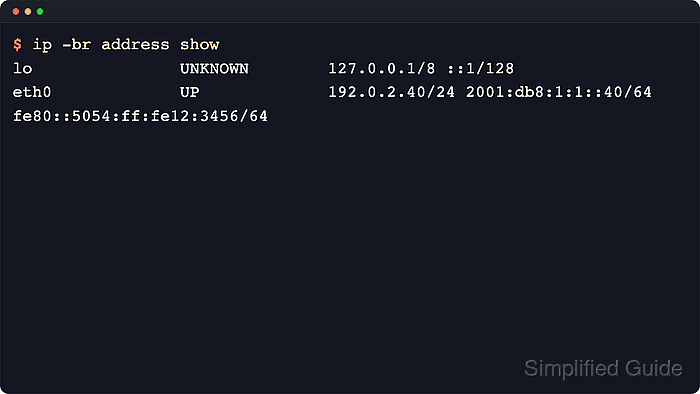
The ip utility from iproute2 reads the kernel's current network state and displays IPv4 and IPv6 addresses attached to loopback, Ethernet, Wi-Fi, bridge, VLAN, VPN, and container interfaces. The full ip address show view is the starting point, and family, state, interface, and brief-output selectors narrow the same data without changing network configuration.
Many systems carry more than one address at the same time, and the output may include loopback, link-local, temporary IPv6, or container-related interfaces alongside the main LAN address. Look for inet and inet6 lines on the expected interface, treat scope host entries as local-only addresses, and use the public-IP tool only when the question is which address remote services see after NAT, VPN, or provider routing.
Steps to show IP addresses with ip in Linux:
- Show the full address view for every interface.
$ ip address show
1: lo: <LOOPBACK,UP,LOWER_UP> mtu 65536 qdisc noqueue state UNKNOWN group default qlen 1000
    link/loopback 00:00:00:00:00:00 brd 00:00:00:00:00:00
    inet 127.0.0.1/8 scope host lo
       valid_lft forever preferred_lft forever
    inet6 ::1/128 scope host proto kernel_lo
       valid_lft forever preferred_lft forever
##### snipped #####
2: eth0: <BROADCAST,MULTICAST,UP,LOWER_UP> mtu 1500 qdisc fq_codel state UP group default qlen 1000
    link/ether 52:54:00:12:34:56 brd ff:ff:ff:ff:ff:ff
    inet 192.0.2.40/24 brd 192.0.2.255 scope global dynamic eth0
       valid_lft 1792sec preferred_lft 1792sec
    inet6 2001:db8:1:1::40/64 scope global dynamic
       valid_lft 1792sec preferred_lft 1792sec
    inet6 fe80::5054:ff:fe12:3456/64 scope link
       valid_lft forever preferred_lft forever
The full view is the best starting point when multiple interfaces or both address families are involved. The show subcommand can be omitted because ip address defaults to the same display.
- Limit the output to active interfaces when down or disconnected devices are noise.
$ ip address show up
1: lo: <LOOPBACK,UP,LOWER_UP> mtu 65536 qdisc noqueue state UNKNOWN group default qlen 1000
    inet 127.0.0.1/8 scope host lo
       valid_lft forever preferred_lft forever
    inet6 ::1/128 scope host proto kernel_lo
       valid_lft forever preferred_lft forever
2: eth0: <BROADCAST,MULTICAST,UP,LOWER_UP> mtu 1500 qdisc fq_codel state UP group default qlen 1000
    inet 192.0.2.40/24 brd 192.0.2.255 scope global dynamic eth0
       valid_lft 1792sec preferred_lft 1792sec
    inet6 2001:db8:1:1::40/64 scope global dynamic
       valid_lft 1792sec preferred_lft 1792sec
    inet6 fe80::5054:ff:fe12:3456/64 scope link
       valid_lft forever preferred_lft forever
up only filters the interface state. Loopback still appears because it is normally active, even though it is not a LAN address.
- Inspect a single interface when the device name is already known.
$ ip address show dev eth0
2: eth0: <BROADCAST,MULTICAST,UP,LOWER_UP> mtu 1500 qdisc fq_codel state UP group default qlen 1000
    link/ether 52:54:00:12:34:56 brd ff:ff:ff:ff:ff:ff
    inet 192.0.2.40/24 brd 192.0.2.255 scope global dynamic eth0
       valid_lft 1792sec preferred_lft 1792sec
    inet6 2001:db8:1:1::40/64 scope global dynamic
       valid_lft 1792sec preferred_lft 1792sec
    inet6 fe80::5054:ff:fe12:3456/64 scope link
       valid_lft forever preferred_lft forever
Replace eth0 with the actual interface name, such as enp1s0, ens33, or wlp2s0. Container and veth interfaces may show a suffix such as @if215 after the name.
- Use the brief table when a single-line summary per interface is easier to scan.
$ ip -br address show
lo               UNKNOWN        127.0.0.1/8 ::1/128
eth0             UP             192.0.2.40/24 2001:db8:1:1::40/64 fe80::5054:ff:fe12:3456/64
-br keeps the same address data but drops the multiline detail, which is useful for quick checks or terminal screenshots.
- Show only IPv4 addresses when the task cares about IPv4 routing, firewall rules, or a service bind address.
$ ip -4 address show
1: lo: <LOOPBACK,UP,LOWER_UP> mtu 65536 qdisc noqueue state UNKNOWN group default qlen 1000
    inet 127.0.0.1/8 scope host lo
       valid_lft forever preferred_lft forever
2: eth0: <BROADCAST,MULTICAST,UP,LOWER_UP> mtu 1500 qdisc fq_codel state UP group default qlen 1000
    inet 192.0.2.40/24 brd 192.0.2.255 scope global dynamic eth0
       valid_lft 1792sec preferred_lft 1792sec
-4 is a shortcut for the inet address family, so IPv6 lines are hidden from the result.
- Show only IPv6 addresses when checking global or link-local IPv6 configuration.
$ ip -6 address show
1: lo: <LOOPBACK,UP,LOWER_UP> mtu 65536 state UNKNOWN qlen 1000
    inet6 ::1/128 scope host proto kernel_lo
       valid_lft forever preferred_lft forever
2: eth0: <BROADCAST,MULTICAST,UP,LOWER_UP> mtu 1500 state UP qlen 1000
    inet6 2001:db8:1:1::40/64 scope global dynamic
       valid_lft 1792sec preferred_lft 1792sec
    inet6 fe80::5054:ff:fe12:3456/64 scope link
       valid_lft forever preferred_lft forever
If only ::1 or link-local addresses appear, the host does not currently have a usable non-loopback global IPv6 address on that interface.