How to change system date and time formats in Linux
Mixed regional date formats make timestamps easy to misread when operators compare shell output, exported reports, or application logs across hosts. On Linux, date order and clock style come from the LC_TIME locale category, so changing that category can keep the system language unchanged while using another region's date and time presentation.
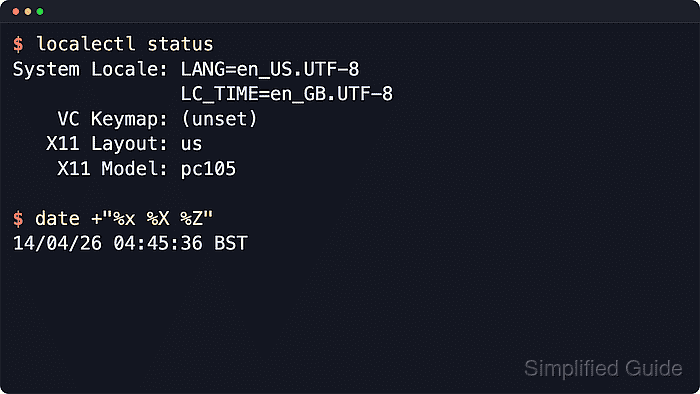
localectl manages system locale defaults on systemd hosts. LANG sets the main language and regional defaults, while LC_TIME overrides only date and time formatting for locale-aware programs. The locale command can show the target d_fmt and t_fmt rules before the system default is changed.
Only generated locales can be selected, and existing shells or services keep old environment values until they start again. Timezone is separate from format: LC_TIME changes how a timestamp is displayed, not the local clock offset. Some command implementations also ignore locale formatting for specific output modes, so verify with locale and a libc-backed check such as Bash printf.
Steps to change system date and time formats in Linux:
- Check the current system locale defaults.
$ localectl status System Locale: LANG=en_US.UTF-8 VC Keymap: (unset) X11 Layout: (unset) - List generated locales that are ready for system configuration.
$ localectl list-locales
C.UTF-8
en_GB.UTF-8
en_US.UTF-8
If the target locale is missing, generate it with the distribution locale tool first. Debian and Ubuntu commonly use locale-gen, while other glibc-based systems may use localedef or a distribution-specific locale manager.
- Preview the target locale date and time format rules.
$ LC_TIME=en_GB.UTF-8 locale d_fmt t_fmt
%d/%m/%y
%T
d_fmt controls the locale date pattern, and t_fmt controls the locale time pattern.
- Preview the target formatted timestamp in Bash.
$ LC_TIME=en_GB.UTF-8 printf '%(%x %X %Z)T\n' -1
13/06/26 11:35:45 UTC
The Bash printf time format uses the system locale data for %x and %X.
- Set the system language and date/time format category with localectl.
$ sudo localectl set-locale LANG=en_US.UTF-8 LC_TIME=en_GB.UTF-8
This keeps general messages in en_US.UTF-8 while applying en_GB.UTF-8 date and time formatting rules.
- Confirm that the system locale defaults were saved.
$ localectl status System Locale: LANG=en_US.UTF-8 LC_TIME=en_GB.UTF-8 VC Keymap: (unset) X11 Layout: (unset) - Open a new login shell, remote terminal, desktop terminal, or restart the affected service.
Running shells, desktop sessions, scheduled jobs, and services normally keep the locale environment they received at startup.
- Confirm that the new session received the LC_TIME override.
$ locale
LANG=en_US.UTF-8
LANGUAGE=
LC_CTYPE="en_US.UTF-8"
LC_NUMERIC="en_US.UTF-8"
LC_TIME=en_GB.UTF-8
LC_COLLATE="en_US.UTF-8"
LC_MONETARY="en_US.UTF-8"
LC_MESSAGES="en_US.UTF-8"
LC_PAPER="en_US.UTF-8"
LC_NAME="en_US.UTF-8"
LC_ADDRESS="en_US.UTF-8"
LC_TELEPHONE="en_US.UTF-8"
LC_MEASUREMENT="en_US.UTF-8"
LC_IDENTIFICATION="en_US.UTF-8"
LC_ALL=
- Verify the displayed date and time format in the new session.
$ printf '%(%x %X %Z)T\n' -1
13/06/26 11:35:46 UTC
If the timezone abbreviation or offset is wrong, change the system timezone separately instead of changing LC_TIME.