How to check disk space and usage in Linux
Filesystem capacity checks prevent package installs, log writes, backups, and database workloads from failing when one mounted volume reaches its limit. The df command shows total size, used space, available space, and percentage used for each mounted filesystem.
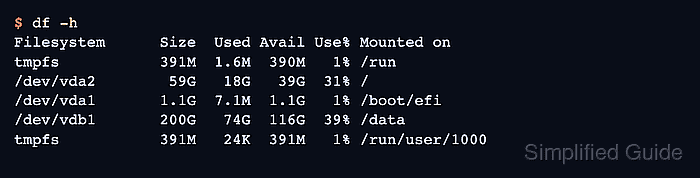
With no path argument, df lists the current mount table. With a path such as /var, it reports the filesystem that contains that path, which is why df -h /var checks the volume behind /var rather than measuring the directory tree itself.
The output can include memory-backed filesystems such as tmpfs, removable devices, network mounts, and container mounts alongside local disks. Most df checks do not need sudo, and df -i is the matching inode check when new files cannot be created even though the Avail column still shows free space.
Related: How to investigate low disk space in Linux
Related: How to free disk space on Linux
Related: How to check file and folder sizes in Linux
Steps to check disk space and usage with df in Linux:
- List mounted filesystem usage in human-readable units.
$ df -h
Filesystem      Size  Used Avail Use% Mounted on
tmpfs           391M  1.6M  390M   1% /run
/dev/vda2        59G   18G   39G  31% /
/dev/vda1       1.1G  7.1M  1.1G   1% /boot/efi
/dev/vdb1       200G   74G  116G  39% /data
tmpfs           391M   24K  391M   1% /run/user/1000
-h uses powers of 1024 for units such as M, G, and T. Use --si instead when powers of 1000 are required.
- Check the filesystem that contains a specific path.
$ df -h /var
Filesystem      Size  Used Avail Use% Mounted on
/dev/vda2        59G   18G   39G  31% /
The argument can be any file or directory path on the target filesystem. df reports the containing filesystem, not the size of the directory tree at that path.
Related: How to check file and folder sizes in Linux - Show the filesystem type for the same path.
$ df -hT /var
Filesystem     Type  Size  Used Avail Use% Mounted on
/dev/vda2      ext4   59G   18G   39G  31% /
The Type column helps distinguish local disk filesystems from memory-backed, network-backed, and container-backed mounts.
- Exclude memory-backed filesystems when only storage-backed mounts matter.
$ df -h -x tmpfs -x devtmpfs
Filesystem      Size  Used Avail Use% Mounted on
/dev/vda2        59G   18G   39G  31% /
/dev/vda1       1.1G  7.1M  1.1G   1% /boot/efi
/dev/vdb1       200G   74G  116G  39% /data
Repeat -x to exclude other filesystem types such as overlay or squashfs when those appear in the output.
- Check inode usage for the same path.
$ df -i /var
Filesystem        Inodes   IUsed   IFree IUse% Mounted on
/dev/vda2       3899392  247381 3652011    7% /
A filesystem can still reject new files when IUse% reaches 100 percent even if free blocks remain.