How to show disk activity on Linux
Storage stalls can hide behind high load averages, paused shells, and slow application responses even when CPU and memory checks look ordinary. Sampling live disk activity during the slowdown shows whether a block device is busy or whether storage is only where another problem becomes visible.
Linux exposes block-device counters through /proc/diskstats, and the sysstat tools turn those counters into interval reports. iostat shows device throughput, wait time, queue depth, and utilization, while pidstat -d shows disk read and write rates for active processes.
Per-process attribution depends on kernel task I/O accounting and on the process still being alive when the sample runs. If pidstat prints Requested activities not available, or if a device stays busy with no matching process line, continue with a longer sample window, kernel messages, service-specific logs, or storage-layer checks outside the guest.
Related: How to check disk errors in Linux
Related: How to check CPU I/O wait in Linux
Steps to show disk activity with iostat and pidstat on Linux:
- List block devices before sampling.
$ lsblk -d -o NAME,SIZE,TYPE,MOUNTPOINTS
NAME    SIZE TYPE MOUNTPOINTS
loop0    64M loop
loop1   128M loop
loop2    64M loop
vda     120G disk
vdb   624.9M disk
Ignore pseudo devices such as loop entries and empty network block devices. If iostat or pidstat is missing, install the sysstat package from the distribution package manager.
- Sample all disks over a few short intervals.
$ iostat -dx -y 1 3
Device            r/s     rkB/s   rrqm/s  %rrqm r_await rareq-sz     w/s     wkB/s   wrqm/s  %wrqm w_await wareq-sz     d/s     dkB/s   drqm/s  %drqm d_await dareq-sz     f/s f_await  aqu-sz  %util
##### snipped #####
vda              0.00      0.00     0.00   0.00    0.00     0.00 1371.00 1480036.00    94.00   6.42   15.67  1079.53  211.00 8696784.00     0.00   0.00    0.54 41216.99    6.00   86.17   22.12  68.70
vdb              0.00      0.00     0.00   0.00    0.00     0.00    0.00      0.00     0.00   0.00    0.00     0.00    0.00      0.00     0.00   0.00    0.00     0.00    0.00    0.00    0.00   0.00

Device            r/s     rkB/s   rrqm/s  %rrqm r_await rareq-sz     w/s     wkB/s   wrqm/s  %wrqm w_await wareq-sz     d/s     dkB/s   drqm/s  %drqm d_await dareq-sz     f/s f_await  aqu-sz  %util
##### snipped #####
vda              0.00      0.00     0.00   0.00    0.00     0.00 1165.00 1273244.00   103.00   8.12   15.29  1092.91  193.00 9262676.00     0.00   0.00    0.75 47993.14    6.00   77.00   18.42  64.60
vdb              0.00      0.00     0.00   0.00    0.00     0.00    0.00      0.00     0.00   0.00    0.00     0.00    0.00      0.00     0.00   0.00    0.00     0.00    0.00    0.00    0.00   0.00
r/s and w/s show request rates, rkB/s and wkB/s show throughput, await shows average wait time, aqu-sz shows queue depth, and \%util shows how busy the device stayed during the interval.
- Focus iostat on the busy disk.
$ iostat -dx -y vda 1 2
Device            r/s     rkB/s   rrqm/s  %rrqm r_await rareq-sz     w/s     wkB/s   wrqm/s  %wrqm w_await wareq-sz     d/s     dkB/s   drqm/s  %drqm d_await dareq-sz     f/s f_await  aqu-sz  %util
vda              0.00      0.00     0.00   0.00    0.00     0.00 1371.00 1480036.00    94.00   6.42   15.67  1079.53  211.00 8696784.00     0.00   0.00    0.54 41216.99    6.00   86.17   22.12  68.70

Device            r/s     rkB/s   rrqm/s  %rrqm r_await rareq-sz     w/s     wkB/s   wrqm/s  %wrqm w_await wareq-sz     d/s     dkB/s   drqm/s  %drqm d_await dareq-sz     f/s f_await  aqu-sz  %util
vda              0.00      0.00     0.00   0.00    0.00     0.00 1165.00 1273244.00   103.00   8.12   15.29  1092.91  193.00 9262676.00     0.00   0.00    0.75 47993.14    6.00   77.00   18.42  64.60
Replace vda with the disk name from lsblk. Sustained high \%util together with rising await or aqu-sz is a stronger sign of storage pressure than a brief one-interval spike.
Related: How to check CPU I/O wait in Linux
- Show process disk read and write rates during the same window.
$ pidstat -d -p ALL 1 3
05:12:20      UID       PID   kB_rd/s   kB_wr/s kB_ccwr/s iodelay  Command
##### snipped #####
05:12:21        0      3545      0.00 393216.00      0.00       0  dd
##### snipped #####
05:12:22        0      3545      0.00 393216.00      0.00       0  dd
##### snipped #####
Average:        0      3545      0.00 391433.77      0.00       0  dd
kB_rd/s and kB_wr/s show per-task throughput, while iodelay reflects time spent waiting for block I/O and swap-in completion. pidstat reports only active tasks, so -p ALL keeps the report broader during short bursts.
- Filter the process view to a known command when the full task list is noisy.
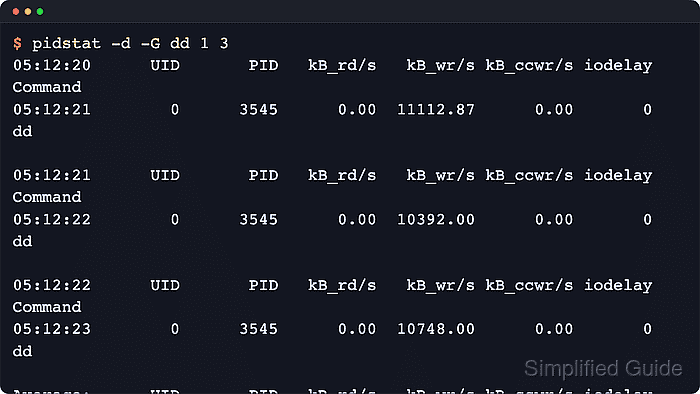
$ pidstat -d -G dd 1 3
05:12:20      UID       PID   kB_rd/s   kB_wr/s kB_ccwr/s iodelay  Command
05:12:21        0      3545      0.00 393216.00      0.00       0  dd

05:12:21      UID       PID   kB_rd/s   kB_wr/s kB_ccwr/s iodelay  Command
05:12:22        0      3545      0.00 393216.00      0.00       0  dd

05:12:22      UID       PID   kB_rd/s   kB_wr/s kB_ccwr/s iodelay  Command
05:12:23        0      3545      0.00 387869.31      0.00       0  dd

Average:      UID       PID   kB_rd/s   kB_wr/s kB_ccwr/s iodelay  Command
Average:        0      3545      0.00 391433.77      0.00       0  dd
Replace dd with a command name or regular expression such as rsync, postgres, or mysqld when the workload name is already known.
- Correlate the device and process samples before deciding what is slow.
A busy disk in iostat should line up with one or more active readers or writers in pidstat during the same sample window. If the device stays busy but pidstat shows no useful process, the pressure may come from a short-lived workload, kernel thread, virtual storage backend, or environment without per-task I/O accounting.