How to configure SSL for JMeter remote testing
JMeter remote testing uses Java RMI between the controller and each remote engine. When remote engines run outside one isolated load-test host network, the RMI channel needs shared SSL key material so the registry, engine object, and result callbacks can negotiate encrypted sockets.
Since JMeter 4.0, RMI SSL is enabled by default. JMeter includes create-rmi-keystore.sh and create-rmi-keystore.bat to create a shared rmi_keystore.jks file with alias rmi, default password changeit, and a short default certificate lifetime.
Use the same JMeter release, Java release, plugins, and test-plan dependencies on the controller and workers before checking the SSL layer. Keep the RMI registry, engine, and callback ports reachable; a CLI smoke run should start the worker through the SSL-enabled endpoint and write a successful sample into the controller result file.
Steps to configure JMeter RMI SSL for remote testing:
- Generate the RMI keystore from the JMeter bin directory.
$ ./create-rmi-keystore.sh
Enter the distinguished name. Provide a single dot (.) to leave a sub-component empty or press ENTER to use the default value in braces.
What is your first and last name?
  [Unknown]:  rmi
What is the name of your organizational unit?
  [Unknown]:  QA Engineering
What is the name of your organization?
  [Unknown]:  Example Corp
What is the name of your City or Locality?
  [Unknown]:  Kuala Lumpur
What is the name of your State or Province?
  [Unknown]:  Selangor
What is the two-letter country code for this unit?
  [Unknown]:  MY
Is CN=rmi, OU=QA Engineering, O=Example Corp, L=Kuala Lumpur, ST=Selangor, C=MY correct?
  [no]:  yes
Generating 2,048 bit RSA key pair and self-signed certificate (SHA384withRSA) with a validity of 7 days
	for: CN=rmi, OU=QA Engineering, O=Example Corp, L=Kuala Lumpur, ST=Selangor, C=MY
Copy the generated rmi_keystore.jks to jmeter/bin folder or reference it in property 'server.rmi.ssl.keystore.file'
The generated keystore contains the private key used by the RMI SSL socket factory. Store it like credential material, do not commit it to a test-plan repository, and replace or regenerate it before the helper certificate expires.
- Copy the same keystore to a protected path on every controller and worker.
$ sudo install -D -m 600 rmi_keystore.jks /opt/jmeter/ssl/rmi_keystore.jks
Use the same file path, alias, and password on every node unless each host has a matching keystore and truststore pair. The simple shared-file setup works because every node trusts the same certificate it uses for RMI.
- Confirm the keystore contains the rmi private-key entry.
$ keytool -list -keystore /opt/jmeter/ssl/rmi_keystore.jks -storepass changeit -alias rmi
rmi, Jun 30, 2026, PrivateKeyEntry,
Certificate fingerprint (SHA-256): 78:C4:31:AF:12:72:F9:50:77:BC:41:CC:4D:85:6A:E5:96:A5:AA:B0:92:9B:90:9B:77:3A:37:A1:BE:CB:37:7B
The alias must match server.rmi.ssl.keystore.alias. Current JMeter defaults to rmi for the helper-generated keystore.
- Add the RMI SSL properties to user.properties on every node.
server.rmi.ssl.disable=false
server.rmi.ssl.keystore.type=JKS
server.rmi.ssl.keystore.file=/opt/jmeter/ssl/rmi_keystore.jks
server.rmi.ssl.keystore.password=changeit
server.rmi.ssl.keystore.alias=rmi
server.rmi.ssl.truststore.type=JKS
server.rmi.ssl.truststore.file=/opt/jmeter/ssl/rmi_keystore.jks
server.rmi.ssl.truststore.password=changeit
JMeter defaults the truststore type, file, and password to the keystore values, but writing them explicitly makes controller and worker configuration easier to compare during remote-test troubleshooting.
- Start the remote engine with RMI SSL enabled.
$ SERVER_PORT=1664 jmeter-server \
  -Djava.rmi.server.hostname=worker-01 \
  -Jserver.rmi.localport=4000
Using local port: 4000
Created remote object: UnicastServerRef2 [endpoint:[worker-01:4000, SSLRMIServerSocketFactory(keyStoreLocation=/opt/jmeter/ssl/rmi_keystore.jks, type=JKS, trustStoreLocation=/opt/jmeter/ssl/rmi_keystore.jks, type=JKS, alias=rmi)]]
SERVER_PORT sets the RMI registry port, and server.rmi.localport fixes the worker engine port. Set java.rmi.server.hostname when the worker must advertise a specific reachable hostname.
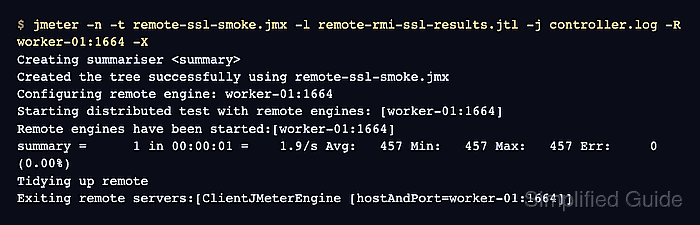
Related: How to set RMI ports for JMeter remote testing - Run a remote smoke test from the controller.
$ jmeter -n \
  -t remote-ssl-smoke.jmx \
  -l remote-rmi-ssl-results.jtl \
  -j controller.log \
  -R worker-01:1664 \
  -X
Creating summariser <summary>
Created the tree successfully using remote-ssl-smoke.jmx
Configuring remote engine: worker-01:1664
Starting distributed test with remote engines: [worker-01:1664]
Remote engines have been started:[worker-01:1664]
summary =      1 in 00:00:01 =    1.9/s Avg:   457 Min:   457 Max:   457 Err:     0 (0.00%)
Tidying up remote
Exiting remote servers:[ClientJMeterEngine [hostAndPort=worker-01:1664]]
-R supplies the SSL-enabled remote engine for this run. -X asks the remote engine JVM to exit after the test finishes.
Related: How to run a distributed JMeter test - Check the controller result file for a successful sample from the remote engine.
$ cat remote-rmi-ssl-results.jtl
timeStamp,elapsed,label,responseCode,responseMessage,threadName,dataType,success,failureMessage,bytes,sentBytes,grpThreads,allThreads,URL,Latency,IdleTime,Connect
1782806603671,457,remote-rmi-ssl-smoke,200,OK,worker-01:1664-Remote users 1-1,text,true,,24,0,1,1,null,0,0,0
The threadName value should include the remote host:port entry, and the success column should contain true. A successful remote sample confirms that the controller and worker can use the configured RMI SSL material during distributed execution.