How to create a JavaScript Web Worker
Long JavaScript calculations can pause typing, clicking, and painting when they run on the page's main thread. A dedicated Web Worker moves one page-owned job into another browser context so the page can send work to the background and render the returned message when it arrives.
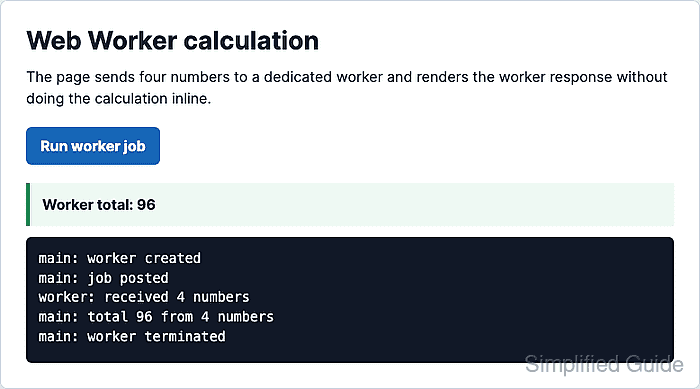
The page talks to the worker through postMessage() and the message event. The worker script runs with its own global scope, so it cannot query or update the DOM directly; send plain data back and let the main thread change the interface.
Serve the files from an HTTP or HTTPS origin while testing. The worker script URL is resolved from the page, must be allowed by same-origin rules, and should be served as JavaScript; an error handler on the Worker object makes path, origin, or script-load failures visible.
Steps to create a JavaScript Web Worker:
- Create the page that loads the main script and displays worker messages.
- index.html
<!doctype html>
<html lang="en">
  <head>
    <meta charset="utf-8">
    <meta name="viewport" content="width=device-width, initial-scale=1">
    <title>Web Worker demo</title>
    <script defer src="app.js"></script>
  </head>
  <body>
    <main id="worker-demo">
      <h1>Web Worker calculation</h1>
      <p>The page sends four numbers to a dedicated worker.</p>
      <button id="run-worker" type="button">Run worker job</button>
      <p id="worker-result">No worker result yet.</p>
      <pre id="worker-log" aria-label="Worker message log"></pre>
    </main>
  </body>
</html>
defer lets app.js run after the page elements exist.
Related: How to load JavaScript with defer - Select the page elements and create the log helper.
- app.js
const runButton = document.querySelector("#run-worker");
const resultOutput = document.querySelector("#worker-result");
const logOutput = document.querySelector("#worker-log");
let activeWorker = null;

const evidence = [];
window.workerEvidence = evidence;
window.lastWorkerResult = null;

function writeLog(message) {
  evidence.push(message);
  logOutput.textContent = evidence.join("\n");
  console.log(message);
}
- Create the Worker object and handle messages from the worker script.
- app.js
function createWorker() {
  if (!window.Worker) {
    resultOutput.textContent = "Web Workers are not supported in this browser.";
    return null;
  }

  const worker = new Worker("worker.js", { name: "sum-worker" });
  writeLog("main: worker created");

  worker.addEventListener("message", (event) => {
    const message = event.data;

    if (message.type === "progress") {
      writeLog(message.text);
      return;
    }

    if (message.type === "result") {
      window.lastWorkerResult = message;
      resultOutput.textContent = `Worker total: ${message.total}`;
      writeLog(`main: total ${message.total} from ${message.count} numbers`);
      worker.terminate();

      if (activeWorker === worker) {
        activeWorker = null;
      }

      writeLog("main: worker terminated");
    }
  });

  worker.addEventListener("error", (event) => {
    resultOutput.textContent = `Worker failed: ${event.message}`;
    writeLog(`main: worker error at ${event.filename}:${event.lineno}`);

    if (activeWorker === worker) {
      activeWorker = null;
    }
  });

  return worker;
}
The Worker URL is relative to index.html in this plain-file setup. Bundled projects often use new Worker(new URL(“worker.js”, import.meta.url)) so the bundler can rewrite the worker file path.
- Post the worker job when the user clicks the button.
- app.js
runButton.addEventListener("click", () => {
  if (activeWorker) {
    activeWorker.terminate();
  }

  evidence.length = 0;
  window.lastWorkerResult = null;
  logOutput.textContent = "";
  resultOutput.textContent = "Waiting for worker...";

  activeWorker = createWorker();

  if (activeWorker) {
    activeWorker.postMessage({ numbers: [12, 31, 48, 5] });
    writeLog("main: job posted");
  }
});
- Create the worker script that receives the payload and sends a result back.
- worker.js
self.addEventListener("message", (event) => {
  const numbers = Array.isArray(event.data?.numbers)
    ? event.data.numbers.map(Number)
    : [];

  self.postMessage({
    type: "progress",
    text: `worker: received ${numbers.length} numbers`
  });

  const total = numbers.reduce((sum, number) => sum + number, 0);

  self.postMessage({
    type: "result",
    total,
    count: numbers.length
  });
});
Use self inside the worker. Worker code has no direct document or window access, so app.js owns the visible page update.
- Serve the files from a local HTTP origin.
$ python3 -m http.server 8000 --bind 127.0.0.1
Serving HTTP on 127.0.0.1 port 8000 (http://127.0.0.1:8000/) ...
Do not open index.html directly from disk for this check. A local origin avoids browser-specific file: URL behavior and makes the worker script path test match a deployed page.
- Open the page from the local server.
http://127.0.0.1:8000/
- Click Run worker job.
- Verify that the page shows the worker result and message log.
Worker total: 96

main: worker created
main: job posted
worker: received 4 numbers
main: total 96 from 4 numbers
main: worker terminated
The result line is written by app.js after it receives the worker's result message. The worker calculates the total but never updates the page directly.
- Stop the local server when testing is complete.
^C