How to read URL parameters with JavaScript
Query strings often carry filters, page numbers, campaign labels, return targets, and feature flags into browser pages. JavaScript reads those values through the URL and URLSearchParams APIs, which keep parameter lookup tied to the browser's URL parser instead of fragile string splitting.
The searchParams object exposes decoded query arguments by name. get() returns the first value for a key or null when the key is absent, getAll() preserves repeated keys as an array, and has() checks whether a flag-like key exists at all.
Every value from URLSearchParams is a string until the code converts it. Handle missing keys, repeated keys, empty values, and numeric parsing before query data changes page state, especially when a URL can be copied, bookmarked, or edited by hand. Treat query parameters as user-controlled input; server-side authorization, pricing, ownership, and other sensitive decisions still need server-side validation.
Related: How to debug JavaScript in the browser console
Tool: URL Parser
Steps to read URL parameters with JavaScript:
- Create read-url-parameters.mjs with a function that parses one URL and reads its single-value filters.
- read-url-parameters.mjs
function readProductFilters(locationHref = window.location.href) {
  const url = new URL(locationHref);
  const params = url.searchParams;

  return {
    category: params.get("category") ?? "all",
    page: Number(params.get("page") ?? "1"),
  };
}
get() returns the first matching value or null when the key is absent. The nullish fallbacks provide defaults before page is converted to a number; validate its range before using it for pagination.
- Replace the function's return block with fields for repeated tags and a flag-style preview parameter.
- read-url-parameters.mjs
  return {
    category: params.get("category") ?? "all",
    page: Number(params.get("page") ?? "1"),
    tags: params.getAll("tag"),
    preview: params.has("preview"),
  };
getAll(“tag”) returns every matching value in URL order, while has(“preview”) returns true when the key exists even without an equals sign or value.
- Append two calls that exercise populated and missing query strings.
- read-url-parameters.mjs
const filtersWithQuery = readProductFilters(
  "https://www.example.com/products?category=books&page=2&tag=javascript&tag=web&preview",
);
const filtersWithoutQuery = readProductFilters("https://www.example.com/products");

console.log("with query:");
console.log(JSON.stringify(filtersWithQuery, null, 2));
console.log("without query:");
console.log(JSON.stringify(filtersWithoutQuery, null, 2));
Explicit URLs make the function testable outside a browser. A call without an argument uses window.location.href in browser page code.
- Confirm that read-url-parameters.mjs matches the consolidated program.
- read-url-parameters.mjs
function readProductFilters(locationHref = window.location.href) {
  const url = new URL(locationHref);
  const params = url.searchParams;

  return {
    category: params.get("category") ?? "all",
    page: Number(params.get("page") ?? "1"),
    tags: params.getAll("tag"),
    preview: params.has("preview"),
  };
}

const filtersWithQuery = readProductFilters(
  "https://www.example.com/products?category=books&page=2&tag=javascript&tag=web&preview",
);
const filtersWithoutQuery = readProductFilters("https://www.example.com/products");

console.log("with query:");
console.log(JSON.stringify(filtersWithQuery, null, 2));
console.log("without query:");
console.log(JSON.stringify(filtersWithoutQuery, null, 2));
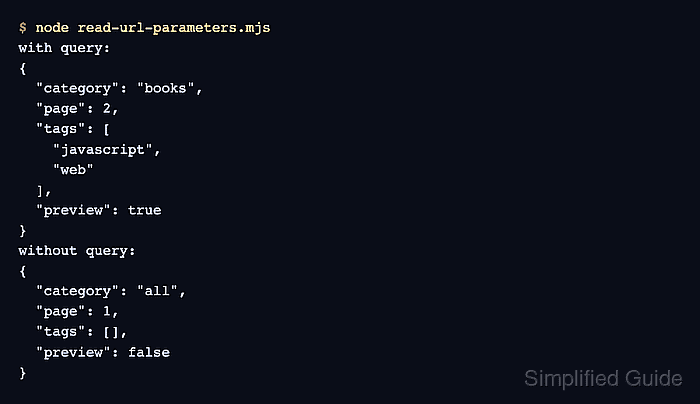
- Run the completed script to confirm single values, repeated tags, the preview flag, and missing-query defaults.
$ node read-url-parameters.mjs
with query:
{
  "category": "books",
  "page": 2,
  "tags": [
    "javascript",
    "web"
  ],
  "preview": true
}
without query:
{
  "category": "all",
  "page": 1,
  "tags": [],
  "preview": false
}
The without query block confirms the missing-parameter defaults, and the with query block confirms repeated tag values and the preview flag.