How to install Java Runtime Environment (JRE) on openSUSE and SLES
openSUSE and SLES hosts need a Java runtime before they can launch packaged JAR files, vendor server applications, and other programs that ship Java bytecode instead of native binaries. Installing the distribution OpenJDK runtime gives the host a supported java command managed by zypper and normal operating system updates.
SUSE packages runtime-only OpenJDK builds as versioned packages such as java-21-openjdk-headless. The headless package is the smaller choice for server and terminal-launched applications, while java-21-openjdk adds desktop Java integration for graphical applications that need it.
The available major version depends on the openSUSE or SLES release and the enabled repositories. Search the repository first, install the runtime package required by the application, and verify java --version before starting the application. A JRE runs existing Java applications but does not install the javac compiler; install the JDK when source compilation is required.
Steps to install Java Runtime Environment (JRE) on openSUSE and SLES:
- Open a terminal with sudo privileges.
- Refresh the zypper repository metadata.
$ sudo zypper refresh
Retrieving repository 'SLE_BCI' metadata [done]
Building repository 'SLE_BCI' cache [done]
All repositories have been refreshed.
Repository names vary by openSUSE or SLES release. zypper should finish with refreshed repository metadata.
- Search for the required OpenJDK runtime package.
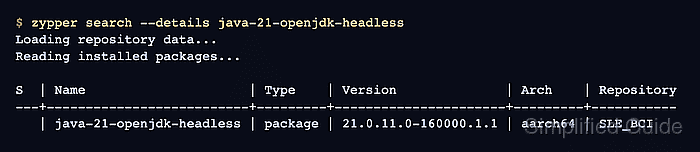
$ zypper search --details java-21-openjdk-headless
Loading repository data...
Reading installed packages...

S  | Name                     | Type    | Version              | Arch    | Repository
---+--------------------------+---------+----------------------+---------+-----------
   | java-21-openjdk-headless | package | 21.0.11.0-160000.1.1 | aarch64 | SLE_BCI
If the application requires another supported major version, search for that package name, such as java-17-openjdk-headless. Install the full java-21-openjdk package instead only when a desktop Java application needs graphical runtime libraries.
- Install the OpenJDK runtime package.
$ sudo zypper --non-interactive install java-21-openjdk-headless
Loading repository data...
Reading installed packages...
Resolving package dependencies...

The following 23 NEW packages are going to be installed:
  file file-magic findutils java-21-openjdk-headless javapackages-filesystem
  javapackages-tools mozilla-nss mozilla-nss-certs update-alternatives
  ##### snipped #####

23 new packages to install.
Package download size: 50.8 MiB
##### snipped #####
- Confirm that the java command is available in the shell path.
$ command -v java
/usr/bin/java
- Verify the installed OpenJDK runtime.
$ java --version
openjdk 21.0.11 2026-04-15
OpenJDK Runtime Environment (build 21.0.11+10-suse-160000.1.1-aarch64)
OpenJDK 64-Bit Server VM (build 21.0.11+10-suse-160000.1.1-aarch64, mixed mode)
Security updates change the exact update number. java should run and report the OpenJDK major version expected by the application.
- Select the default runtime only when more than one Java runtime is installed.
$ sudo update-alternatives --config java
After changing the default, rerun java --version to confirm that /usr/bin/java points to the runtime the application requires.